toggle/flip-flop
Hey Y'all,
Trying to do some logic that should be simple, but I can't make it work (newbie ignorance)..
SigmaStudio V4.7, and ADAU1701...
What I'm trying to control is an Up/Down Pushbutton Volume function block that I'm using basically as a Mute.
f/b is set up with only 2 steps, so Down is full off, and Up is full on.
and using two GPIO's, this part works.. and I could connect a latching spdt to the two GPIO's and be done with it...
But, what I'm trying accomplish is some sort of toggle/flip/flop that I can control with a single momentary switch and use only one GPIO.
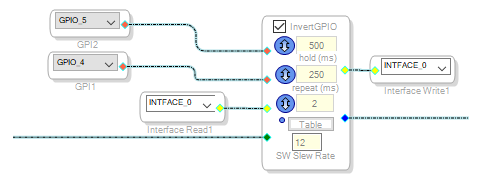
I thought something like this would work, but it does not (and again, my ignorance), from what I'm reading in the wikis,
If I have this toggle set to 28.0, then the output will toggle between zero and one, and with the Invert, one input would be high, and the other low, or vise versa.
or am I misunderstanding this?
Can someone point me in the right direction please?
hardware
sigmaStudio 4.7
processors and dsp
Processors and Microcontrollers
adau1701
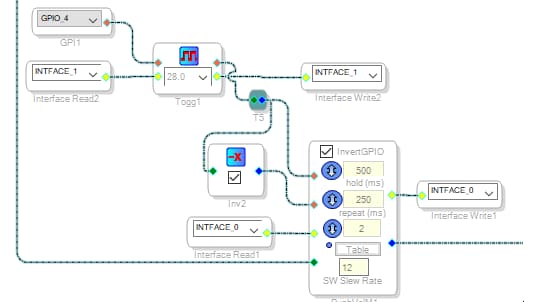
Alright, so it is memorial day weekend, and I suppose everyone's busy..
But after a few hours of trial and error, I came up with this...
Right, wrong, or indifferent, it works...
Hello stagecraft,
I check the forum often. Yes, I was on vacation Monday and Tuesday but others check this as well. So I am scratching my head as to why I only saw this post now? I can offer one suggestions for the next time, post the question on the sub-forum of Processors & DSP called SigmaStudio and SigmaDSP. That space is a little less crowded.
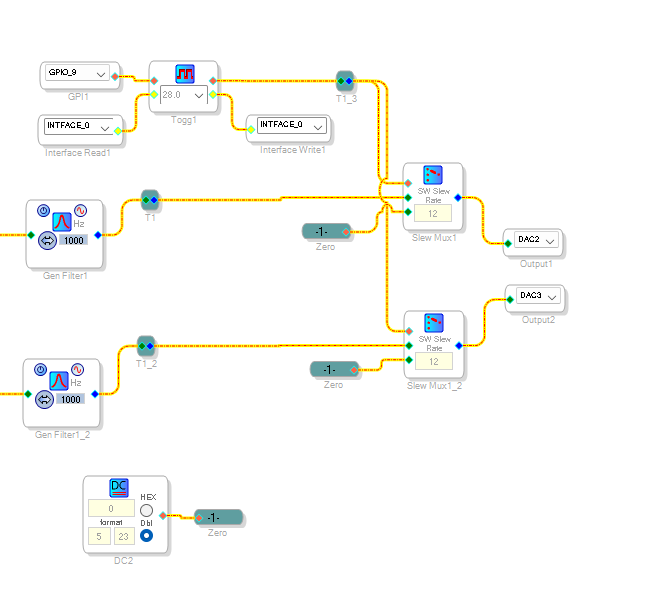
You did find a solution. This is what I would recommend for fewer instructions and still get a smooth mute:
Use the slew Mute block so you get a slew up and down for a smooth sounding mute and unmute.
Note that this is a switch and we are just switching to Zero.
Dave T
Hey Dave,
Ok, that makes sense.
I started out with the Push/Vol/Mute as it said that pushing the Up and Down simultaneously would initiate a Mute (one gpio to both inputs and done I thought), unfortunately it did not un-mute in the same fashion.
then I realized that I could set the volume steps to 2, and in the table make that 0 and 1, set the slew to 6, and it made a very smooth Mute...
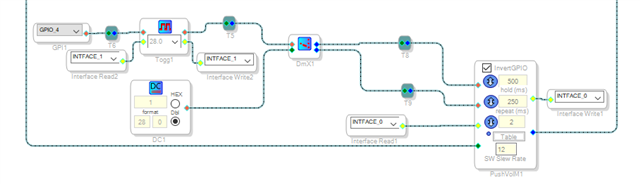
So I'm demuxing a DC 1 to either control input of the Vol, where you are muxing either signal or DC 0 to the output...
six to one, half a dozen to the other other?
I'll give your method a shot next time I modify this project, but I doubt I will hear a difference?
Regards,
JohnR/stagekraft
So now, in the same project, trying to save I/O, I've been playing with a two-state LED driver controlled by a single GPIO, that shows the mute state...
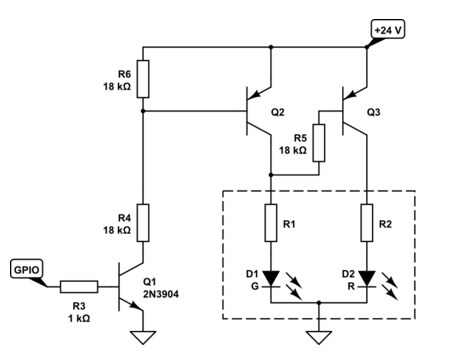
I found this circuit a while back in some online search, and did a screenshot of the schematic, and just this week I built up the circuit, and it almost works...
And of course, now I can't find the original article where I found the circuit. and only difference is 12V vs 24V powering the circuit.
Seems pretty straight forward, using a 3-lead/3-color LED (common cathode), power one side green, power the other side red, (and power to both yellow)...
The circuit consists of 2 pnp transistors driving the LED's, one biased on and the other off, and an npn transistor driven from a GPIO that makes the 2 pnp's change state, so should change from red to green..
But somehow there is enough leakage from the "on" transistor that the "off" state is yellow, while the "on" state makes green. ok, cool that it changes state, but the visual difference between green and yellow is sometimes hard to distinguish in bright light, would rather have a distinct green/red..
Any suggestions??
a month later...
nobody's gonna touch this one?
Please log in to reply.