Mains Subwoofers and Active Room Mode Cancellation (Bass Trap)
Hello, I am so excited to begin this journey into ADAU DSP design. I am currently building an active bass trap. Actually I have the physical bass trap and the mains systems operational. I was not at all happy with the DSP I was trying to use and wanted some far more granular in control and far more effective through design. I am using version 4.7 of the Sigma Studio software. I have ordered a combo board set with the DSP core the ADAU1466 and the CODEC AD1938. So far I have thrown together a basic control topology. I have no idea if it is correct and I have multiple questions.
1. i need possibly to understand more about the use of multi phasic per frequency centers phase control and would like to tie my phase block automatically to the chosen frequency centers.
2. I want to use external pots to control the 2 Volume sliders that will be used for overall system balance between the main subwoofer system and the active cancellation system.
3. I want to add the ability to control the delay in real time for tuning purposes.
4. I want to control the delay of the active cancellation section also with an external pot.
I am attaching my project in text format as I could find no way to just add the file and look forward to any feedback you have for my project.TIGER DSP MABT.dspproj
Edit Notes
I removed that text code, sorry about that, and added my project file.
[edited by: ZX14Dream at 12:27 PM (GMT -4) on 24 Jun 2026]
software
Subwoofers
4.7 SigmaStudio
processors and dsp
SigmaDSP Audio Processors
Processors and Microcontrollers
Active Room Mode Cancellation
Audio CODECs
adau1466
Show More
Hello ZX14Dream,
I have quickly created a project which controls volume and delay in runtime using AUXADC (Pot). You can edit this project further as you want.
There are so many ways to control volume, I just directly used AUXADC value to do it, if you want to implement in any other way then let me know.
1466_delay_vol control.dspproj
The text file you attached can't help us see thru your project, so please attach the sigma studio project like I attached above. You can either drag and drop your project into the reply box or go to Insert>file>upload.
Regards,
Harish
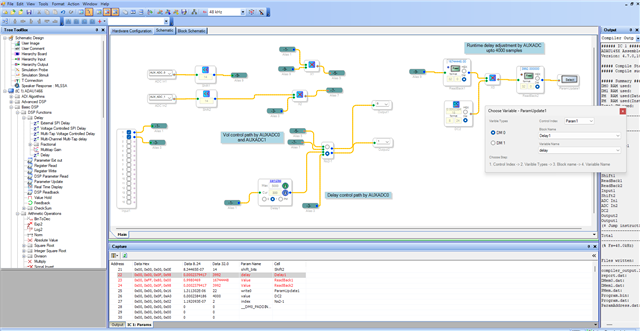
Thank you for the help Harish. I removed that ugly useless text and added my project the correct way. Im taking a look at your file now!
Oh wow I have a lot to learn just from what you shared.
Please log in to reply.