Find a Sample program
I get a AD2428-ADAU1452 - AD1761 project from colleague.It can work on soft SigmaStudio4.5.1. I want to change AD1761 to AD1938(2chanels to 8chanel 's output). But my singal only can arrival ADAU1452 's outputchanel 40/41.I change ADAU1452's outputchanel to16/17 32/33 , but AD1938 DAC2L/R DAC3L/R no any vioce.
2428Pin conect 1452Pin conect 1938Pin
BCLK BLCK_OUT0
SYNC LRCLK_OUT0
DTX0 SDATA_IN0
DTX1 SDATA_IN1
BCLK_OUT3 DBCLK
LRCLK_OUT3 DLRCLK
SDATA_OUT0 DSDATA1
SDATA_OUT1 DSDATA2
SDATA_OUT2 DSDATA3
SDATA_OUT3 DSDATA4
CDATA ----GND
COUT ----GND
CCLK ----GND
CLATCH ----GND
Please give me some ideas about how to troubleshoot my problem.
Thanlk you!
ADAU1452 AD2428
software
ad1452
ad1938
processors and dsp
Interface Transceivers & Isolators
Processors and Microcontrollers
Audio A/D Converters
SigmaStudio 4.5.1 and SigmaStudio+ v2.3.0
ad2428
Show More
Hello,
It would be great if you could attach your Sigma studio project with hardware schematic.
It seems the audio input is coming from A2B to ADAU1452, and I guess the ADAU1452 is the master?
The incoming streams from A2B to DSP's serial port 0 and 1 are I2S or TDM?
What's the config of serial output port of DSP? Is it I2S?
Have you routed the input signals to all four output ports in schematic?
I see you connected serial output port 3 to the AD1938 and I guess the DSP is master, so you have to set all other 3 serial output port as master and connect the SDATA_OUTx alone to AD1938. It will work.
But, if you have set serial output 0,1,2 as slave internally (by register) to serial output 3 which is master then it won't work.
So, it's better to have your project instead of assuming things.
If you have an oscilloscope, then probe the serial output port 0,1,2 and see if you can see the clock and data coming out.
So, please attach your SS+ project with hardware schematic so that it will be easy for us to figure this out quickly.
Regards,
Harish
数字麦克风测试板VA6-260528.pdf2427-2428-1452.zip1452in ss.zip
Hello,Harish!
Thank you for your reply!
This is my hardware schematic and SS+ project ,
About my schematic,2428's BP/BN connect 2427's AP/AN , and 2427 connect 2 Silicon earphone;
About my SS+ project ,1452 can't receive any signal.
There must be some errors on 1452's setting,but i can't get it.
In the 1452 SS project, signal can arrive 1452,i can listen it by 1452's SDATA_OUT chanel 40/41, I can see it by Single Level Detetor.
I followed the configuration of 1452 in the SS project to configure 1452 in my SS+ project. However, it was definitely a problem with the configuration of a certain department, which caused my signal to be unable to be displayed through the 1452 chip.
So i have 2 questions ,first is in the 1452's SS peoject , why i change 1452's SDATA_OUT0/1/2/3 ,but i can't get any signal at 1938"s DAC2L/R and DAC3L/R; Second is in my SS+ project ,why can't i get signal on 1452.
Please give me some ideas about how to troubleshoot my problem.
Thank you!
Regards,
Baizi.
7737.数字麦克风测试板VA6-260528.pdf8625.2427-2428-1452.zip
7776.数字麦克风测试板VA6-260528.pdf
Hello Baizi,
I had a look at your Sigma studio project, and I have modified a few things.
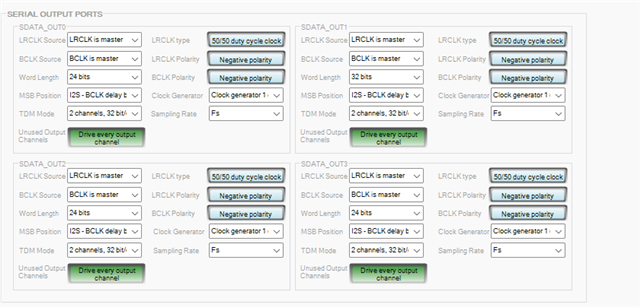
The DAC's are stereo when operating in standalone mode. You have configured Output port 3 (I2S mode) to give clocks to the DAC which is fine.
But your output port 0 and 1 are at TDM16 mode, even though those port's clocks are not used in DAC, but SDATA_OUT0/SDATA_OUT1 carries 16 channels for a stereo digital input of DAC which only looks for 2 channels.
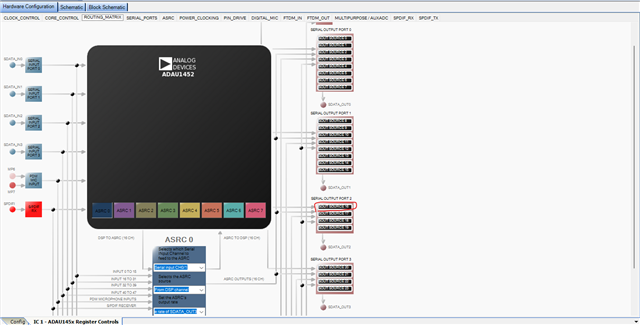
And serial output port 2 is disabled in routing matrix which is why you don't see any signal.
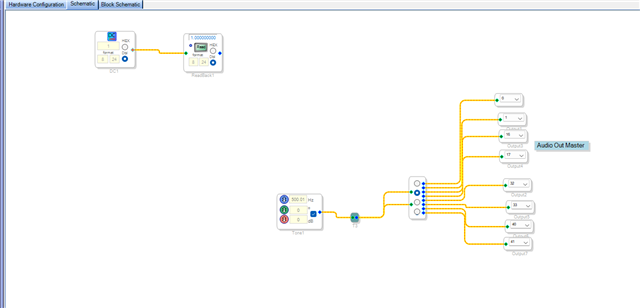
I have removed your input block and put a tone for a testing purpose, I configured all serial output ports to be in I2S mode, and I enabled serial output port 2 in routing matrix.
Now I can see signals from all 8 DACs.
The output is enabled now in the below screenshot.
Now you can run this project in your hardware to see if all DAC outputs a signal.
Also, if you setup serial port 0 and 1's clock to TDM16 for a reason like generating clocks for external device or something, then let me know. So, we can put the DAC in TDM8 mode and free some serial output port for your clock generating purpose.
I still don't know about your requirement, if you have any specific reason for the clock setup then we will discuss further.
Changes are pretty much the same with SS+ too, I just couldn't run it since it has A2B chips.
Regards,
Harish
Hello,Harish!
I am extremely grateful to receive your reply again!
Next week, I will follow the plan we just discussed and refer to the configuration you provided to conduct the debugging. I will then share the results with you.
Wish you a pleasant weekend!
Regards,
Baizi
Hello,Harish!
Thank you for your ideas!
Fllow your thoughts , i solved my problem!
Now I would like to gain a deeper understanding of the use of ASRC. Can you give me some examples with explanations? Only DataSheet , I can't understand how to use ASRC.
In my 1452's using, SDATA_OUT0/1/2/3 used to output data to 1938,but now SDATA_OUT0‘s TDM mod is 16channels,32bit/channel,1938-DAC1L/R's output is noise.
In my 1452's using , SDATA_OUT0 pin connect 1938's DSDATA1 pin , 1452's pin BLCK_OUT0 and LRCLK_OUT1 connect 2428's CLK,In order for 2428 to function properly,SDATA_OUT0's TDM Mode must be configed 16-channels,32bits/channels.I know that SDATA_OUT0 can't work in 1938-standalone-mode.I would like to know if 1938 is controlled by spi , Can the SDATA_OUT0 of 1452 output data?
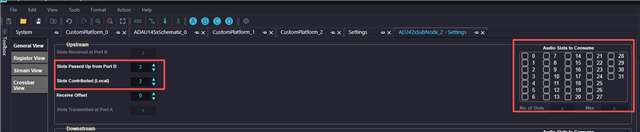
I'm aware that the SS+A2B project might not be able to run on your device.But I still want to ask if the parameters 'Slots Passed Up from Port B' and 'Skots Contributed(local)' always fail to be saved and whether this is related to 'Slots to Consume'. I don't know how to set 'Slots to Consume'. In my SS project, I did not make any configuration for parameter 'Slots to Consume'.
The SS+V2.3.0 I downloaded from the ADI website is version 90xx. However, if you want to install the A2B plugin on it, the version downloaded from the official website is too low and needs to be updated before installation. I find it very difficult to install it on my non-internet-connected computer. Could you please update it on the official website instead?
Regards,
Baizi.
Hello Baizi,
I understand that you need this Serial output port 0's TDM16 clocks for A2B. So, let that be.
We will solve this in another way.
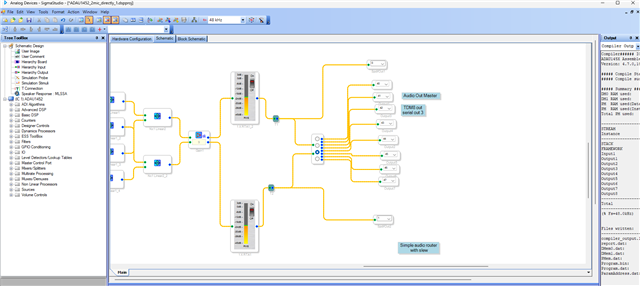
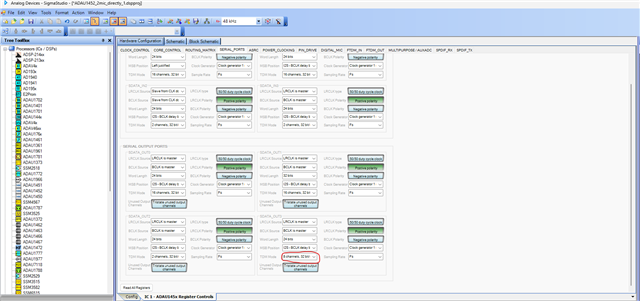
So, instead of running every serial output port in stereo mode, we will just route all 8 channels to serial out 3 in the schematic and configure serial output port 3 in TDM8 and configure the DAC part in TDM8 mode (slave), now all 8 output channels are routed to the DAC and will be played.
You now have three output ports 0,1,2 free, you can use that for any clocking purposes.
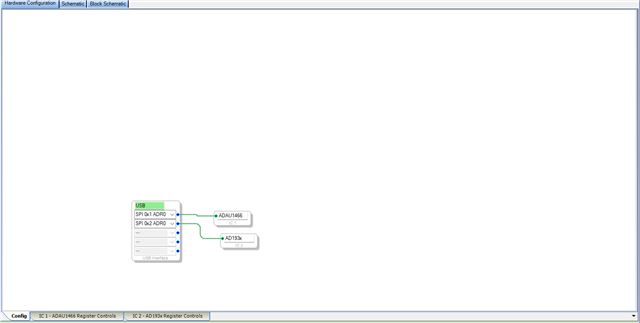
The AD1938 has SPI interface that you can control from Sigma studio, just give the SPI connections from USBi to AD1938, and use additional latch (CS pin) from the USBi.
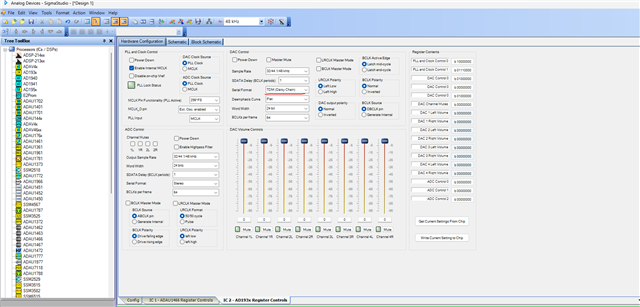
This is the register setup for AD1938. I have just run this in my eval board, and it works fine in TDM8 mode.
Your schematic and serial out 3 config have to be like below.
I have just edited the output channels in your project.
Channel 40-41 will be played by DAC1 L/R
Channel 42-43 will be played by DAC2 L/R
Channel 44-45 will be played by DAC3 L/R
Channel 46-47 will be played by DAC4 L/R
I have attached the modified project as well.
Please give it a try and let me know if you have any questions.
ADAU1452_2mic_directly_1_mod1.dspproj
Regards,
Harish
Hello Harish,
Thank you very much for your reply!
The project you sent me, some of the changes you mentioned earlier have not been modified, such as the SOUT SOURCE16 part of the ASRC section 1452.
I directly used the project you sent me and found that only the DAC4L/R of 1938 still had an output.
Regarding the project I modified in 1938 where grounding of the SPI interface could successfully achieve the function, I made the configuration modifications according to your instructions. I have attached the modified project. However, I failed to achieve the function. I only heard the sound in the DAC4L of 1938.
On my circuit board, I connected the SPI interface led out from the USBi interface to the chip interface of 1938. USBi_MOSI was connected to 1938_CDATA, USBi_MISO was connected to 1938_COUT, USBi_SS was connected to 1938_CLATCH, and USBi_CLK was connected to 1938_CCLK.
Could you please offer some suggestions or help me identify which parameters I haven't configured properly that led to this outcome?
Regards,
Baizi
.ADAU1452_2mic_directly_1.dspproj
Hello Baizi,
Please make sure that you are communicating with the CODEC. You can just read any known register like PLL lock etc and verify the read and write is working, basically if you are communicating with the part.
BIBi858 said:
I connected the SPI interface led out from the USBi interface to the chip interface of 1938. USBi_MOSI was connected to 1938_CDATA, USBi_MISO was connected to 1938_COUT, USBi_SS was connected to 1938_CLATCH, and USBi_CLK was connected to 1938_CCLK.
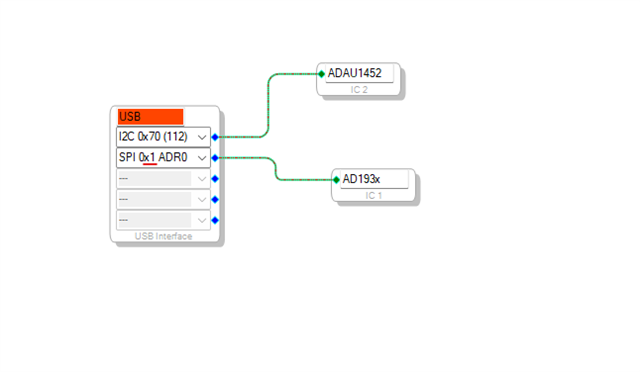
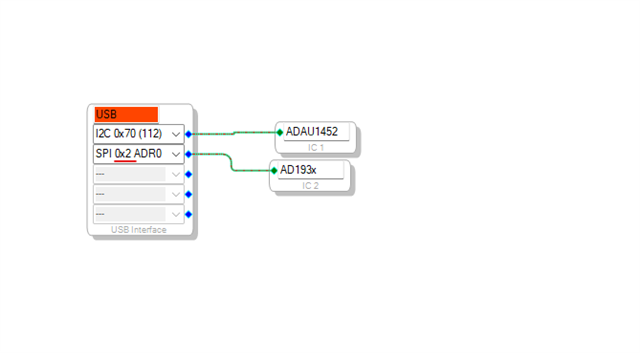
Your connection seems fine, except one thing. I think you are using CS pin from the USBi header. If you are then you have to use latch 1 in the USBi schematic. please refer below.
In my schematic, I used latch 2 since my USBi is modified and I have taken out extra latches.
It seems you also used the same latch 2 but I'm not sure whether which pin (latch) is connected from your USBi to Codec.
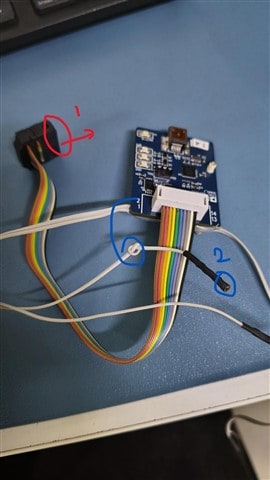
I will attach my USBi for reference.
The red mark at the header is using Latch 1 which is used most of the time.
The blue mark is Latch 2, an additional latch used for multiple SPI slaves.
So, if you are using the pin from header then choose latch 1 in the schematic.
I guess this must be the problem. please get back to us about the results.
Regards,
Harish
Hello Harish,
I have ensured my connection of USBi-1938.I should use Latch 1 .However, the result was not changed.I still can't hear any sound.
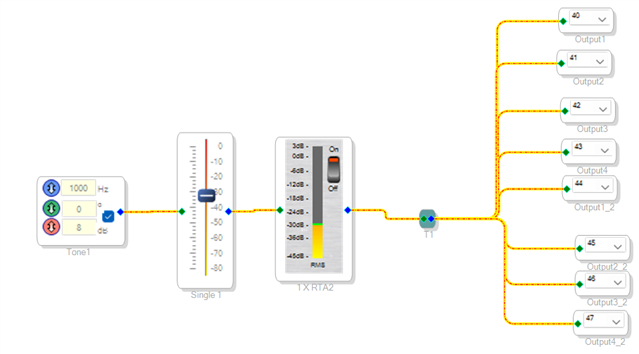
I re-established a simple project and made the following key configurations. I want to implement the configuration steps of connecting 1452 and 1938 on this project first.
About ADAU1452,
About AD1938, I think the USBi has connected my chip 938.I can see PLL Lock Status.
In this project ,I can see the signal by Single Level Detector ,but I can't get any sound from 1938's DACOutput interface.
There must have some errors, If you can identify or correct these errors, that would be great.
I have attached my engineering files. Thank you very much for your assistance. I am looking forward to receiving your guidance.
Design 1.dspproj
Regards,
Baizi
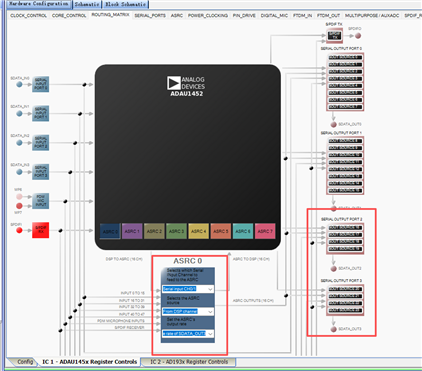
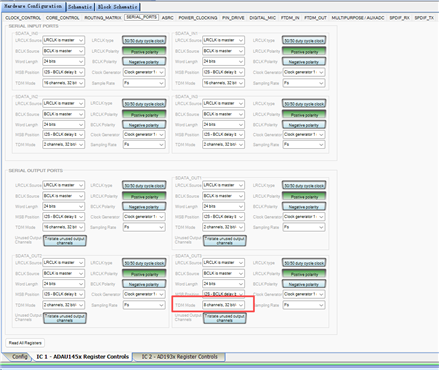
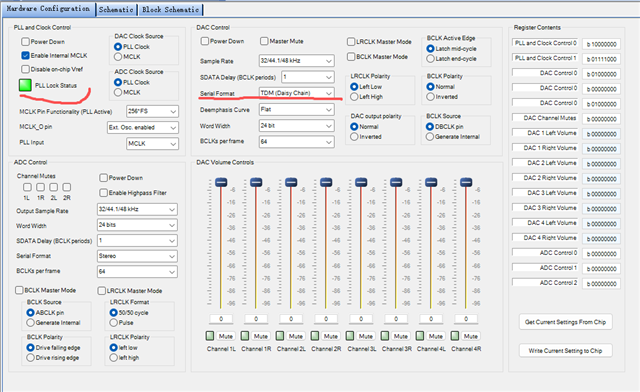
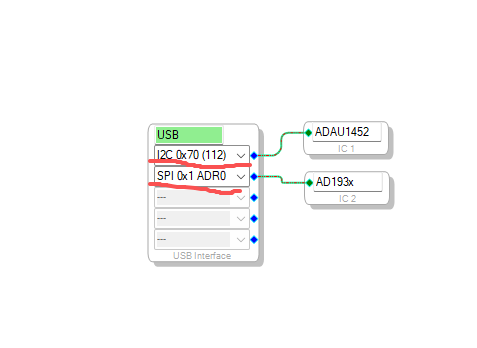
Hello Baizi,
Your project seems fine.
If you have an oscilloscope, please probe serial out 3 (BCLK, LRCLK, SDATA_OUT3) and see if the TDM8 stream is coming out.
You said you hear output only in DAC4L/R, then please slide the volume slider of channel4 L/R in the CODEC control and see if the volume controls accordingly. By this we can double confirm the Usbi is communicating with the Codec.
Read any other register like sample rate register and verify the value in the capture window. I still think communication would be the issue, because your SS project is setup correctly for TDM8 out as far as I see.
The scope shot would confirm that.
Regards,
Harish
Hello Harish,
Earlier I mentioned that I could hear sounds from the DAC4L of 1938. This was probably due to some of my operational mistakes. Now, I can no longer hear any sounds from the output channel of the 1938 DAC...
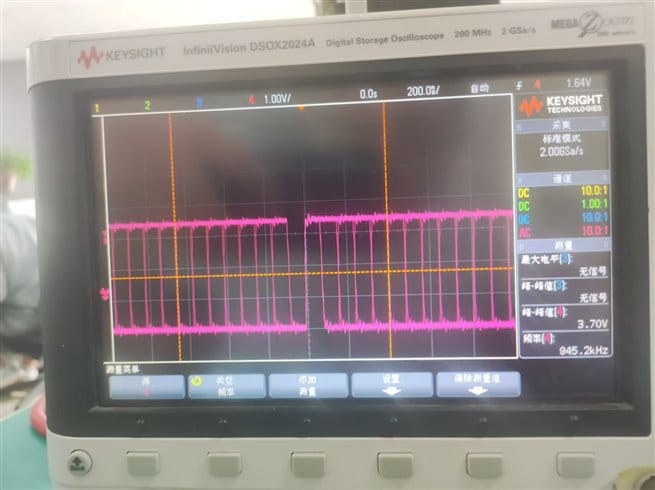
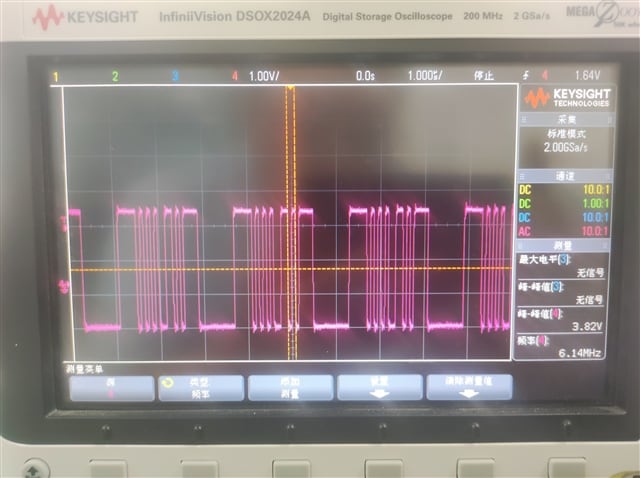
On my circuit board, the BCLK_OUT3 pin of 1452 outputs a 12.3 MHz signal, and the LRCLK_OUT3 pin of 1452 outputs a 48 KHz signal. Below is the signal output by my SDATA_OUT3 pin.
...
Would you please give it a try? I'd like to see if my project can function properly on your circuit board, using USBi-IIC to control 1452 and USBi-SPI to control 1938.
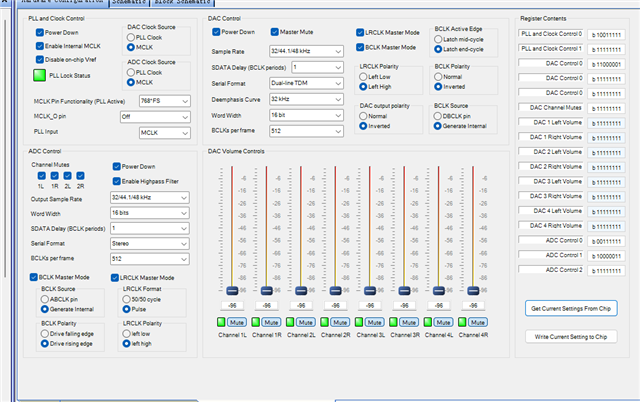
On the 1938 register setting interface, I performed the following operations:
1. Clicked the "Get Current Settings From Chip" button
2. Changed the Serial Format to DAC Aux
3. Clicked the "Write Current Settings to Chip" button
4. Clicked the "Get Current Settings From Chip" button again
5. Changed the Serial Format to TDM (Daisy Chain)
6. Clicked the "Write Current Settings to Chip" button again
4. Clicked the "Get Current Settings From Chip" button again
I copied the operation log of the Capture window as follows. Maybe by comparing the register values with the cases where successful communication was achieved, we can identify the areas with issues.
Fullscreen
param addr value.txt
Download
IC 2.PllCtrl0Register 0x0000
IC 2.PllCtrl1Register 0x0001
IC 2.DacCtrl0Register 0x0002
IC 2.DacCtrl1Register 0x0003
IC 2.DacCtrl2Register 0x0004
IC 2.DacMutesRegister 0x0005
IC 2.DacVolumeRegistes0 0x0006
IC 2.DacVolumeRegistes1 0x0007
IC 2.DacVolumeRegistes2 0x0008
IC 2.DacVolumeRegistes3 0x0009
IC 2.DacVolumeRegistes4 0x000A
IC 2.DacVolumeRegistes5 0x000B
IC 2.DacVolumeRegistes6 0x000C
IC 2.DacVolumeRegistes7 0x000D
IC 2.AdcCtrl0Register 0x000E
IC 2.AdcCtrl1Register 0x000F
IC 2.AdcCtrl2Register 0x0010
IC 2.PllCtrl0Register 0x0000 0x80
IC 2.PllCtrl1Register 0x0001 0x78
IC 2.DacCtrl0Register 0x0002 0x40
IC 2.DacCtrl1Register 0x0003 0x00
IC 2.DacCtrl2Register 0x0004 0x40
IC 2.DacMutesRegister 0x0005 0x00
IC 2.DacVolumeRegistes0 0x0006 0x00
IC 2.DacVolumeRegistes1 0x0007 0x00
IC 2.DacVolumeRegistes2 0x0008 0x00
IC 2.DacVolumeRegistes3 0x0009 0x00
IC 2.DacVolumeRegistes4 0x000A 0x00
IC 2.DacVolumeRegistes5 0x000B 0x00
IC 2.DacVolumeRegistes6 0x000C 0x00
IC 2.DacVolumeRegistes7 0x000D 0x00
IC 2.AdcCtrl0Register 0x000E 0x00
IC 2.AdcCtrl1Register 0x000F 0x00
IC 2.AdcCtrl2Register 0x0010 0x00
IC 2.DacCtrl0Register 0x0002 0x80
IC 2.PllCtrl0Register 0x0000 0x80
IC 2.PllCtrl1Register 0x0001 0x78
IC 2.DacCtrl0Register 0x0002 0x80
IC 2.DacCtrl1Register 0x0003 0x00
IC 2.DacCtrl2Register 0x0004 0x40
IC 2.DacMutesRegister 0x0005 0x00
IC 2.DacVolumeRegistes0 0x0006 0x00
IC 2.DacVolumeRegistes1 0x0007 0x00
IC 2.DacVolumeRegistes2 0x0008 0x00
IC 2.DacVolumeRegistes3 0x0009 0x00
IC 2.DacVolumeRegistes4 0x000A 0x00
IC 2.DacVolumeRegistes5 0x000B 0x00
IC 2.DacVolumeRegistes6 0x000C 0x00
IC 2.DacVolumeRegistes7 0x000D 0x00
IC 2.AdcCtrl0Register 0x000E 0x00
IC 2.AdcCtrl1Register 0x000F 0x00
IC 2.AdcCtrl2Register 0x0010 0x00
IC 2.PllCtrl0Register 0x0000
IC 2.PllCtrl1Register 0x0001
IC 2.DacCtrl0Register 0x0002
IC 2.DacCtrl1Register 0x0003
IC 2.DacCtrl2Register 0x0004
IC 2.DacMutesRegister 0x0005
IC 2.DacVolumeRegistes0 0x0006
IC 2.DacVolumeRegistes1 0x0007
IC 2.DacVolumeRegistes2 0x0008
IC 2.DacVolumeRegistes3 0x0009
IC 2.DacVolumeRegistes4 0x000A
IC 2.DacVolumeRegistes5 0x000B
IC 2.DacVolumeRegistes6 0x000C
IC 2.DacVolumeRegistes7 0x000D
IC 2.AdcCtrl0Register 0x000E
IC 2.AdcCtrl1Register 0x000F
IC 2.AdcCtrl2Register 0x0010
IC 2.PllCtrl0Register 0x0000 0x80
IC 2.PllCtrl1Register 0x0001 0x78
IC 2.DacCtrl0Register 0x0002 0x80
IC 2.DacCtrl1Register 0x0003 0x00
IC 2.DacCtrl2Register 0x0004 0x40
IC 2.DacMutesRegister 0x0005 0x00
IC 2.DacVolumeRegistes0 0x0006 0x00
IC 2.DacVolumeRegistes1 0x0007 0x00
IC 2.DacVolumeRegistes2 0x0008 0x00
IC 2.DacVolumeRegistes3 0x0009 0x00
IC 2.DacVolumeRegistes4 0x000A 0x00
IC 2.DacVolumeRegistes5 0x000B 0x00
IC 2.DacVolumeRegistes6 0x000C 0x00
IC 2.DacVolumeRegistes7 0x000D 0x00
IC 2.AdcCtrl0Register 0x000E 0x00
IC 2.AdcCtrl1Register 0x000F 0x00
IC 2.AdcCtrl2Register 0x0010 0x00
IC 2.DacCtrl0Register 0x0002 0x40
IC 2.PllCtrl0Register 0x0000 0x80
IC 2.PllCtrl1Register 0x0001 0x78
IC 2.DacCtrl0Register 0x0002 0x40
IC 2.DacCtrl1Register 0x0003 0x00
IC 2.DacCtrl2Register 0x0004 0x40
IC 2.DacMutesRegister 0x0005 0x00
IC 2.DacVolumeRegistes0 0x0006 0x00
IC 2.DacVolumeRegistes1 0x0007 0x00
IC 2.DacVolumeRegistes2 0x0008 0x00
IC 2.DacVolumeRegistes3 0x0009 0x00
IC 2.DacVolumeRegistes4 0x000A 0x00
IC 2.DacVolumeRegistes5 0x000B 0x00
IC 2.DacVolumeRegistes6 0x000C 0x00
IC 2.DacVolumeRegistes7 0x000D 0x00
IC 2.AdcCtrl0Register 0x000E 0x00
IC 2.AdcCtrl1Register 0x000F 0x00
IC 2.AdcCtrl2Register 0x0010 0x00
IC 2.PllCtrl0Register 0x0000
IC 2.PllCtrl1Register 0x0001
IC 2.DacCtrl0Register 0x0002
IC 2.DacCtrl1Register 0x0003
IC 2.DacCtrl2Register 0x0004
IC 2.DacMutesRegister 0x0005
IC 2.DacVolumeRegistes0 0x0006
IC 2.DacVolumeRegistes1 0x0007
IC 2.DacVolumeRegistes2 0x0008
IC 2.DacVolumeRegistes3 0x0009
IC 2.DacVolumeRegistes4 0x000A
IC 2.DacVolumeRegistes5 0x000B
IC 2.DacVolumeRegistes6 0x000C
IC 2.DacVolumeRegistes7 0x000D
IC 2.AdcCtrl0Register 0x000E
IC 2.AdcCtrl1Register 0x000F
IC 2.AdcCtrl2Register 0x0010
IC 2.PllCtrl0Register 0x0000 0x80
IC 2.PllCtrl1Register 0x0001 0x78
IC 2.DacCtrl0Register 0x0002 0x40
IC 2.DacCtrl1Register 0x0003 0x00
IC 2.DacCtrl2Register 0x0004 0x40
IC 2.DacMutesRegister 0x0005 0x00
IC 2.DacVolumeRegistes0 0x0006 0x00
IC 2.DacVolumeRegistes1 0x0007 0x00
IC 2.DacVolumeRegistes2 0x0008 0x00
IC 2.DacVolumeRegistes3 0x0009 0x00
IC 2.DacVolumeRegistes4 0x000A 0x00
IC 2.DacVolumeRegistes5 0x000B 0x00
IC 2.DacVolumeRegistes6 0x000C 0x00
IC 2.DacVolumeRegistes7 0x000D 0x00
IC 2.AdcCtrl0Register 0x000E 0x00
IC 2.AdcCtrl1Register 0x000F 0x00
IC 2.AdcCtrl2Register 0x0010 0x00
Because the data is updated in real time, the interface modifications will be automatically written into the registers. After each modification, click the "Get Current Settings From Chip" button. The interface will not change. If the value stored in the register is different from the value on the interface, there should be a change after reading. If the USBi is disconnected to simulate a SPI communication error, the interface will be as follows
Perhaps we can start from these aspects to identify the cause.
Besides, I still have a question. Regarding the version of SS+ on the official website, when I re-downloaded and installed the version today, it was 9049. The version required to install the A2B plugin is 9210. It is necessary to update SS+ via the internet. Is there any possibility of updating the installation package on the official website to the latest version so that I can install this software on a computer without an internet connection?
Also, on the SS+ platform, it's not possible to set the 1938 register; the only option is to import an XML file, right?
Regards,
Baizi
Please log in to reply.