AWE on EV-SOMCRR-EZKIT + BRKOUT + SOM-ADSP21569-EVAL
Hello,
I'm using the EZKIT along with a ADSP21569-SOM and am running the BSP with AWE Core.
My goal is to add more inputs to the setup using a SOM-BRKOUT to connect two EVAL-1978Z.
However when connecting only the BRKOUT between the SOM and the carrier board, initialization already fails at initializing an AWE instance. I tried debugging and it appears the communication between the DSP and the flash memory is causing the error - probably due to increased conductor length on the BRKOUT.
Q1: Is this a common issue with an existing solution?
Q2: Would it be possible to use J10 to realize the connection to the EVAL-1978Z? I'm a little consfused about the schematic as the pins on those connectors are already labeled with signals (mostly related to A2B).
ADSP-21569
hardware
ADSP-21565
processors and dsp
Processors and Microcontrollers
BRKOUT
AWE
EZKIT_SOM_21569
Show More
Hello KevS,
Thank you for your inquiry.
We believe that you are using ADAU1978Z eval board and you are trying to connect additional digital inputs (output of these ADCs) to SHARC via BRKOUT board.
Could you please provide details regarding the below points.
For Q2, are you configuring this ADC via Sigmastudio/USBi or from SHARC? If you have USBi then you can connect the USBi to port J8 of 1978Z and program from SS.
If you want to program the 1978Z from SHARC then you can use TWI/SPI pins from connectors and use it to program the 1978Z. However, the easy way is to program from Sigmastudio and USBi if you have them.
For Q1, have you previously run this AWE core interfacing with SHARC without a problem? or it was working fine before and after interfacing this 1978Z makes it fail?
Waiting for your reply.
Regards,
Santhakumari.V
Hello Santhakumari,
thanks for your reply.
Yes, that description of the setup is correct.
Regarding Q2: How can I configure the ADAU1978 from SS, as it doesn't seem to be supported in neither SS 4.7, nor SS+ 2.3.
I figured there is a standalone GUI for ADAU1977/1978/1979, however I can't launch it in Windows 11 (tried a corporate managed device with all kinds of security and an unmanaged one). I got the following error on both devices using "ADAU1977_RevC.exe > fail.txt 2>&1" in cmd run as admin:
Unhandled exception: System.AccessViolationException: Attempted to read or write protected memory. This is often an indication that other memory is corrupt.
at Analog.BaseLib.UI.UIProject..ctor(Object owner, String name, String settingDirectory)
at ADAU1977.WinADAU1977Reg.UIsCreate()
at ADAU1977.WinADAU1977Reg..ctor()
at ADAU1977.Program.Main()
Regarding Q1: Without the BRKOUT plugged between SOM and carrier board, the AWE instance is running perfectly fine. Please note as of now, I didn't connect the ADAU1978Z physically to the BRKOUT. It's SOM<->BRKOUT<->EZKIT only.
Best regards,
Kevin
Hello Kevin,
For Q1,
1)Could you please run any audio pass thru example from BSP and see if it works fine in your SOM+BRKOUT+CRR setup? Here just bypass the AWE completely and run basic BSP I2S pass thru project
If it works fine, then include AWE core and give it a try and please let us know about what exactly fails in the AWE initialization, like which API returns the failing case?
2)If part of your AWE code is written in DDR memory, then please verify that if you can read/write to DDR memory with BRKOUT board connected. You can just do some DDR memory read/write test.
3) Please check if the SHARC continues to run even the AWE initialization fails, you can use any GPIO toggle.
For Q2)
For programming ADAU197x, it seems you are using server script.
Do you have USBi module and Sigma studio handy? if you have you can connect the USBI directly and test any read/write to the ADC.
Make sure that the address is correct.
Regards,
Santhakumari.V
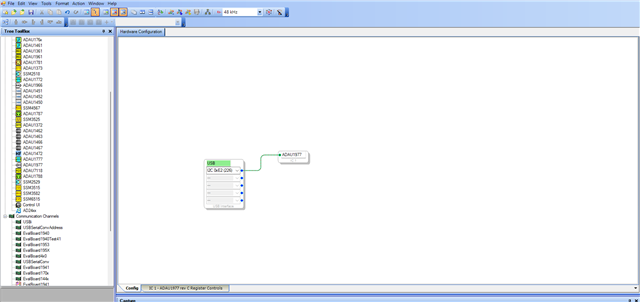
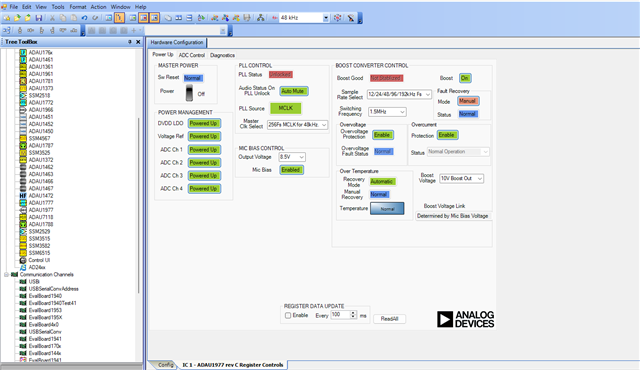
Hello Santhakumari,
I managed to solve Q1 issue by changing SPI clock speed in sc5xx_Flash_System.c:
/* SPI_Clock = (SCLK0_0/(SPI2_NORMAL_SPEED_CLK+1) */
#define SPI2_NORMAL_SPEED_CLK (5u) //changed from 3u to 5u
I tried that earlier at another point without noticing the comment here so I decreased the value instead of increasing it...
Regarding Q2:
I got the connection with Sigma Studio running, thanks for this advice. In between, I also tried TWI and SA-Mode, but didn't get either working.
Meanwhile I also managed to get the additional channels from the ADAU1978Z-EVAL into AWE, although that has been quite a struggle. This raised another question from my side:
In the BSP I received, SPORT4A is configured as Tx and SPORT4B is configured as Rx for the EZKITs ADAU1979. I tried to use SPORT3B for the additional ADAU1978Z, however I didn't manage to get data into the memory (let alone AWE).
Now I simply switched the SPORT3B to SPORT4A and moved Tx to SPORT5A and it works like a charm. I'm pretty confident in using the exact same way I configured SPORT3B earlier. Am I missing something "special" about SPORT3B preventing it from working as intended?
Hi Kevin,
We are glad that you have resolved the issue and made progress with your project.
Reg the SPORT config in BSP, you are using SOMCRR-EZKIT, Clocks from DAC is routed to DAI1 and The SPORT4 and SPORT5 are in DAI1 domain, so clocks can be routed easily.
Whereas SPORT3 is in DAI0 domain, to route the clocks from DAI1 to DAI0, you have to do cross connections between DAI1 and DAI0 in SRU config. You would have probably missed that. Hence no response from SPORT3.
SPORT0-3 - DAI0 domain
SPORT4-7 - DAI1 domain
Clocks can be shared between the DAI domains but proper SRU routing is needed with cross pin connections.
Let’s imagine a scenario like the following.
SPORT0 (DAI0) = Receiver (ADC side) and SPORT4 (DAI1) = Transmitter (DAC side). We must share BCLK and FS between both SPORTs via CRS-based routing (PB03–PB06)
Let us assume that clocks are available at DAI0 pins.
Step 1: Route DAI0 SPORT0 signals into CRS pins (PB03–PB06)
DAI0 → CRS input mapping (SPORT0 side)
SRU(DAI0_PB03_O, DAI0_CRS_PB03_I); // Bit Clock
SRU(LOW, DAI0_PBEN03_I);
SRU(DAI0_PB04_O, DAI0_CRS_PB04_I); // Frame Sync
SRU(LOW, DAI0_PBEN04_I);
SRU(DAI0_PB05_O, DAI0_CRS_PB05_I); // Data (A channel)
SRU(LOW, DAI0_PBEN05_I);
SRU(DAI0_PB06_O, DAI0_CRS_PB06_I); // Data (B channel if needed)
SRU(LOW, DAI0_PBEN06_I);
Now DAI0 signals are available on CRS network
Step 2: Cross from DAI0 CRS → DAI1 CRS outputs
// CRS cross connection from DAI0 → DAI1
SRU2(DAI0_CRS_PB03_O, DAI1_CRS_PB03_I); // Bit Clock
SRU2(HIGH, DAI1_PBEN03_I);
SRU2(DAI0_CRS_PB04_O, DAI1_CRS_PB04_I); // Frame Sync
SRU2(HIGH, DAI1_PBEN04_I);
SRU2(DAI0_CRS_PB05_O, DAI1_CRS_PB05_I); // Data A
SRU2(HIGH, DAI1_PBEN05_I);
SRU2(DAI0_CRS_PB06_O, DAI1_CRS_PB06_I); // Data B
SRU2(HIGH, DAI1_PBEN06_I);
Step 3: Feed into SPORT4 (DAI1 side)
// DAI1 CRS → SPORT4 input mapping
SRU2(DAI1_CRS_PB03_O, SPT4_ACLK_I); // BCLK
SRU2(DAI1_CRS_PB04_O, SPT4_AFS_I); // FS
SRU2(DAI1_CRS_PB05_O, SPT4_AD0_I); // Data A
SRU2(DAI1_CRS_PB06_O, SPT4_BD0_I); // Data B (optional)
Hope this helps. Please try and let us know how you are getting on.
Regards,
Santhakumari.V
Please log in to reply.