[ADUA1701] Auxillary ADC input and tolerance analyzer. How to use?
Hello!
At this time i'm in the learning curve about the ADUA1701 DSP chip. One of the things that i'll try to understand how the tolerant analyzer works when connected to one of the auxillary ADC inputs. I connected a 10K potentiometer to the ADC0 pin. Checking with the DSP readout block shows different values when turning the potentiometer, so i assume that this one works. In this testing stage, i would like to turn on 3 different LED's (connected to 3 seperate GPIO outputs, with resistor offcourse) independently by rotating the potentiometer. In a later state the leds are been replaced for real functions, the leds are only for testing purposes for now.
When connecting the 28.0 switch to the tolerance analyzer, and checking the output of it with the DSP readout block, it works (switch off => output zero, switch on => output 1). Now i'm trying to do the same with the auxillary with connected potentiometer. But it's look like another format.
Can anybody help me out to make this setup work? Maybe with a screenshot from sigmastudio with a working flow? Hope anybody can help me so i can further with my DSP project! Thanx a lot!
Hello Audiodude,
Yes, there's a format mismatch between the ADAU1701's Aux ADC and the Tolerance Analyzer, and it's easy to fix. First, it's a good idea to review the number formats here:
What are the number formats for SigmaDSP?
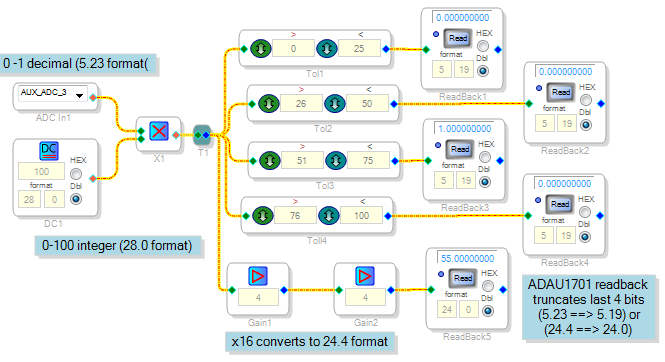
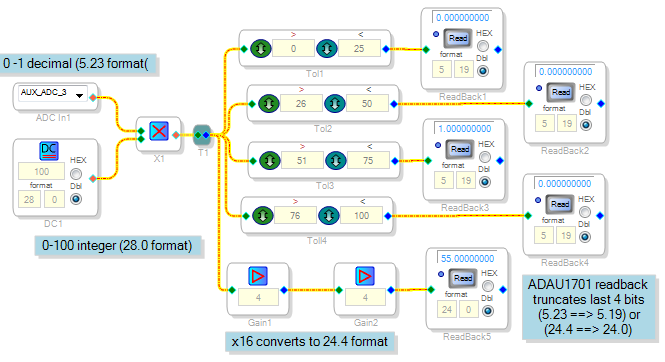
The ADAU1701's Aux ADCs output a number from 0 to + 1.0 decimal, in 5.23 format (the same format as audio). The Tolerance Analyzer specifies its levels as integers (28.0 format). Thus we need to convert from one format to the other. In the example below, I multiply the Aux ADC output by integer 100. Thus when the Aux ADC is fully up, the multiplied result is integer 100 (actually it rounds down to 99). This integer varies from 0 to 99 according to the pot position. You can feed your tolerance analyzers this result and they work as expected.
I also show a Readback for the 0-99 integer, mainly to illustrate how to read integers from the ADAU1701. Unlike the other DSPs, the readback register in this chip leaves out the lowest four bits. Decimal numbers simply lose a little precision, but integer numbers below 16 (1 0000 binary) don't read at all. The fix is to multiply integers by 16 which shifts left four bits before the readback. In the ADAU1701, the highest decimal number is 15.99999 -- so to multiply by exactly 16, multiply by 4 twice.
Auxiliary ADCs in the newest Sigma DSPs (ADAU1452 and above) output an integer from 0 -- 1023, so they don't need this conversion.
Best regards,
Bob
Hello Bob,
This is a very nice way to get the Tolerance analyzers working. Thank you very much for the explanation and the screen shot! Appriciate very much! Thank you!
Hello Audiodude,
Here is another way to do it that is quite simple. I don't think you need to use the tolerance analyzers. I set this up with the evaluation board. The eval board only has two LEDs but I can see it working with all three using the Readbacks.
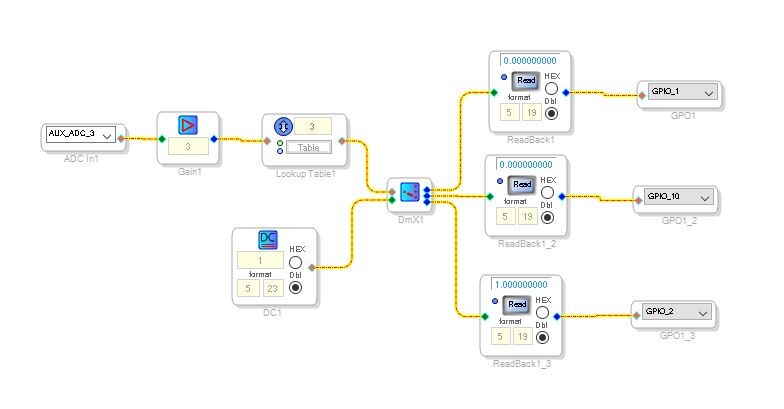
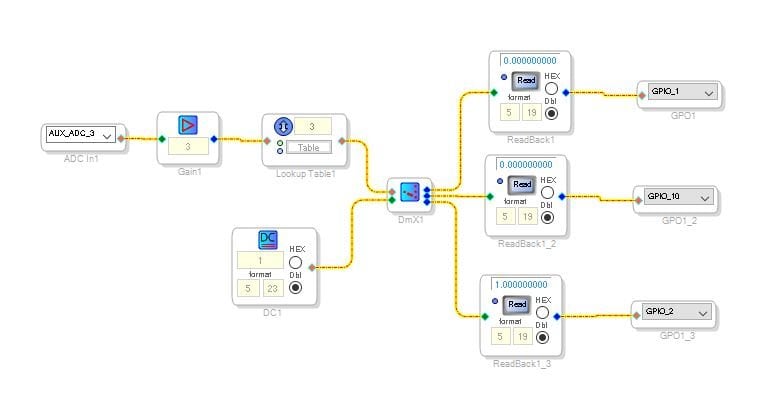
Here is a screenshot of the project:
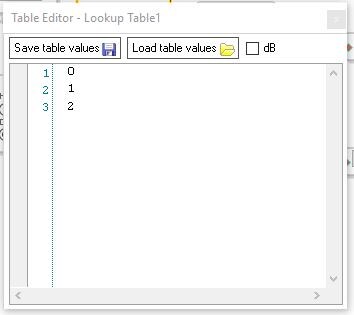
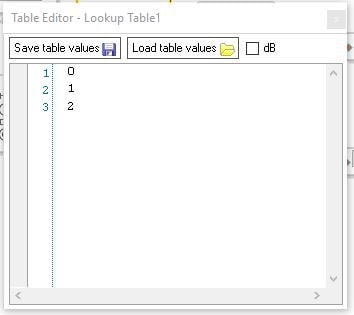
It takes the ADC input and multiplies it by three. The will give you an output between 0 and almost 3. So the lookup table is set to fractional input and integer output. There are only three values in the table. 0,1 and 2. This will route the DC source to the selected output. The unselected outputs will be zero and the DC cell is set to "1". So only one of the outputs will be high at a time.
Here is the table:
Rather simple.
I have attached the project.
Dave T
Please log in to reply.