How to control several Push button using one GPIO
Hi Everyone,
Am using ADAU1452, I need to control volume,frequency, Pitch using push buttons. I didn't find any free gipo's in my schematics. How can we control 7 push buttons using one GPIO.
I have seen related thing i.e, controlling using resistor ladder network. Is it possible to control like that via Sigmastudio.
Link: arduino - Resistor ladder with Same resistor value and different resistor value - Electrical Engineering Stack Exchange
Please do the needful.
Regards
Siva
Audio Signal Processors
adau1452
SigmaDSP Audio Processors
Hello Siva_Sankar,
Can you give us a little more info? You can use a resistor ladder to get several different levels out of the aux ADC but not the GPIO. Is the one pin you have open have one of the four AUXADCs on that pin?
If you do have an AUX ADC available then I will have to think about how to do this in SigmaStudio. I am pretty sure it can be devised. I assume you want volume up/down, frequency up/down, Pitch is the same as frequency so I do not know what that means? So that is four buttons. So what do the 7 buttons supposed to do?
Then how many MIPS is your program using now? You can find that in the compiler output log file.
Dave T
Hello Dave Thib,
Here I have attached our Processor schematics and buttons schematics.
The above seven buttons need to connect with the processor. Is it possible to connect with either GPIO's or AUX ADC's.
Or-else As you said with one AUX ADC using resistor ladder network. How can we connect buttons to the processor.
Regards
Siva
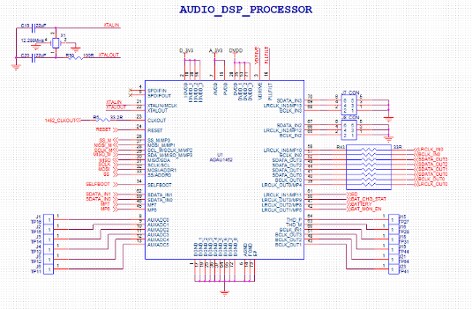
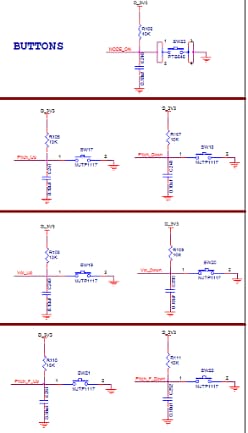
Have you considered using a GPIO expander?
Hello TAM,
Thanks for your response. We didn't considered using GPIO expander. Is there any GPIO expander for ADAU1452.
Regards
Siva
It wouldn’t be specifically for the ADAU1452, just a device you communicate with via I2C (or whatever other interface the expander supports). Here’s an overview of of some of the types available from NXP, for example:
https://www.nxp.com/docs/en/brochure/75016987.pdf
Other manufacturers offer them as well, and they’re readily available through online distributors. Cheap hobbyist-style PCBs are available too if you just need one to get started quickly.
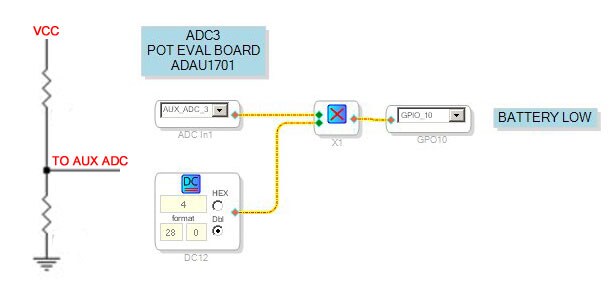
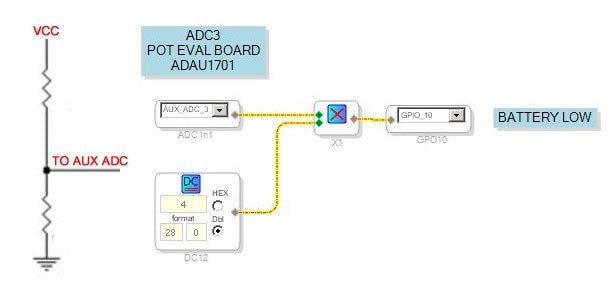
If you do not need precision, you can use an AUX ADC with a voltage divider at its input.
Hi TAM,
Thanks for your useful Info.
I need some other information. Is there any schematics for Battery Monitoring.
Regards,
Siva
Sorry, I don’t know anything about that. Maybe someone else on the forum does.
Hello Team,
As per TAM suggestion I used PCA9698 GPIO Expander.
How to control push buttons using GPIO Expander in ADAU1452. Is there any schematics for controlling push buttons using GPIO Expander.
Foe Example,
If I press Switch 1 necessary information has to control (i.e.) increase/decrease (or) on/off. Similarly for every switches
Please do the helpful.
Regards
Siva
Hi TAM,
Thanks for necessary info.
Regards
Siva
Hello Piero,
Thanks for your valuable info.
I need some other info. How to control push buttons using GPIO Expander in ADAU1452. Is there any schematics for controlling push buttons using GPIO Expander. Please suggest any schematics for GPIO expander to control buttons.
Regards
Siva
Hello,
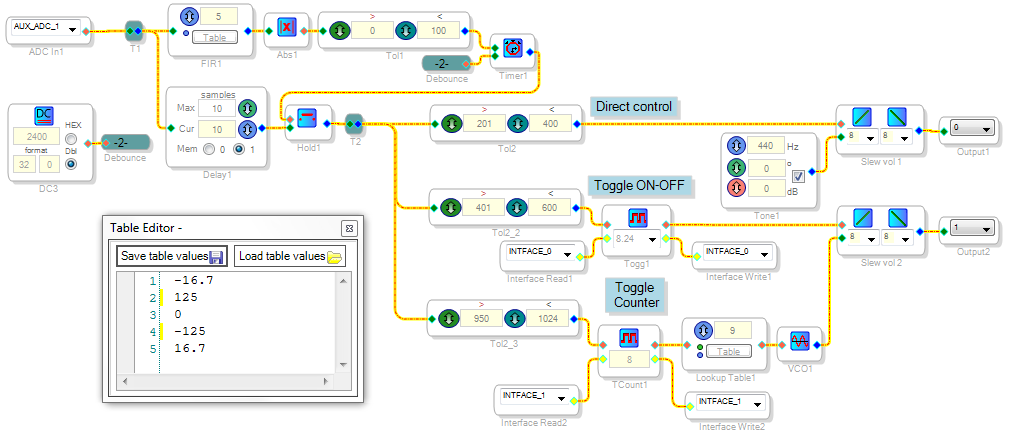
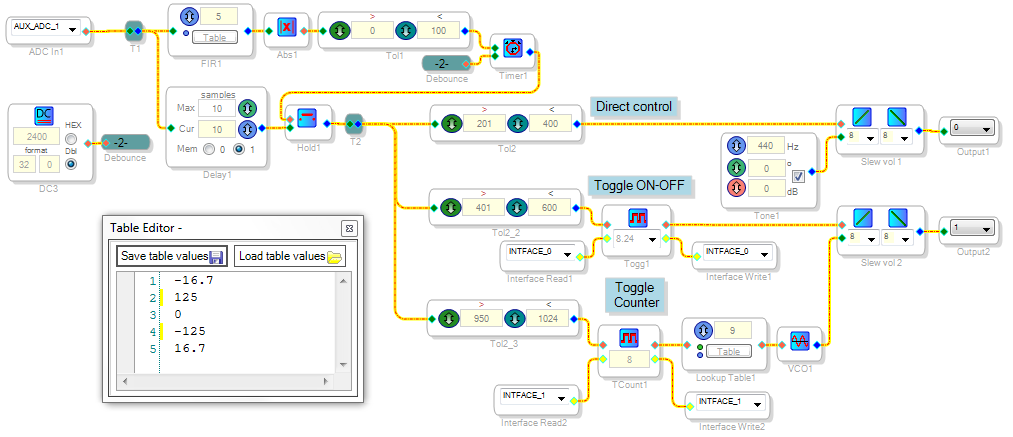
If you have a free Aux ADC and a button and resistor arrangement which outputs a specific voltage for each button, then you can have this control multiple "push button" tasks. The key is debouncing the input, and preventing unwanted activations while the Aux ADC slews to each new value. Here's one way to do it (note that it's far from the only way):
The input Aux ADC value passes through the FIR filter set up as a Lanczos low-noise differentiator (see Lyons, Understanding Digital Signal Processing, 3rd edition, pg. 227 ). If the input jumps in either direction, the resulting high input to Tol1 disables updating the input level for the debounce time set by the DC source. Once this times out, the new value advances to the remaining Tolerance Analyzers, whose outputs act like individual push buttons. These outputs can be used directly or conditioned with push button blocks as shown.
This project is compiled for a ADAU1452, but I ran it on the ADAU1466 eval board because that board is equipped with Aux ADC pots. Thus I could test the operation by twiddling a pot. This example handles only one button press at a time -- allowing simultaneous button operation is much more complicated to do and usually not necessary. In that case you'd likely be better off with a microcontroller scanning the buttons.
Best regards,
Bob
Hello Bob,
Thanks for your response. I ll workout on this.
Regards,
Siva
Hello Siva,
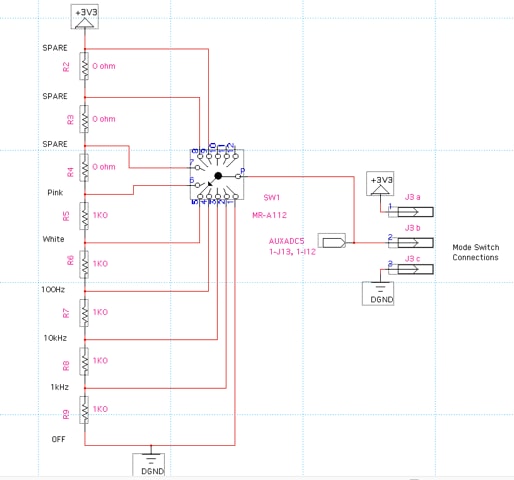
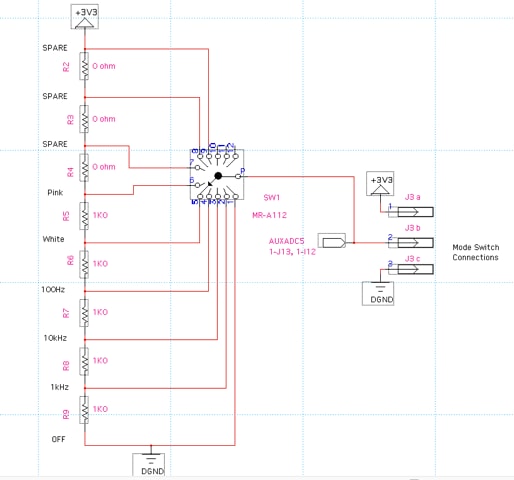
Now I am going to show that there are so many ways to accomplish a task using SigmaStudio. The above examples are great. Bob also alluded to the many ways this can be done. For this first example I will use a program I already had designed and tested but it is for the ADAU1452 family of processors. This would be the Sigma300 and Sigma350 processors. Those devices implement the AUXADCs a little differently. The Sigma300 outputs the 10 bit ADC numbers as an unsigned integer which is handy sometimes and sometimes it is not. The ADAU1701 outputs it as a 1.23 number. But this is all a side note. This is what I did with this project. Let me start with the hardware. Here is the schematic of what I did:
As you see I am using a single pole 12-throw rotary switch. This could also be done with several push buttons. The only tricky thing with pushbuttons is that multiple ones can be pressed at one time. If someone presses the top and bottom ones at the same time it will present a short between power and ground. So you may have to adapt this somewhat for pushbuttons. Like not using the top and bottom positions for anything.
So I left room for expansion and the top three positions I stuffed 0-ohm resistors into those positions.
This simple divides the 3.3V power supply into 6 different values. The first is 0V and the last is 3.3V.
The selected DC level is then sent to the AUXADC input of the DSP. As I look at this now it might have been good to add a 0.01uf Cap on the switch wiper with a small 47 or 100ohm series resistor to limit the in-rush current to the cap.
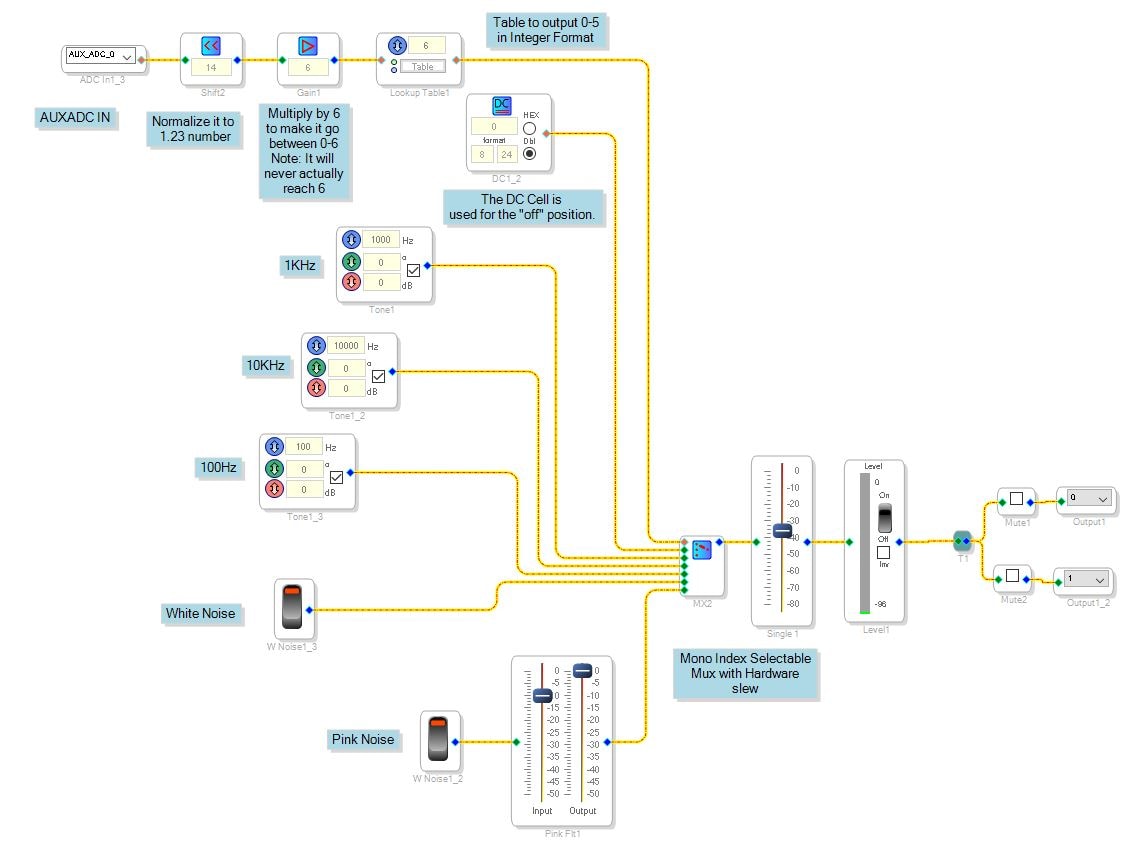
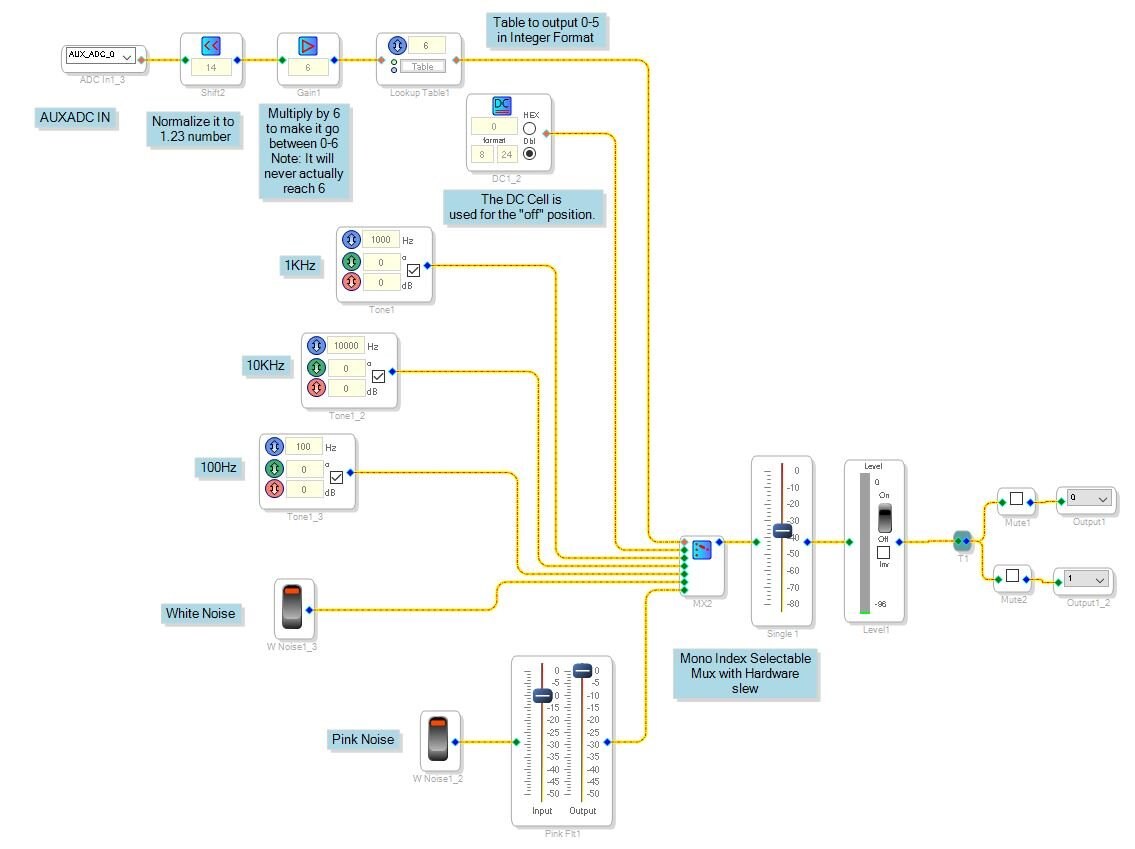
Here is the DSP program:
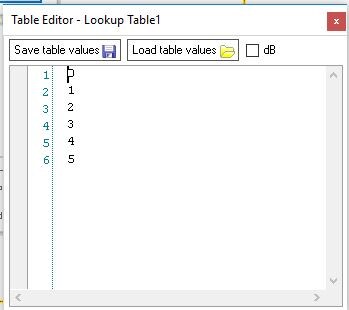
So I take the ADC input and normalize it to a 1.23 number. Then I multiply it by 6. I want 6 settings so this will have the AUXADC input produce a number between 0 and 6 in an 8.24 number inside the DSP. Then I go into a table with 6 values. The input of the table is set to Fractional input. The output is set to integer so that it will produce the correct output for the MUX. Here are the table values:
So the result is that the input is divided up into 6 different levels and the output is 0 to 5.
That is fed to the MUX to select which oscillator is selected. It works great. I am using a slewed MUX so that the transition is smooth. There is a hysteresis on the AUXADC input.
I will work on an ADAU1701 version of this. It should be easy to replicate. I have attached the project.
Dave T
Edit to this Post:
I added the ADAU1701 version of this project. Those of you who have the evaluation board can test this using the AUXADC pot.
Dave T
Hello Dave,
Thanks for your reply.
Regards
Siva
Please log in to reply.