Manually generate sequence file
Hello Everyone,
For my project I would like to read the coefficients from my DSP via a microcontroller and import them into Sigma Studio as a sequence file (please see Import Parameter to Sigma Studio). Therefore the sequence file cannot be generated by Sigma Studio, but by a script.
Is there documentation about the sequence file available to help solving the following questions (I could not find anything beside a general description)?
The file generated by Sigma Studio contains several "writeSafeload" instructions. Each has only one parameter (with 4 bytes). This applies for single parameters (e.g. for a switch), but also for the 5 coefficients of a Filter (each has its own line). Does Sigma Studio internally concatenate the 5 entries of a filter and writes them as a single safeload?
Is it correct that the commands "writexbytes", "writesingle", "writesafeload", "delay", "pllwait", "noop" and "end" (from tool sigmadsp-genfirmware) are available? Is there more detail about the functionality of the commands available?
Could I always use a "writesafeload" instead of a "writesingle"?
Why is the number in the len, by 2, higher than the number of bytes that shall be written (instruction writeSafeload and writeXbyte)?
sigma studio
sequence file
sequence
sequences
not sure I understand your questions. Can you use some diagrams/screenshots to ask the questions more specifically?
Sorry about the extra work.
1) Safeloading and block loading coefficients will write all 5 coefficients consecutively. One filed for the address followed by all the data.
2) what are you trying to do? writexbytes (writes bytes) writesingle (writes a single 5.23 (4byte) word), writesafeload (safeloads one or more words), delays, (freezes for a period of time the consecutive writing), pllwait (same as delay). The datasheet contains information about the default number format as well as the safeloading mechanism.
3) yes but you might get clicks and pops during run-time. sometimes this works without a problem.
4) not sure what "len" means, can you place some graphic. Are you talking about the first 2 bytes that show the address for parameters being written?
Please comment.
Miguel
I am very thankful for the work You are doing when answering my questions. I will therefore provide as much information as needed to get an answer and more understanding.
The sequence file that is analyzed here has been generated by copy-paste from Capture Window to Sequence window in Sigma Studio (as prosed in the general description).
1)
From the datasheet I understand that a safeload writes up to 5 coefficients during one audio sample.
When I change the parameters of a "General EQ (2nd order) Multi-Channel, double precision" a single line is generated in the capture window for each coefficient:
This leads to one line per coefficient in the sequence file:
<action instr="writeSafeload" len="6" addr="9148" CellName="DSP2Filter.Ch1_4" ParamName="General2ndOrderDPSigma300Alg11B2_1" DspName="DSP2">00 FB C5 29</action>
<action instr="writeSafeload" len="6" addr="9149" CellName="DSP2Filter.Ch1_4" ParamName="General2ndOrderDPSigma300Alg11B1_1" DspName="DSP2">FE 08 75 AD</action>
<action instr="writeSafeload" len="6" addr="9150" CellName="DSP2Filter.Ch1_4" ParamName="General2ndOrderDPSigma300Alg11B0_1" DspName="DSP2">00 FB C5 29</action>
<action instr="writeSafeload" len="6" addr="9151" CellName="DSP2Filter.Ch1_4" ParamName="General2ndOrderDPSigma300Alg11A2_1" DspName="DSP2">FF 08 63 C9</action>
<action instr="writeSafeload" len="6" addr="9152" CellName="DSP2Filter.Ch1_4" ParamName="General2ndOrderDPSigma300Alg11A1_1" DspName="DSP2">01 F7 78 6E</action>
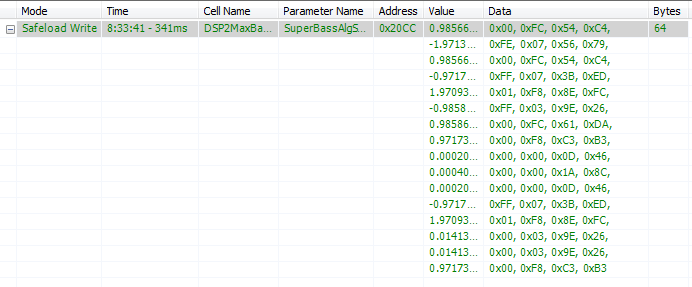
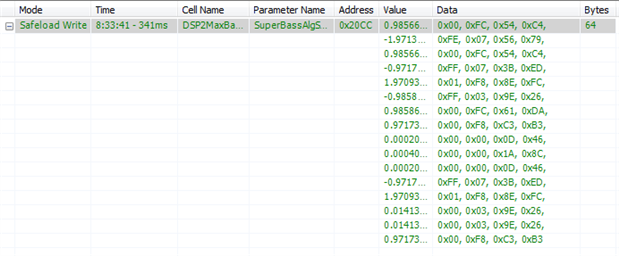
When I change a parameter of a "Optimized Mono Super Bass SW Slew"
a single instruction is used. This can also be seen in the sequence file (I removed data to shorten the line):
<action instr="writeSafeload" len="66" addr="8452" CellName="DSP2MaxBass.SuperBassCh3" ParamName="SuperBassAlgS3003bs_2" DspName="DSP2">00 FC [removed data] 06</action>
So now there is question
1a) Why does the filter block generate an individual safeload for every coefficient?
1b) How can 64 Bytes (Super Bass) be written in a Safeload instruction?
2)
To me it is unclear when to use writeSafeload, writeSingle or writeXbytes when there is only one coefficient.
A "Mute (HW slew)" uses two writeXbytes instructions to set two parameters (one FixPt, one Int32):
<action instr="writeXbytes" len="6" addr="7870" CellName="DSP2Mute.Channel1Mute" ParamName="MuteHWSlewAlgADAU145X1mute" DspName="DSP2">01 00 00 00</action>
<action instr="writeXbytes" len="6" addr="7869" CellName="DSP2Mute.Channel1Mute" ParamName="MuteHWSlewAlgADAU145X1slew_mode" DspName="DSP2">00 00 20 8A</action>
A switch "OnOff 32_0 Output", that has only one coeffizient also uses a safeload instruction:
<action instr="writeSafeload" len="6" addr="9607" CellName="DSP2MultibandCompressor.MultibandCompressorCh1Enable" ParamName="SwitchAlg3226ison" DspName="DSP2">00 00 00 00</action>
I would expect that this could be done with a writesingle instruction without causing any clicks because it is only one coeffizient. Am I wrong in my expectation?
I could not yet find an example for a writeSingle.
3)
Just to make sure I get it right: I could get clicks when using "writesafeload", but will avoid them by the use of "writesingle"?
I then wonder why the switch of 2) uses a writesafeload. The data type is int32. Can a writesingle not be used for this type?
4)
I was talking about the len field in the sequence file. For example
<action instr="writeXbytes" len="6" addr="7870" CellName="DSP2Mute.Channel1Mute" ParamName="MuteHWSlewAlgADAU145X1mute" DspName="DSP2">01 00 00 00</action>
Here we have 4 bytes of data, but the len (Length?) is 6. Is there always a 2 Bytes offset?


1a) Why does the filter block generate an individual safeload for every coefficient?
not sure why the capture window is shown each coefficients but I'm fairly sure that the communication going to the DSP is writing all 6 parameters at once. (address for 1st coefficients, followed by the 5 coefficients). Lastly, the number of safeloads will be written to trigger the safeload process.
1b) How can 64 Bytes (Super Bass) be written in a Safeload instruction?
More than 5 parameters must be split in chunks of 5. This is what SigmaStudio is currently doing in the background. Although this may affect the audio in some conditions, when writing to a gain table, doing so in chunks prevents clicks and pops audible when writing them all at once, one at a time.
2) I would expect that this could be done with a writesingle instruction without causing any clicks because it is only one coeffizient. Am I wrong in my expectation?
you are correct however our designers prefer to use (or more accurately, have standarized) using the safeload mechanism. It should be the same as you mention.
The mute might be doing a single write (don't recall)
3) No, you might get clicks when NOT using safeload. Safeload avoids partially written filter (that can become unstable). You might get clicks when NOT using safeloads with some algorithms however each algorithm may or may not contain logic to avoid such clicks. For example a volume control that slews would not click regardless if you safeload or not.
However, even using safeload, If the filters being written are dramatically different, there will be a one sample step that might be audible (or NOT). In other words, although safeload helps load complete sets of biquads, it would still NOT guarantee a click free signal flow, specially if those coefficients are written constantly when the filters have a dramatically different transfer function.
4) Got it, this is the size of the transaction. 6 words are needed to prepare the safeload transaction. One additional word is needed to both write the number of transaction for the DSP to load AND as a triggering mechanism.
Hope this helps.
Miguel
Hi Miguel,
Your answer was again very helpful.
Do I get it right, that the instructions that should be used for writing coefficients rather depend on the affected algorithm and cannot be derived from the number or data type of the parameters?
Therefore I should check in the Capture Window with which instructions the coefficients are written and then use the same instructions in the sequence file and when writing with a microcontroller.
For example I would intuitively have written the two parameters of "Mute (HW slew)" by a writesafeload, but from the capture window I see that writexbytes must be used.
Christian


Hi Christian:
This is correct, however there is no harm in always safeloading.
If you don't want to think about it or reverse engineer from the capture window and you don't mind the extra writes, just safeload always.
If you want to save some writes and you are only loading one parameter, just write directly into memory.
Miguel
Hi Miguel,
thanks a lot for Your help.
Christian
About 1a):
For those who are interessted: I checked the access with an oscilloscope. The five lines are performed as a single safeload write:
This is also true when written as a sequence. Therefore the display in Sigma Studio is just misleading, but seems to work.




This question has been assumed as answered either offline via email or with a multi-part answer. This question has now been closed out. If you have an inquiry related to this topic please post a new question in the applicable product forum.
Thank you,
EZ Admin
Please log in to reply.