Сhannel for a subwoofer or how physically combine two channels with DSP
hello everyone
for my project I want to buy amplifier with DSP (ADAU 1701) by Sure audio. I need 50 W Rms 4 ohm. But it must be ''honest'' 50 W Rms.
There are two possibilities 2 x 50 Watt Class D (4 Ohm, 19V 4.7 A) JAB3-250 and 1x 100 Watt Class D JAB3-1100.
They mentioned that in 2* 50 W version they use tpa3116, but there is not information about 100W version.
as far as I understood to get the subwoofer channel, I need to combine 2 stereo channels into one mono channel, thereby physically I will get more power. I have two questions about Sigma Studio
1) can I combine two channels into one for a subwoofer inside Sigma Studio, process it with filters and output this signal only to one output ?(so the second one I can use for another purpose)
2) in case I do not have enough power from one amplifier channel and I have to unite physically the stereo in mono to increase the power, in this case what should be the settings of the Sigma Studio for these two channels? Completely identical? ( I need to filter the signal) or will there be a conflict in the physical linking of channels and filtering will not work correctly? How to set up a sigma studio in this case?
How can I be in this situation?
Just wanted to know if a good choice is to use ADAU 1701? This is a powerful chip, with it there is no problem? I need to use it for two-way sound system
And what you can say about this amplifiers by Sure Audio with DSP ADAU 1701? It a good realized product?
Thank you!.
Hello ynikoros,
Answers to your questions:
1) Yes, you can combine and process the signal in many ways inside of the DSP. Certainly summing can be done.
2) I think you are asking if you can just send the same signal to two different amplifiers. Yes, you can send the same signal to all four outputs if you like.
I do not know much about the Sure products so I cannot say anything about the quality.
I did look into the block diagram and it looks like the amplifiers are stereo. I am not certain how you will be organizing these units.
You can use the serial port to send and receive digital data between processors but with them physically located on different PCBs that would be difficult to do, if not impossible. If the amplifiers are located close to the speakers then there is no way to send the data digitally. Fortunately, I think there is a solution. Simply send both channels to every DSP. So every DSP can choose what it uses. Actually, what you will do is to select which channels are on when you program the DSPs.
Then on the subwoofer DSP, You simply filter the full range audio and sum the two channels and send it out of only one output port.
I have attached a project which shows you in a basic way how to take in the signals, strip off the sub information, sum it and send it out. Then it also shows how to select which channel you want to use for this DSP output. Then I split it into a low and high frequency signal.
This is a simple project. There are no compressors or limiters and no meters.
There are a lot of things this part can do but I do not know what the Sure hardware is setup to use. You will have to ask them for assistance with that.
Dave T
Hello DaveThib
Thanks for the explanation and the example - it's useful for me!
They provide also a programmer and everything should work without problems. As far as I know, ADAU 1701 has 4 output channels, right?
In general ADAU 1701 its a good and powerful chip?
this board with an amplifier has two channels (you can connect extension board and get all 4 channels with DSP)
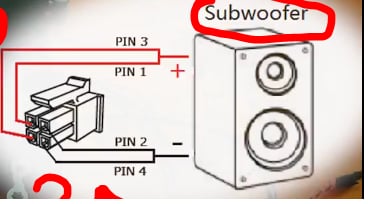
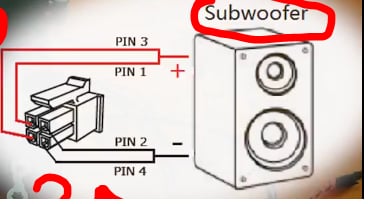
Channel for a subwoofer can be obtained by physically combining two stereo in mono (as in the photo). So you can get more power from two channels than from one. I do not understand how to configure these two channels in this case in Sigma Studio.
For example, I need to apply a peak filter to a certain frequency for a subwoofer, do I need to create a filter and use it on both of these channels? (It will not be logical to use a filter for only one channel, and the second simply connect directly to the input.) Because then I connect this two channels physically.
Or is it also necessary to change the polarity inside the Sigma studio or do smth else? Sorry, but I correctly asked the question, do you understand ?, if not, I will rephrase again!
Thank you!
Hello ynikoros,
I think what is going on is that they are using the two power amps in Bridged-Mono mode. This takes two amplifiers, and only a mono signal, sends it to one channel then inverts the signal and sends it to the other channel. This way when one amp is pushing the other is pulling and so you get a lot more power out. However, this is driven by only one signal not two. The signal has to be mono before this is done.
Now, if this amp is a Class-D amp I do not think they can operate it in Bridged-Mono. Then shorting the signal together like you show in the diagram is really bad and should not be done.
You will have to sum in the DSP.
It is better to sum then apply the filter you mentioned. This will use less DSP instructions to implement.
So you will only be using one DSP board for all the speakers? Then you will run out of channels. You will need a Hi and Low output for each channel and then one subwoofer output, that is a total of five outputs. That is why I was expecting you to use two of the boards, one for the left and one for the right.
Dave T
Thanks for the answer
This amplifier uses the chip tpa3116
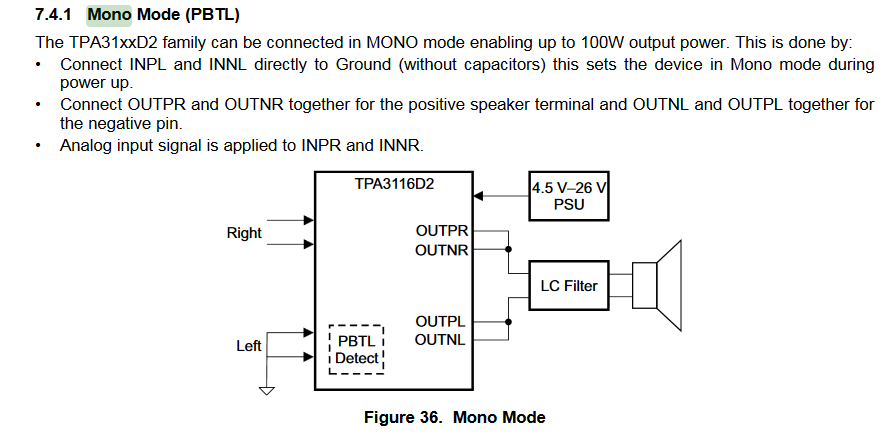
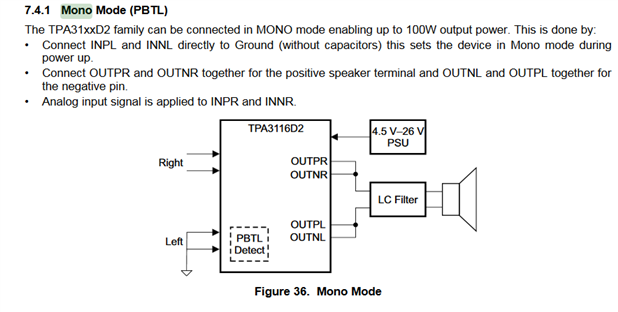
according to the datasheet, it can work in bridge mode:
The purpose of my project is to create a mini subwoofer with an amplifier and a DSP, but since ADAU 1701 provides me 4 output and since for a subwoofer I need 1 max 2 channels and 2 other channels I can use for the left and right channel
I think Sigma studio will let me do this?
Hello,
Notice in the diagram you inserted. It only uses the right channel input. This input has to be a mono signal which is summed from the stereo input. The project I supplied to you does that.
So you will not be splitting the audio again for the left and right speakers? Only a passive crossover or something like that?
The project I sent you can be modified easily to do what you need. Just remove the Left/Right switch and run those out of the DSP.
Dave T
Please log in to reply.