Can I Open two project so I can compare them.
I had some old projects and I want to compare them. But I cannot open two sigma studio!
Hello shark,
What processors are you using?
What revision of SigmaStudio?
Generally, older projects will open in current versions of SigmaStudio but projects created with newer versions of SigmaStudio will not open in the older versions. But it depends on how far back you go.
Dave T
yes, you can open 2 schematics at once in SigmaStudio and place them side by side for comparison
Regards
Miguel
It's not possible to run two instances of SigmaStudio. I open the first project then the second. It might look like the second one did not opened but it did. To view the second project you might have to go to Window and change window arrangement to see both projects/schematics (in the same instance of SigmaStudio). If you work with two monitors it's not possible to place each schematic on a separate monitor but at least you can see two schematics next to each other.
Hello PiotrT,
You do not need to open up two instances of the program. You can do this in one instance.
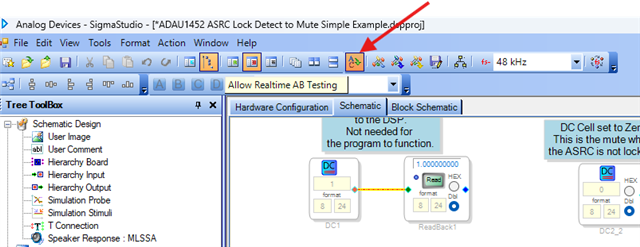
We have a feature kind of hidden in SigmaStudio called A/B testing. You enable it here:
Then you can do this two ways. Load in two programs, use the "Window" pull down to select one and kink/compile/download. Then go to "Window" menu and go to the other program and do the same thing, Link/Compile/Download.
Then all you have to do it use the "Window" menu to switch between the two programs. SigmaStudio will download the current program to the DSP. There is a short delay because the program needs to be loaded.
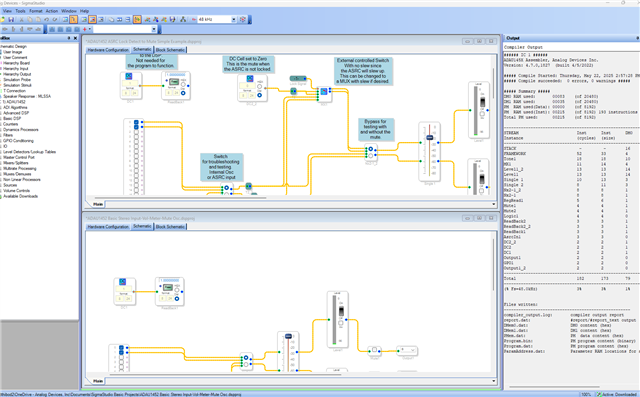
You can also tile the display on the screen. Then all you have to do is click on the window and it downloads that program. Click on the other and it downloads!
This is what it looks like with two programs loaded and the window tiled:
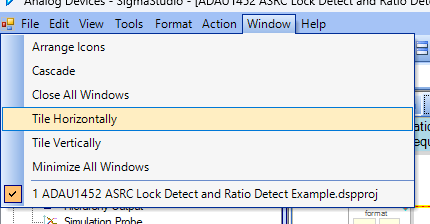
The tile command is also in the Window pull down menu.
I hope this helps. It is a cool feature.
Here is the help file on that feature:
Allow Real-Time A/B Testing Between Projects [Analog Devices Wiki]
Dave T
Let me add one more little detail.
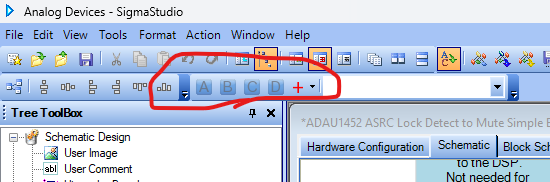
SigmaStudio also has a way to compare different settings on a project. So this would be only one project but different parameters like filter settings, volume compressors. Here is where that is located:
It is called Project Presets.
Dave T
Thanks for the hints. I've tested both and they certainly will become useful during debugging. The first one allows me to have slightly different projects and easily switch between them without having to change connections every time.
In my specific case I was copying ADAU1761 project to ADAU1452 project, hence the need to see both schematics, without necessarily being able to load each project as I work only with one dev kit and one programmer at a time.
Hello PiotrT,
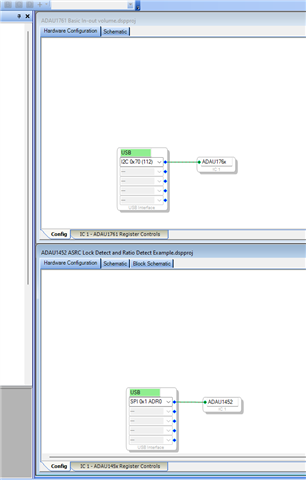
I expect you may have figured this out from my earlier post. By using the "Tile" command you can see both projects on the screen:
So load in both projects then select to tile them. Here is where I did it for two different projects for two different processors.
On another note, I like to have some fun and enjoy a good laugh when possible. To me it is part of enjoying life even if it is at my expense. When I was reviewing this thread I saw a typo I did in my earlier post. This is funny and I can laugh at myself.
DaveThib said:
select one and kink/compile/download
That is too funny!
Have a great day!
Dave T
Please log in to reply.