USBi comm error with Windows 10
My Win 10 laptop is no longer on speaking terms with my USBi / eval boards, resulting in Comm errors and nonworking readbacks.. My work computer worked fine until as an experiment I deleted its USBi driver, then re-installed SigmaStudio which replaced the driver -- now this computer won't communicate with the hardware as well (what a dumb idea that was!). Have tried SigmaStudio versions from 3.13 -- 3.17. Any suggestions?
comms_failed
usbi
windows10
Hi Bob,
I also had this problem on the win10 home edition version.
I installed the professional version and everything worked perfectly.
I do not know if I have solved for a lucky event or because the win10 home version has limitations.
Regards
Piero
you may try (if not done already) moving to cypress drivers for USB3.0 , even if still using USB2.0 machine (can't remember the link, google will be your friend)
Thanks, Piero and fabriceo,
So far I downloaded the Cypress driver installer, will try it as time permits. If I can't get this to work I'll try upgrading to Pro. I'm happy that folks here are willing to offer assistance!
Best regards,
Bob
Hi Bob,
I did not upgrade from the home version to the pro, I formatted the disk and I installed a new copy of the proffessional of win 10.
I've always had bad adventures with windows upgrades so I completely reissue the operating system.
By installing the professional version, SigmStudio did not give any problems, installed its drivers on its own and everything is working properly
Piero
Hello again,
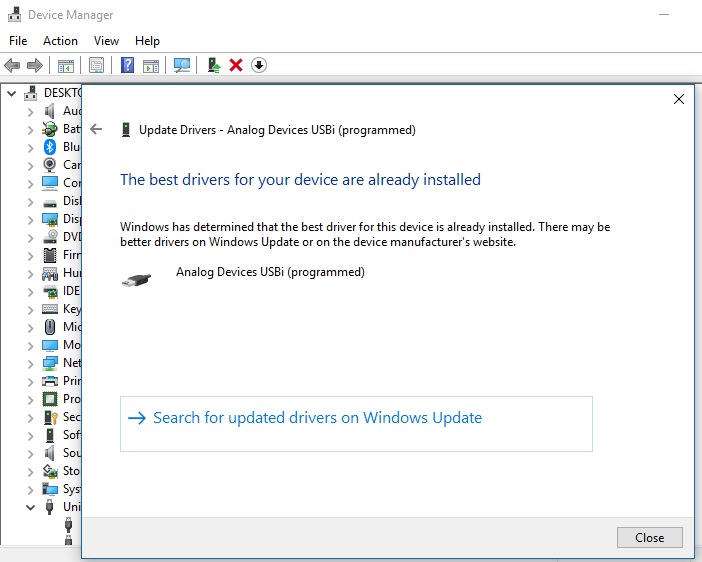
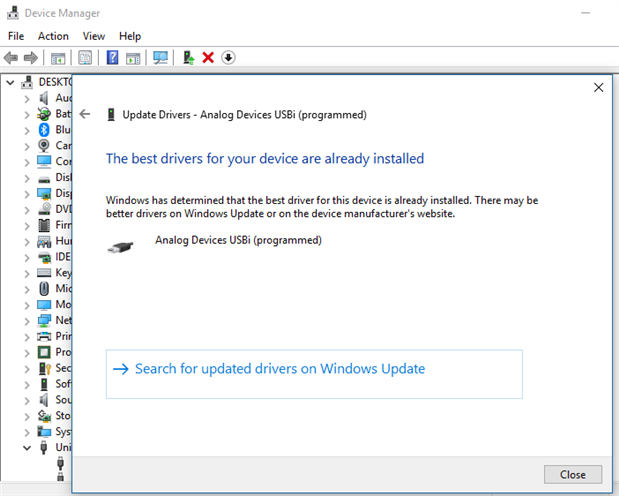
fabriceo, I can't see how to get my computer to use the Cypress serial driver -- this box keeps showing:
Is there some special procedure to make the driver change?
@piero, I tried reinstalling Windows Home, then upgraded to Pro -- sorry to say, neither worked for me. There must have been something unique to your setup which got fixed by the upgrade.
Best regards,
Bob
I don't know who marked this "assumed answered" -- it's not. None of the suggestions have worked for me.
Hello Bob,
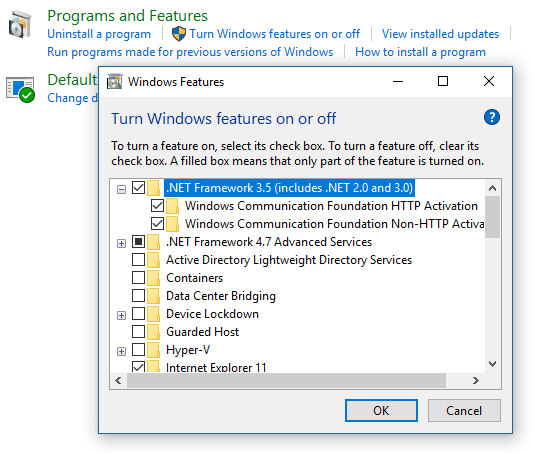
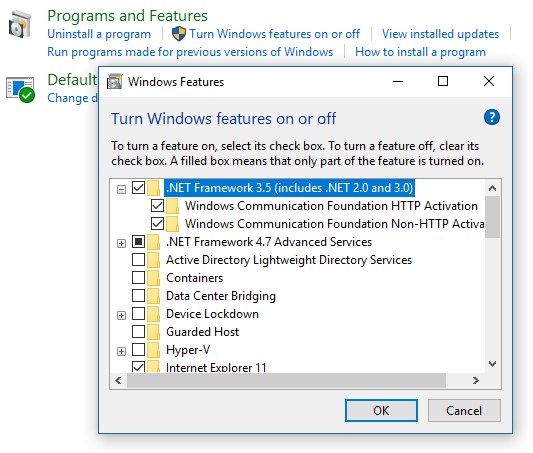
Check to see if .net 3.5 is installed.
Regards.
Hi KKSL,
Thanks for the suggestion. I found that .NET 3.5 was only partially installed so I checked all its boxes to install the rest:
Unfortunately, still no HW response. I'm afraid I'm no IT guy. All I know is that the USBi always worked on my old Win 7 machine with USB 2.0 ports (which has since died). The USBi always ran a bit flaky with Win 10 before it quit altogether a month ago.
Hello again,
The latest v3.17 is picky about .net v4.7 too. Sorry, just found that myself.
Since Windows likes re-start:
1. Un-install any version of SigmaStudio previously installed
2. Re-start
3. Install v3.16
4. Re-start
I hope this works.
Regards,
Thanks to all who kindly replied to my thread. Although none of the answers worked for me (at least the way I tried them), they did work for those who suggested them -- thus may be useful to others.
After my Windows 7 laptop died, I switched to a new one with Windows 10 and USB 3.0. I've always experienced occasional hiccups with this, but it worked well enough until recently -- now I get only com errors, thus this thread. My office Windows 10 machine was fine until I experimented with deleting and reinstalling SigmaStudio and its drivers, now it suffers as well. Having been frustrated with this for over a month, I finally applied the hiker's rule: When you've lost the trail, turn around and go back until you find it. The last time my AD eval hardware worked 100%, I was running Windows 7 and USB 2.0 -- so it became high time to return to what works.
Thus my solution: I bought through eBay a refurbished Dell Latitude laptop with Windows 7 Pro and USB 2.0. The Latitude series is built much sturdier than Dell's consumer-grade stuff. And most importantly, SigmaStudio and my eval boards are on speaking terms once more! No hassles at all, it just works the way I fondly remember. Not only Link-Compile-Download, but as many data read-backs as I could ever want -- all without com errors!
Windows 10 has some flashy features -- but when it comes to making things work, Windows 7 is the best OS Microsoft has ever made.
For the future, perhaps AD needs to rework the USBi for full compatibility with new computer hardware and software.
USBi and USB 3.0
This issue has been around for some time
.
Thanks for your observation. My Win10 laptop with is USB 3 ports wasn't ideal -- it would hiccup the USBi occasionally -- but the combo was at least serviceable until about a month ago. Now it's unworkable. My work computer worked fine with its original Win7. IT upgraded it to Win10 last year with no problems initially, however something changed since. Besides my troubles with the USBi, now my PIC dongle is acting up as well. When it hiccups it hangs the programming software so badly that Task Manager can't close it; I have to restart. When this machine had Win7 (and obviously the same USB ports), everything just worked.
Best regards,
Bob
Hi all.
Since the last windows 10 updates, Sigma studio is not working with the USBi programmer for 90% of the time... This is really unworkable. The driver of sigma studio 4.0 is signed now (wasn't before) but it does not work at all... Hardware in my case has not changed, only change is a windows 10 update somewhere in februari/march. After that update programming is completely useless... After completely restarting the computer, power of the DSP board and USBi device and back on again programming works some times, but when the programmer is disconected from the DSP board into another one programming just fails almost every time. Will AD do something about this soon?? Commercially this makes sigma studio completely useless at the moment, including all the supported DSP's. Not a good advertisement of brand...
Hope this issue is solved very soon.
BR,
Bazeman
Hello Bazeman,
My friend here wonders if USB should stand for Universal Serial Bus. I guess not so universal after all... I'm having other manufacturer's programming methods and dongles fail with Windows 10. And my Win7 x64 laptop which I had bought secondhand specifically to run SigmaStudio is working beautifully with the USBi. Thus, to some extent this is really Microsoft's fault. Yet, you do have a valid point. At the rate things are going, if nothing changes -- one will have to find a suitable computer for Sigma work in a museum!

Hello Bazeman,
What version of Window's 10 are you using? Home or Pro? or Enterprise?
What computer hardware are you using? Manufacturer?
I recently upgraded my six year old laptop I am using here at ADI to a new Windows 10 machine. We have some issues with the datasheet templates in Word (A Microsoft product have issues with a Microsoft operating system change, go figure!)
Anyways, I have had no problem at all with my USBi at my desk. Not a single issue. It has been about a month now that I have had the Windows 10 machine. So I am asking these questions so we can try to find a common thread with people who are having problems and people who are not. It will help us find a solution.
Dave T
Hello Dave,
I'm happy it's working for you. My previous laptop, an old Dell Win7 Home which I upgraded to Win10 Home, played nicely with the USBi until the day it died. The Win10 laptop I bought last year worked fine with SigmaStudio until an update a few months ago. I tried upgrading it from Home to Pro, and just now the latest Win10 update (1803) and that didn't help. My desktop at work, an old Dell 32 bit Win 7 Pro which was upgraded to Win10 Pro, worked until as an unfortunate experiment I uninstalled and reinstalled SigmaStudio. Evidently an average PC user like me is unlikely to troubleshoot this issue, which is why I found temporary relief with a used Win7 Pro 64 bit Dell Latitude laptop.
BTW -- my update to Win10 1803 lasted for half an hour before I rolled it back. It didn't help with the USBi -- and on top of that, it created a new D: partition filled with invisible stuff, and Windows Explorer reminded me every five minutes that this D drive is running out of space! This update is definitely not ready for prime time. There's a setting to delay new feature updates for up to a year, and I heartily recommend it.
Best regards,
Bob
Hi Guys
I also suffered this issue when I upgraded Laptops, Both were WIN7 Pro
I have previously discussed this on this forum.
I ran a USB trace and found the new laptop was sending Much larger Packet sizes.
I then wrote my own Application to send and receive data instead of Sigma Studio to the PCB.
And broke up the packets into smaller chunks. My new laptop worked when i did this. So this appears to be solvable in my case
As previously discussed. I would like Sigma Studio to have a setting to set the Max Packet size to send.
Thanks
Brett
Hi,
@Dave
I have a Dell, AIO 9020 or so, I5-4670S with Win10 Pro 1803
As said, until ~februari everything worked well with the USBi programmer allready for a few years on this machine with Win7 and since +/- 1,5 year with Win10. The issue is caused by the microsoft updates I'm well aware of that, as I and many others have issues with new drivers and older hardware since all the newer updates of Win10.
It seems more and more that microsoft is doing this on purpose so older hardware is getting replaced sooner...But that's my "conspiracy" thinking...
However to be able to program and use the AD DSP chips in real time there should be stable working hardware/software available without these issues. If a new USB programmer is needed with a USB3 interface, then this should have been available for a while, since USB3 is allready used on computers of 2 years or older even.
I hope there will be a good solution any time soon, as hardware/software that does still work flawlessly with the USBi programmer is getting older and difficult to maintain every day...
Hi all,
For many of us including me, the USBi issues with Win10 and/or USB 3.0 ports surfaced with a nondescript Win10 update around February / March, 2018. Yet, Brettcoupe, jimwoodElectrojim and others have been dealing with it since May 2016 -- two years ago! Which computers work and which don't has been all over the map -- by my experience, older ones work better, yet DaveThib's new one is gold. Brettcoupe's experimentation with a USB sniffer and smaller packet sizes is the sort of work that's most likely to lead to a solution. He linked to his work above but sorry I didn't check it out at the time, figuring that this was more Win10 than USB 3.0. It seems to be a complex interaction of both.
Best regards,
Bob
ADI’s effort to address this problem has brought forth Sigmastudio 4.1. I have noticed a significant improvement in USBi reliability with this version.
Best regards,
Bob
Hi
my USBi works now on my Win7 HPz book. As discussed previously it stopped when I updated to this Machine.
Thanks heaps
Hi guys, any solutions for this problem yet? Its still happening for me. Just got my ICP3 board and i'm having this problem of USB communication , it's a pain.
Hello Flavio,
I am fairly certain that the programming team has worked this all out. Have you tried to reinstall SigmaStudio using the most recent release? Have you taken it one step further and uninstall the drivers then reinstall SigmaStudio?
Dave T
Please log in to reply.