Need help correcting speaker frequencies
Hi,
On request of a friend we're building an omnidirectional bluetooth speaker. Because space is very limited we bought an ADAU1701 to correct the sound for it. One of the problems we're facing is the high notes. Because using multiple conventional tweeters have multiple dead spots we resorted to using a cone to break the soundwaves in a 360 degree pattern. While this works well, some frequencies get muffled. I tried a lot to get it sound right again but it does not work.
I tried experimenting with ADI Virtual, HDSX and SuperPhat Spatializer with no good results. Yesterday i tried to measure with a db-meter the difference in frequencies with and without cone, put those delta values in Parametric EQ with still no good results. It is buggy and the Q-factor doesnt play along very well. Vocals and instruments sound like they are not really present in the song. Also boosting 4000/3000/180 and 400hz does not work really well. Everything i do to provide more clarity results in a sharp sound rather than a clean sound.
What can i do about this?
Greetings
Hello,
The issue you're facing appears to be more related to acoustical design than to DSP. I'm no expert so my comments would be rather general:
The "vocal sweetener" project you had asked about previously is for making singers sound better -- it likely would not effectively correct for speaker characteristics.
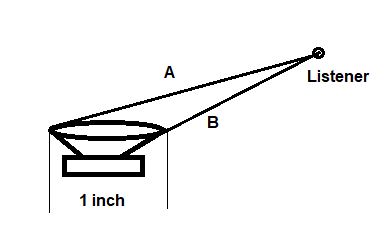
As you're finding out, making a speaker that's truly omnidirectional over a wide frequency range is not easy. The wavelength of high frequency sounds approaches the size of the drivers, making them tend to beam sound straight outward. For example, at 12 KHz the wavelength is about one inch. As shown below, an angle which causes path A to be half an inch longer than path B would result in the paths being 180 degrees out of phase, resulting in some cancellation. For the same reason, a diffuser cone isn't trivial to design and may cause more harm than good. The easiest path toward omnidirectional sound is to use the smallest tweeter which can still provide the needed SPL.
Measurements at treble frequencies with a tone generator and SPL meter often run into difficulties with standing waves and reflections -- any such measurements would likely require an anechoic chamber and much more expertise than I've got.
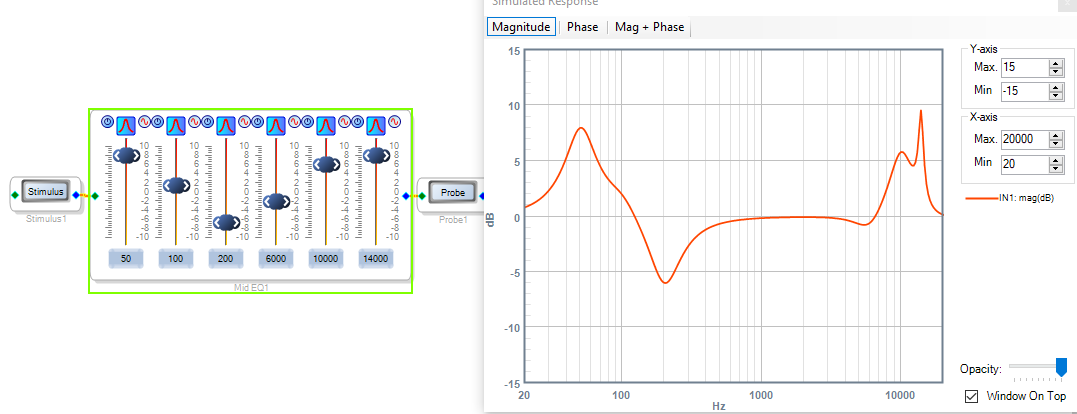
If you're not doing so already, use the Stimulus-Probe tool in SigmaStudio to visualize the response of your parametric EQ filters -- it will show you the actual result not only of your frequency and boost slider settings, but the Q as well. In the example below, the filters' Q is 1.41 except for the 14 KHz filter with a Q of 5. Notice how this filter produces a very sharp peak. A little Q goes a long way!
SigmaStudio offers an Automatic EQ but it actually requires detailed response characteristics of your speaker(s), which as I described above is not easy to measure accurately.
Sorry I can't be of much help with this topic. Perhaps your question would get more attention from those who know about speaker design and compensation if you post it in the Audio section.
Best regards,
Bob
Thanks for the well written reply! I tried the automatic EQ with REW and the microphone of my phone and i must say it works pretty well. I'm new to the stimulus-probe tool but it looks like it can be very helpfull. I think i will change the design of the speaker.
On another note i do have some other 'problems' with figuring out.
- After 5 seconds without sounds the bluetooth music receiver makes a hearable pop sound. I tried to make some sort of noisegate but i didn't work.
- When i use Automatic EQ i get a lot of artifacts in the sound(no distortion). Is that normal?
-The IIR table for the Linkwitz Riley tranform from MiniDSP site does not work in sigmastudio. I already noticed i have to convert the , to a . but it still doesnt work.
Greetings
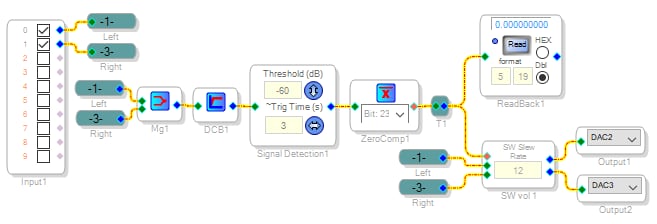
Have you tried the Signal Detect block as a noise gate? Set it for a time shorter than the five seconds your Bluetooth receiver takes to pop, and it should mute the popping.
The Automatic EQ is only as good as the impulse response or frequency response entered. If the compensating filter response as displayed appears rough and peaky, try increasing the Smoothing Control.
I'm not familiar with the mini dsp or its website. You can drop in and set up a Linkwitz-Riley crossover directly in SigmaStudio.
Best regards,
Bob

Hi Bob,
I got the signal detect working and the pop is gone. Thanks for the schematic!
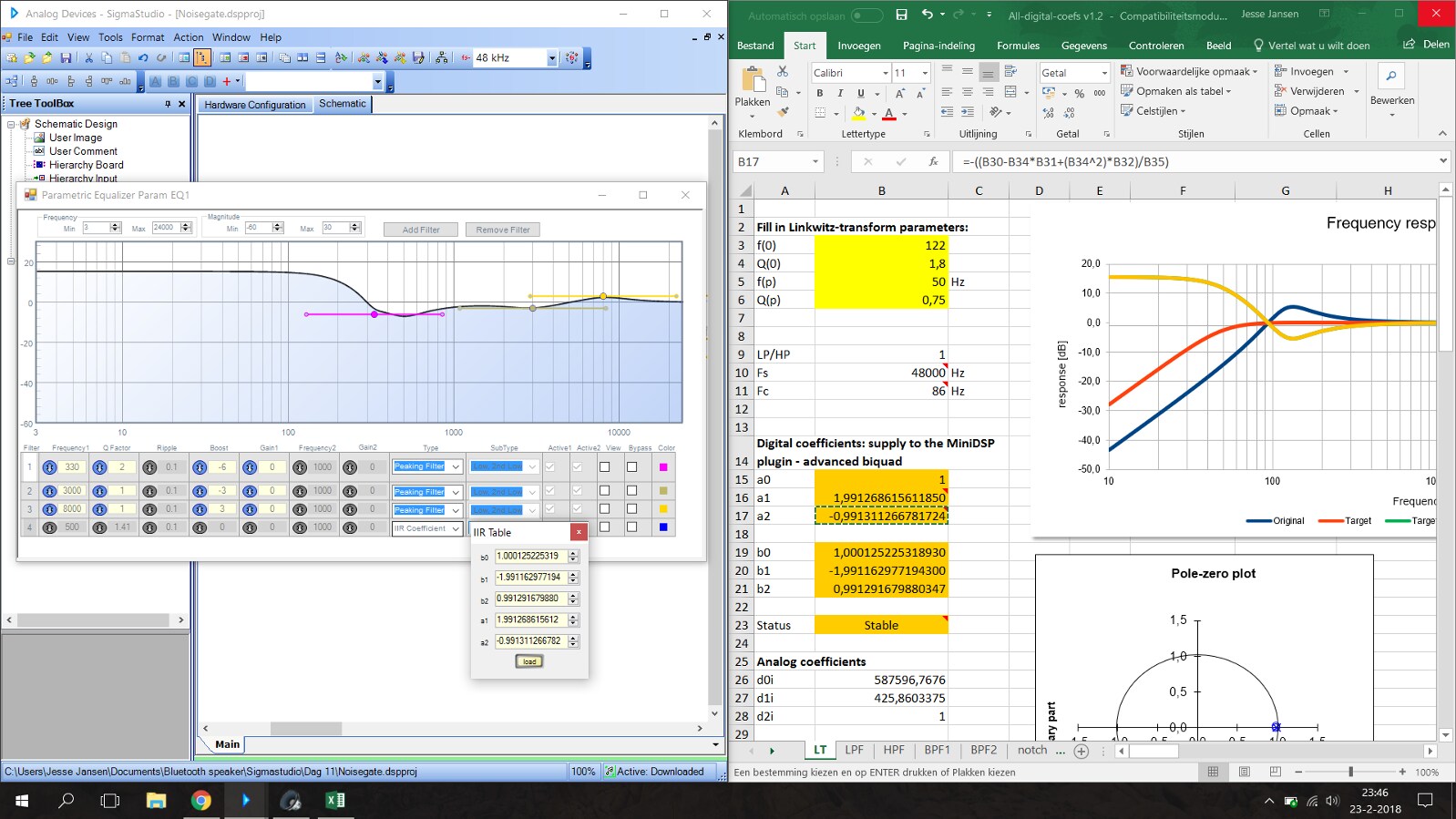
I'm not looking for a linkwitz riley crossover but a transform. MiniDSP offers an excelsheet that can calculate the IRR coefficients. I added a screenshot:
When i enable the filter there is no sound output anymore. Is this a bug?
Greetings.
Hi
In regards to your filters. I believe you will have to change the sign for A1 and A2 due to the implementation on this DSP.
Please let us know your results.
Regards
Miguel
While the graph did bug out it did work. Thanks mmmike!
I want to thank everyone for helping.
Please log in to reply.