Determine SPDIF input rate with ASRC ratio
Hi,
I'm having a bit of confusion in a design using an ADAU1452.
I have a 44.1k signal coming into the spdif input which is set to drive ASRC0. ASRC0 drives my core program (not important what that is). I want to report to the user/operator the incoming sample rate so I read register ASRC0_RATIO (0xf582) and calculate it from what I know the core SampleRate to be.
If the core is running at 48k I get the number 3763 which given that 4096 = 1.0 this says that the core is 48k and the spdif is 44.1k good!
If I change the incoming SPDIF rate the ratio changes appropriatly so also good!!
BUT: If I run the core at 96k I get the same numbers?
I know the core is running at 96k because I am also running the spdif output at core speed and it changes between 48k and 96k when I change the core speed.
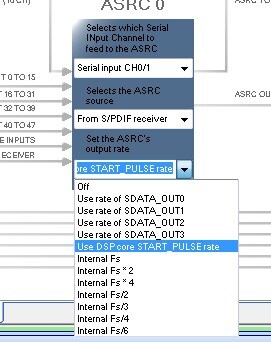
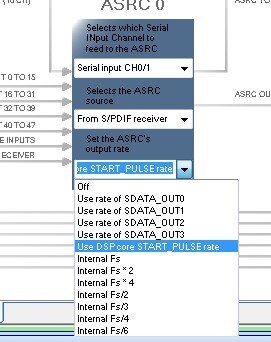
How should the settings be in SigmaStudio? In the Routing Matrix tab there are 3 drop down menus for each of the 8 ASRC's I have set them as shown in the bitmap attached but I'm unsure about the top one. Is it ignored because I'm using SPDIF input or does it still have some significance?
Any thoughts or help would be appreaciated
PhilipJ
Audio Signal Processors
adau1452
SigmaDSP Audio Processors
Hello PhillipJ,
I know this can be a little confusing and the terms used become difficult to make it clear.
In a way there are two different "Core" rates. There is the core rate which is the output of the PLL that drives the core. This gets divided down and there are a number of rates out of the clock tree that are available for all the blocks within the DSP. Then there is the "Core" rate when we talk about the sampling rate of the core. These can be related but then they also can be different. So the 294.912MHz core rate out of the PLL gets divided down to produce the "Internal Rate" clocks. These are the fs/4, fs/2, fs, fs*2, fs*4 rates that are available as a choice.
Next there is the register associated with the DSP core that chooses the actual core sampling rate. This is the "Start Pulse Rate". This can be set to these internal clocks I described above but it can also be set to come from an input or output port or even the SPDIF input. (not recommended to use the SPDIF IN). So this sets the program's sampling rate. The SPDIF Output comes off of this rate.
Now on to the ASRC selections. You are correct, the top choice is only active if you select the source to be from an input serial port. So in your case it has no effect.
So the output rate is the important selection. You have selected the Internal fs rate. This is divided down off of the Core clock from the PLL and never changes. So when you select the Core Start Pulse to run at 96kHz you select the Internal fs*2 for the core sampling rate. However, the ASRC is still set to the Internal fs rate off of the main clock tree so it does not change. You would have to change that register to the internal fs*2 as well.
Now this is a hassle to remember to do so we gave you the ability to have it simply follow the core start pulse rate. So select that in the ASRC and then it will follow the core sampling rate when you change it in the Start Pulse register.
I think this should fix the issue you are seeing.
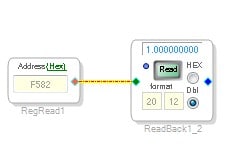
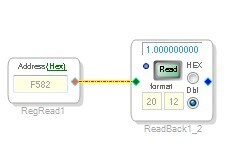
For others reading this. The easy way to look at the ratio number is to look at it in your SigmaStudio project rather than the Hardware Register view. First with the registers you have to "Read All" registers which takes some time. Then the display is an integer number so you have to convert to a 4.12 number which is a hassle. So have SigmaStudio do this for you!
Use a readback cell and set it to 20.12 and you will see the ratio as a number that makes sense.
In this case it was 1:1 but you will see 0.5 or 2.0 if the sample rate is double or half the rate.
If you are reporting this rate I would suggest you setup a window of values because the rates from an external source will hardly never be an exact rate. So setup an acceptable window to call it 44.1kHz or 48kHz etc.
Thanks,
Dave T
Hi Dave,
changed the setting to DSP Core Start Pulse and all is now OK. Thanks for the clear and detailed explanation.
While on this subject of Core Sample Rate, in your opinion is it OK to change the Sample Rate on the fly? That is I have compiled a program with SigmaStudio set for 96kHz sample rate with the Core Start Pulse taken from SDIN0 rate. Would there be any dire consequences if my system were to drop that rate to 48kHz while the product was operating (the user might decide to run the system at 48 or 96kHz, or even 44.1 or 88.2!!).
I know certain parameters such as filter turn-over frequencies are calculated as a fraction of Sample Rate so they would need to be re-calculated and updated but apart from that would the program still run happily, provided I compiled it for the highest sample rate.
Thanks for your time
PhilipJ
Hello PhillipJ,
Yes, you could do that. I always worry about clock glitches causing memory errors etc. You will probably hear some pops or clicks and you will hear some old data in delay lines and filter feedback paths for a split second at the wrong rate. So if it is possible to mute before the change then that is great.
Also keep in mind that if the clock goes away, the DSP core stops. Well, it is still going but it never gets the interrupt to begin processing the new sample so nothing happens.
Oscillators will be at the wrong frequencies. Any delay calculations will be wrong so things like decay times will be calculated in samples since this is the only time stamp we have to go on in the DSP. So there will be a few things that will change.
Generally, I feel it is best to run the core at the same rate and use the ASRCs for signals that will be changing. Then there is the issue of the master clock rate. If that is changing then that can be a problem for the codecs possibly. It would be a problem for the PLL if it is changing. So if the incoming clock is on the same master clock then you could possibly devise a program to monitor the sampling rate and if it is the same then switch over to the input that does not go through the ASRC. This would be done with the ASRC ratio calculation. If it is equal to 1 then switch directly to the serial port input. If it is not then switch to the ASRC output that has the serial port signal as its input. Both can be active. You can send the serial port to the DSP core and also send it to the ASRC.
So my vote would be to not drive the core start pulse from the serial input port if that signal will be changing.
Dave T
Again Hi,
and thanks for your thoughts.
I accept the possibility of glitches as it changes over, I just wanted to be sure that it wouldn't crash the system by doing it. Basically the sigmaDSP is receiving signals from a Dante network system and this allows the user to change the system sample rate whenver they want to.
I am using ASRCs for some signals such as SPDIF input but I didn't think of using them for all inputs and outputs.
Kind regards
PhilipJ
Hello PhillipJ,
I cannot guarantee 100% that the system would not crash. Whenever you are changing clocks that drive the system then you run that risk. It will depend on how smooth the sampling rate change is and what the DSP is doing when it does change. For instance, if the LRCLK clock is high and then suddenly goes low far too early, the DSP program would not have had time to finish running the code for the current sample period. This means that memory locations can be corrupted or a filter change was only partially completed. There are also internal timing that happens for writes and address generation that might get interrupted. The chances of these things happening are low but it is not zero.
It will depend on how smooth the Dante network interface deals with these changes. If it waits for the current sample period to end and then start sending out clocks at the new rate then you should be fine. What I worry about is if it changes abruptly in the middle of a sample period. So if it is possible to investigate the behavior of the clocks when it changes then you can feel more confident that all you have to deal with is the discontinuity of the sound data and that is not a big deal. I would guess the user would expect some sort of click when they change the sample rate of the audio. This would not be happening in the middle of a program.
Now keep in mind that if you are using the SPDIF and not using the Dante then all of a sudden the Dante network changed its data rate then you will hear a glitch in the SPDIF as the ASRC rate will change and the DAC output rate changes.
Dave T
Hi Dave,
once again, thanks for your thoughts and advice.
I do share your concerns about glitches etc. and I accept the advice about the possibility of problems if the change of rate causes a highly shortened frame time, I wouldn't normally want to do anything like this.
I think Dante is benign enough to wait until the frame edge before changing the clock but I haven't been able to catch it on a scope to see exactly what they do (they may even slew it from one speed to another!).
We will make sure that we put notice in our product manual to say that while sample rate changes are possibly we recommend stopping and re-starting the system when doing so.
Regards
Philip
Please log in to reply.