PLL Enable/Disable not working when selfbooted
adau1452 i2c selfboot
Hello Community,
we are having problems when trying to disable and re-enable PLL after ADAU1452 has self booted through I2C eeprom.
Here is a brief description of my project: I built a custom-board including ADAU1452, AD1937 as Codec and some other parts beeing controlled by the Master Control Port via I2C. ADAU1452 is in selfboot-mode connected to a I2C 512kB eeprom. ADAU1452 I2C-Master and I2C-Slave-Port is tied together and also tied to eeprom, AD1937 and so on. Eeprom is programmed via USBi Interface using "Wirte latest compilation USB" while its WP-pin (and selfboot pin on 1452) is pulled low. All this configuration works great so far.
What we do is let the DSP boot from the eeprom so that it has a basic configuration. Then when running we change parameters (volumes, matrix, GPIOs, ...) through I2C (later that will be derived from an USB-I2C Bridge - in an XMOS device). This is also tested and working fine.
Now I wanted to change the CLKOUT Frequency while running.
[Scenario 1] When I load my program through USBi (I2C) into the DSP I can change this as intended by setting the MCLK OUT Frequency and afterwards disable and re-enable PLL. That's nice and works as expected.
BUT ...
[Scenario 2] After flashing exact that same program into EEprom and the let ADAU1452 self boot from it disable/re-enable does not work the same way!:
- PLL disable does nothing (reading back register says it is still enabled!)
- PLL re-enable seems to disable PLL for MCLKOUT stops working and can never be activated again until we reboot.
I watched I2C data for both scenarios and the commands are the same. But only when loading program through USBi and then applyinig this commands it works as it should.
I hope my discription is somehow understandable. Please ask wenn you need more or other details.
Does anyone have an idea for this behavior? Any help or input will be greatly appreciated!
Cheers, Bernd
Audio Signal Processors
adau1452
mclk out
pll enable
master control port
Integrated/Special Purpose A/D Converters
adau1452 i2c selfboot
SigmaDSP Audio Processors
Audio CODECs
ad1937
Show More
Hello Bernt,
The DSP is able to change almost anything in its register settings which is a powerful feature. But, one thing it cannot do is change the PLL which is running the core clock. If that goes away then it stops executing instructions! So you cannot change anything that affects the core clock directly. Even if you are allowed to make the change it can cause a glitch in the core clock and then that can cause errors in the instruction execution and that can be fatal. The MCLKOUT register can be changed to a different setting but not the PLL. So the PLL has to be running at the correct rate when it is booted.
Dave T
Hello Dave,
thanks a lot for your very fast answer. I understand that toggling the PLL-Enable is therefore not a good idea ;-)
Is there an other way to take effect of changing MCLKOUT frequency during normal operation (without rebooting)? Datasheet says: "When changing the settings for the predivider, disable and then reenable the PLL using Register 0xF003 (PLL_ENABLE), allowing the frequency of the CLKOUT signal to update."
It seems as if we have to think about other ways to generate the frequency that we need ...
Bernd
Hello Bernd,
Let's back up a bit.
What frequency do you need?
Do you need to change this during operation several times or just once based on conditions?
Dave T
And one more thing, what is your base rate and MCLK input rate?
Hello Dave,
24.576MHz MCLK is supplied by a Crystal Clock Oscillator. Base rate is 48kHz but we are thinking about 96kHz (maybe replace ADAU1452 with the new ADAU1466 for the next revision - more memory - we also need delay ;-))
Background for the whish to change MCLKOUT: This is the Masterclock for a CS8406 Digital Audio Interface Transmitter which is connected in Hardware-Mode so we cannot acces its settings without board redesign. It normaly runs on 12.288MHz resulting in 48kHz Output-Samplerate. If we switch MCLKOUT to 24.576Mhz along with setting Serial_Ports Register (in ADAU1452) to 2xFs we get 96kHz Samplingrate for the Digital Output ...I know at the moment this is just upsampling and doesn't affect audio bandwidth. But it may get interesting when we run 96kHz base rate and want to be able to switch between 48 and 96kHz output. Anyway it will not be switched too often.
If changing the clock gets too difficult or unhandy I will have to go the long way and modify our PCB to connect CS8406 in Software-mode via I2C ...
Bernd
Hello Bernd,
Thanks for the info.
There is no need to stop the PLL or change the PLL. There are so many clocking options in this part that you can handle this scenario.
When you change the MCLK frequency from 12.288MHz in hardware to 24.576MHz, I am assuming this is a clock oscillator module that will be soldered in and this frequency will never change.
So this means you will now have the pre-divider set to 8 instead of 4 so you will still result in an internal core rate of 294.912MHz.
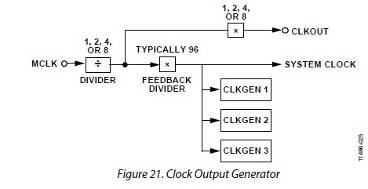
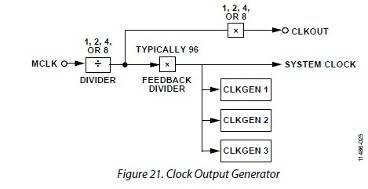
So look at figure 21 in the datasheet.
The CLKOUT pin has a multiplier to give you several options.
So 24.576MHz / 8 = 3.072MHz going into the multiplier.
So setting this multiplier to 4 will give you the 12.288MHz you need to drive the CS8406 at 48kHz fs.
Then when you need to run it at 96kHz you simply change the setting to multiply by 8 and you will output 24.576MHz out of the CLKOUT pin.
Internally you set the fs using the CLKGEN 1 outputs and there you will have the choices of 48kHz or 96kHz always available independent of the CLKOUT pin.
On the data going to and from the CS8406 you will have to use the ASRCs to go into and out of the core and the ASRCs will automatically adapt when either the Core or the SC8406 clocks change. So this should work quite nicely.
These registers can all be changed from within the SigmaStudio generated DSP program using the cell that writes to its own registers. It is the Register Write cell located in the DSP Functions part of the library.
You can devise a program to change this setting based on GPIO input pin. Let me know what you might need and I can come up with an example program if you wish.
Dave T
Well, that is exactly what I initialy wanted to do: changing this multipier. But as stated in the datasheet the multiplier (which is there called the predivider???) is only updated wenn PLL is toggled ("...disable and then reenable the PLL using Register 0xF003 (PLL_ENABLE), allowing the frequency of the CLKOUT signal to update.") And that is what I expierienced my self. Changing multiplyer does not have any effect on the CLKOUT frequency unless I stop and start PLL ...
hello Bernd,
No, you do not change the pre-divider. That will always be set to 8 if you have a 24.576MHz MCLK source. It should never be changed.
It is the CLKOUT Control Register that you change. This is register 0xF005. It is shown in the diagram as the multiplier just before the CLKOUT pin.
For the internal Core sampling frequency you use the Start Pulse Selection register 0xF401. You may also need to change the serial port settings. I would need to know more system details to advise on the core part of your question.
Dave T
Hello Dave,
I know it is register 0xF005. But no matter what I write to this register (0x00 0x07 for 8x/Base_Fs x 512, 0x00 0x05 for 4x) CLKOUT frequency is not changed! CLKOUT enable/disable also has no effect. CLKOUT is always on and always on the same frequency!
Maybe you can verify this on a testboard by yourself?
I can see the right I2C command reaching the ADUA but nothing happens to the output in case of this command ...
Bernd
Hello Dave,
I just tried the following (register 0xF005 is for example initially 0x00 0x05):
Using Read/Write window I write 0x00 0x07 to the register (0xF005 = 61445 dec). Lokking at the capture-window. 0x00 0x07 is written BUT the following read result is 0x00 0x05 ! So nothing is changed. The same (nothing) happens when I toggle output enable ...
Bernd
Hello Bernd,
You are most correct. I forgot about the detail that writes to this register only take effect after toggling the PLL Enable bit. I have no idea why this was designed this way but there must have been a reason. So this will make it not possible for you to change the CLKOUT setting from within the SigmaStudio program. I am concerned that changing the internal core clock may cause an error in program execution.
So do you have any serial ports that are not being used in your design? Namely, a BCLK pin? A serial port can be used to generate a master clock signal and the clock generators inside the part can be setup for quite a few different frequencies.
Dave T
Please log in to reply.