Clock Powerup timing
I have a design using ADAU1452 processor, the power for which may be turned on/off by a control CPU. The XTALIN pin is driven at 24.576MHz from an FPGA which also runs from the same on/off power lines as the ADAU1452.
My first question is:
Is it OK to power up the chip and then apply the XTALIN clock signal a short while later? It takes a second or two to program the FPGA and only then does the clock get established.
2nd question:
I am using the SPI slave interface to load the program etc. Is there a suitable register I can read before I do this that will contain a known value to confirm the chip s powered up and running? At the moment I am reading PLL_CTRL0 (address 0xF000) which says in the data sheet should have a reset value of 0x0060 but I am getting 0x0000...
Thanks anyone for any advice you can offer
PhilipJ
Audio Signal Processors
adau1452
SigmaDSP Audio Processors
Hello Phillipj451,
I will give you a short answer right now and can give more info tomorrow.
First question:
Yes, you can power it up then apply the clocks later. You do have to wait for the PLL to lock before trying to talk to the part. You can also use the reset pin to hold it in reset until the FPGA is awake.
Question 2, when you power up and come out of reset, there is no program running so there is not way to know. The PLL Lock bit is what you should be testing to know if the part is up and running and the PLL is locked. That is register 0xF004 bit 0.
Then once you load in a program, you can have the program pull down a GPIO pin to signal that the DSP program is running. This is easy to do.
Now, one thing you need to be aware of. If you remove the power to the part, then you must be certain that there are no active signals coming into the part from other parts in the system that do have power. No clocks, no GPIO lines and no AUXADC pots that have voltage on them. If you do then you must use level shifters to isolate out those signals until the local power is applied. Why? because if you look at the absolute maximums section of the datasheet you will notice that the input to a digital pin has a max of IOVDD + 0.3V. Well, with the power off this means that the voltage on the pin cannot exceed 0.3V. So have a good look around the pin of the part to see what will still be active when power is shut down.
Now back to your issue with reading. I need to make sure you are doing the three dummy SPI writes to set the part into SPI mode before you try to read the PLL register?
Dave T
Hi Dave,
thanks for the reply.
I am doing the 3 dummy writes, or at least 3 toggles of the CS, the data sheet says that is sufficient.
I have checked to make sure nothing is driving any pins while the chip is powered down.
I will change my code to be 3 actual writes with clock pulse, and I will also change to read the register at 0xF004
regards
PhilipJ
Hi again,
well I can now read the internal registers and see that they are set to the reset values as described in the data sheet, it seems I was doing the power-up stuff too quickly. However, the PLL is never reporting locked status, when I first read it I get FFFF, after 3 reads this changes to 0000 and stays like that.
I am feeding the chip with a 3.072 MHz clock (since the PLL_CTRL1 register initialises to 0, i.e. no input divide), I have previously used 24.576 and 12.288MHz. All other signals are '0'. My SPI interface is running at 2.8 Mbits/sec to stay within the 3.072MHz limit unti the PLL is locked
Any suggestions on what else to check?
regards
PhilipJ
Hello PhillipJ,
Thanks for the info. Glad you are making progress.
OK, I think we should look into the hardware. What do you have for the PLL loop filter?
How are the components connected on the PCB?
Can I have a look at your schematics? At least the parts around the SigmaDSP?
Is your PCB at least four layers with the center layers being power and ground planes?
Does the clock waveform look good on a scope?
It is good that you are keeping the SPI read slow. Try slowing it down even further perhaps?
Well, that is all I can think of right now.
Dave T
Hi,
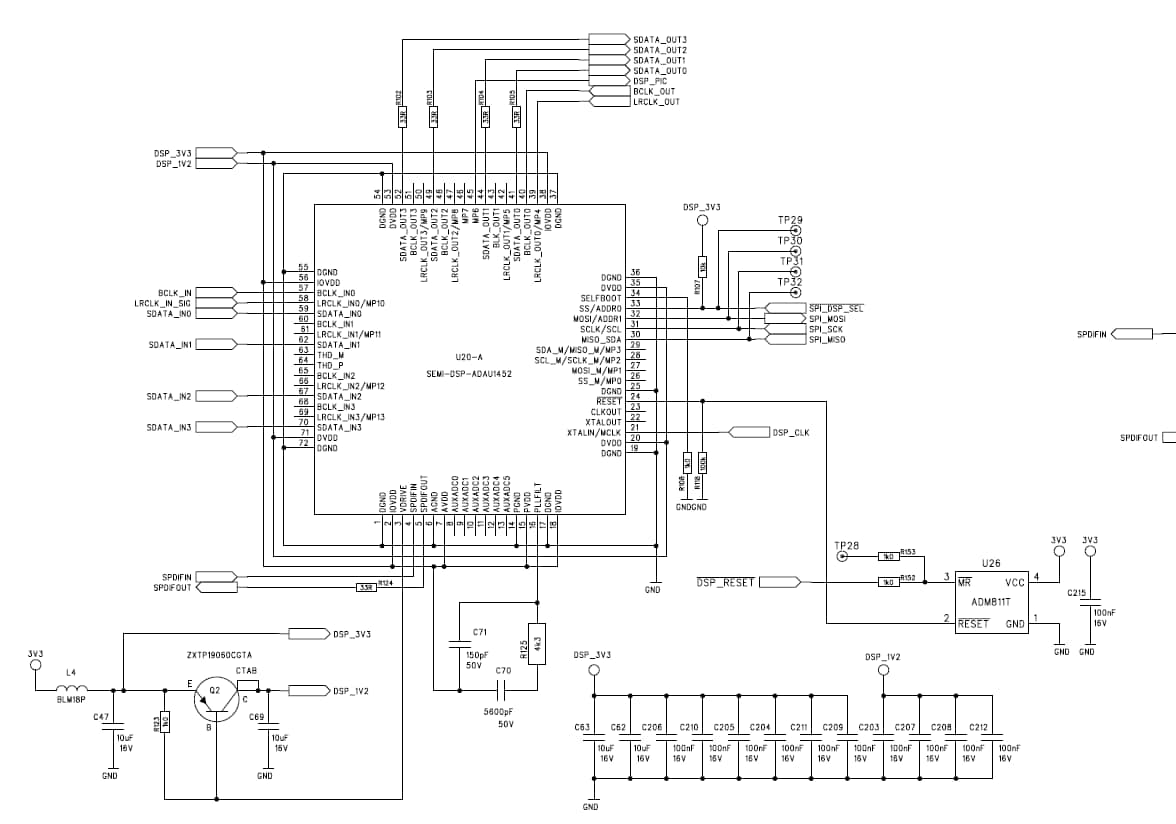
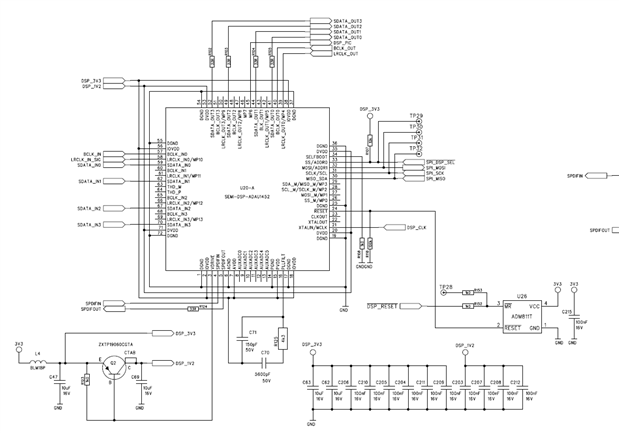
I think I have it tamed now!! Mostly it was my misunderstanding of what I had to do; the PLL registers don't update until I do a PLL enable (register 0xF003 change from 0 to 1), which was why the PLL was staying unlocked and I couldn't write into anything else. Schematic is shown below for your information. Although the decoupling isn't explicitly showing which pins its applied to on the schematic, my colleague and I checked it thoroughly and they are all as you would expect; close to the pins and tracked as shown in the data-sheet. The board is 6 layers with full ground and power planing and there is a lot more decoupling across the rest of the board. My colleague and I have worked for a mixing console company for 28 years and he has developed quite an expertise for very low noise layouts of mixed analog/digital technology.
My 2nd mistake was that I was trying to write to the RAM areas as 16 bit values, I missed the bit about them being 32-bit. Now I can write test values (such as 0xAA000055) in and read them back again.
My 3rd mistake was that I hadn't noticed the bit that says you must stop the core to write into program RAM.
Just one oddity left, if I write a value with the MSbit set into any of the RAM areas then what I read back has the MS-bit clear, e.g. if I write 0xaaaaaaaa then I read back 0x2aaaaaaa, is this something that the program RAM does or am I still looking for an fault? I've checked the timing of the SPI signals and they all look correct... {Edit - ignore this, I have found the problem, the clock polarity was the wrong way up - because it worked fine for the registers I assumed it was OK but when I compared it carefully to the datasheet I realised by clock was passive low whereas the datasheet called for it to be passive high}
I haven't tried loading an actual program yet but that ill come soon.
Thanks for your help
PhilipJ
Hello
One little thing that is not in the datasheet but hopefully I will get a chance to update it soon. Add a 0.5-ohm resistor in series with C69 which is on the output of the regulator. I had recently studied the regulator circuit with the designer and found out that it requires some ESR in the cap to keep the phase margin good. The design was done using an electrolytic but now everybody, including us, uses a ceramic type with very low ESR. We have never seen a problem without it but in new designs we will be adding it in.
Glad you figured out the issues.
Thanks,
Looks good!
Dave T
Hi Dave,
thanks for the note, we have ammended our circuit accordingly.
I am reasonable confident that the hardware is working correctly but I am still having problems getting a program loaded and running. I am taking the file generated by SigmaStudio's Export Files and trasnfering it to be a ".h" file in my project. The CPU is a PIC32 so I have written my own version of the SPI transmit files and I am outputting the data with attention to the specification for the SPI waveform types and speed.
The one bit I'm not sure about: when loading the Program and Data RAM areas (Program, DM0 and DM1) the datasheet says these locations should be read/written as 32-bit values but how does the address value increment? What I mean is, SigmaStudio gives me
0x00, 0x00, 0x00, 0x02
0x0C, 0x00, 0xDC, 0xDC
as the start of the Program Data
so if I write 0x00000002 to Program RAM address 0xC000, do I then write 0x0C00DCDC to Program RAM address 0xC001 or to 0xC004 ?
You may ask why I don't just write the bytes as one block, well the SPI is driving several different devices (external Flash, FPGA control etc.) and I have to allow the other devices time to get in and read/write their necessaries even while booting up the sigmaDSP.
Sorry if I'm being a pain, I've always done everything with SigmaStudio connected before and this time we thought it would be OK to let the host CPU do all the work :-(
thanks
PhilipJ
Hello PhillipJ,
I should say that I have been around the pro audio market for many years as well and involved with large format consoles so I certainly understand your application.
The memory in the DSP is addressed as words and not bytes. So the first 32 bits are loaded into 0xC000 then the next 32 bit word goes into 0xC001. We tried to make it simple but for byte oriented devices it gets a little tricky.
You will need to write at least one full word (32 bits) and not stop mid-word. Because if you lift the CS line then you will have to start writing that word all over again. So if you wrote just one byte you could not resume with the second byte etc.
It sounds like a tricky system to boot up. You know you do have an option of letting the SigmaDSP boot itself and then signal when it is ready. But, I think you probably have considered that already. The positive thing about 1452 is that the master SPI bus is separate from the slave bus so it can happily boot itself up using its own little SPI world and let the rest of the system use the other SPI bus.
Then you setup a GPIO pin in the SigmaStudio program to go low when the program starts running and that can be your signal to the controller that it is up and running and ready to receive any additional control or setup instructions.
Dave T
Please log in to reply.