Downsampling Upsampling techniques Sigma Studio ADAU1452
I have a question regarding Downsampling Upsampling techniques applied by ADAU1452 in a certain configuration. Thanks in advance for your replies.
I have an ADAU1452 configured via Sigma Studio with sample rate set to 192kHz.
-1 input 192kHz (no resampling needed )
-1 input 48kHz (upsampling to 192kHz needed)
-1 output 96kHz (downsampling to 96kHz needed)
The ADAU is set as master for all I2S and it is providing the three different clocks.
Everything is working properly, the ADAU1452 is upsampling and downsampling without the need of any sample rate converters on sigma studio.
1)Which is the downsampling method used? Is it simply decimation? Is there a way to set which techniques should the ADAU use?
2)Which is the upsampling method? Is there a way to set it?
Thanks
Daniele
Audio Signal Processors
adau1452
sigma studio
data conversion
upsampling
SigmaDSP Audio Processors
downsampling
resampling
Show More
Hi
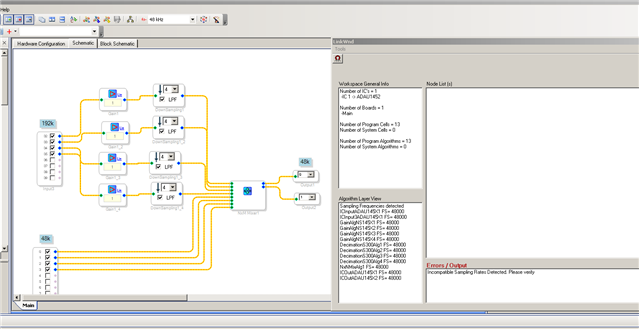
I tried to do similar but project wont compile
I have one I2S port running at 192k then down convert 4 times Thus 48K.
All others at 48k and Project set at 48k
But I an getting incompatible sample rates errors messages.
How do I do this ?
I dont wnat to run the Project at 192k as the final Project will have every input and output channel running and thus will run out of instructions quickly at 192k
Thoughts
Hello Brettcoupe,
I think you haven't set the input (block labeled as input3 in the schematic) sample rate as 192KHz. It is still on 48KHz. You can make sure that by hovering the wire between the input and gain block.
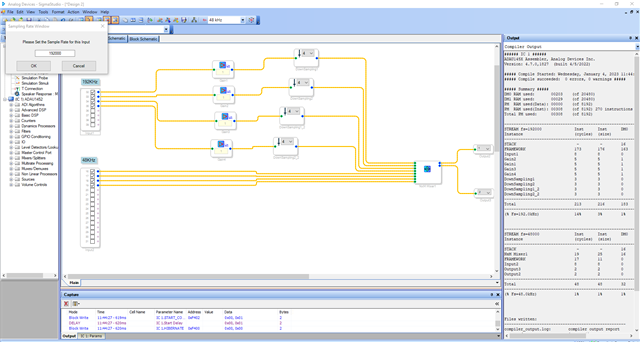
To set the sample rate for the input block >> Right click the block >> set sample rate.
I made the design as you and get it compiled. Please refer the below screenshot.
Kindly do reply if you have any queries.
Regards,
Harish
Oh Course. Wasnt aware that you could set the I/O blocks
Thanks
Hello Brettcoupe,
I want to add a little more here based on your original post where you asked about the up or down sampling method.
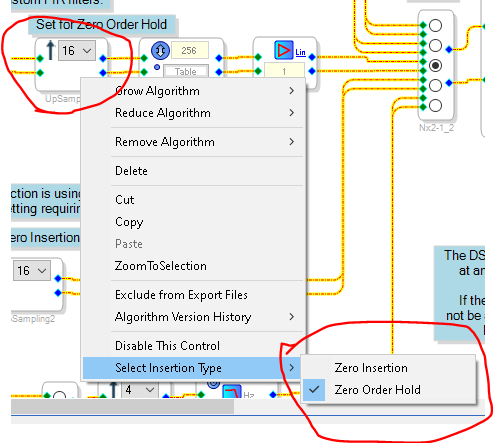
Since tour signals are assumed to be all synchronous and all off the same master clock, you simply have to repeat or drop samples after being careful to filter the audio before downsampling and filtering after dropping samples .Then when up sampling you need to decide if you are using a zero order hold or zero insertion for the added samples. Then adjust the gain accordingly and again do some filtering.
Since you are using the serial input port set to 48kHz the core is going to read the input once every four 192k sample periods so you are fine there. You are actually not going up to 192kHz.
If you were to try to do that you would either set the serial port to 48kHz in registers but keep it as 192kHz in SigmaStudio. Then the DSP program would read every sample four times and so you would have a zero order hold. If you wanted zero insertion then you would have to use the upsample block and set it like this:
The way you did it is great and efficient so no need to change it. I just felt that a little more explanation was needed for others who might be reading this.
Dave T
Please log in to reply.