ADCs not functioning on ADAU1701
Hello all,
Another question for you .. If anyone can help at all!
I have been driven mad recently by attempting to get the ADC functioning on the ADAU1701, for a potentiometer controlled volume.
Setup:
Sure electronics ADAU1701 board, 50K potentiometer, 9v board supply.
I initially connected the pot up to MP2 (centre) with GND and 3.3V. No attenuation could be seen, with the ADC port (I assume correctly) setup in the hardware config. These pins are shown in attached image. I also tried the auxillary ADC circuit as in Fig.31 in the datasheet.
Next step was to try and short MP2 to either GND/3.3v. I used a spare 22R resistor. All that resulted was the 22R getting HOT in 5-10 seconds.
Can anyone possible assist? I guess from the current sinking, the MP2 pin is configured as an output, but for the life of me it seems to be set up as an ADC in the config..
Kind Regards,
Audio Signal Processors
SigmaDSP Audio Processors
adau1701
Hello,
The small pots on the SureDSP board are already connected to all four of the -1701's Aux ADC inputs. You need to remove or disconnect the SureDSP board's pot associated with Aux ADC 1 (MP2) when using an external pot on this input.
Best regards,
Bob
Hello Bob,
Thanks for your reply.
I can confirm that the issue still happens when using the original pots, or disconnecting them.
Kind regards,
Hi,
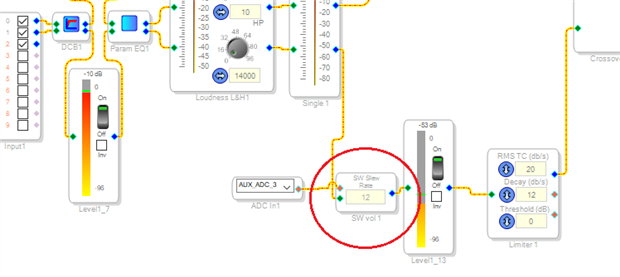
This time I actually loaded your project onto one of my evaluation boards (thanks for attaching it, by the way, since this is often helpful). It did exactly as you said, the Aux ADC appeared not to work despite its correct HW settings. As it turns out, the issue is with the following Slew Ext Volume Control circled below. Its slew setting of 23 was so glacially slow that it made the effect of its control input virtually unnoticeable. The higher this number, the slower the control responds -- see https://ez.analog.com/message/156108?commentID=156108#comment-156108
Extrapolating the table there to "23" yields a slew rate amounting to a 1 dB change in 20 seconds, clearly inaudible.
Changing the slew setting to 12 made it work. To help troubleshoot problems like this, try placing a T junction at the Aux ADC to add a DSP Readback (under Basic DSP / DSP Functions) to its output. Turning the pot should change the "voltage" reading at the Readback.
Best regards,
Bob

Hi Bob,
Thanks for your reply. I had been fiddling with the slew, and unfortunately lower values don't seem to help!
I have also added a DSP readback (great tip!), but it permanently reads 0..
I have also been attempting to connect to the board for the last 30 minutes, but I am getting "compiled, connection error" (normally there's a 1/10 chance of it working). Starting to think this board is fundamentally broken, connections seem so unbelievably glitchy & is very frustrating.
Unless you have any other tips, I think I'll (attempt) to get in contact with Sure, and have a new programmer and board sent over.
Kind regards,
Hello B_arcbox,
I looked at the documentation on the board and the labels are not clear. the fact that MP2 is labeled OL1 is suspect. Usually I would read that as Output 1. So I looked for a schematic and could not find out. So I suggest you contact Sure Electronics for support. Your project looks fine.
The circuit you posted for the AUXADC input from the datasheet is the internal circuit and is not meant to show what to do outside of the part. All you need to do is connect the wiper of the pot to the pin.
Dave T
Hello DaveThib,
I read the (minimal) schematic as pin 11 being MP2, and pin12 as being OL1?
Thanks for reaffirming that I don't need any extra components :-)
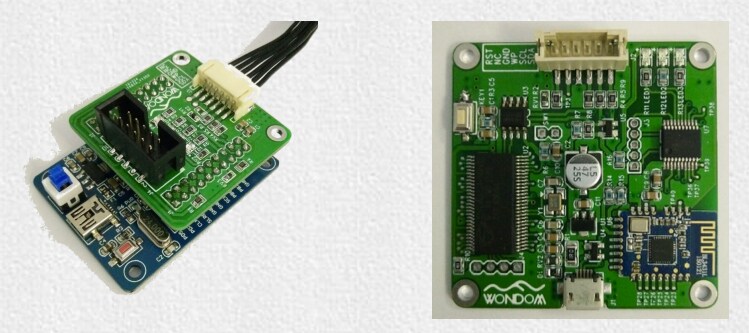
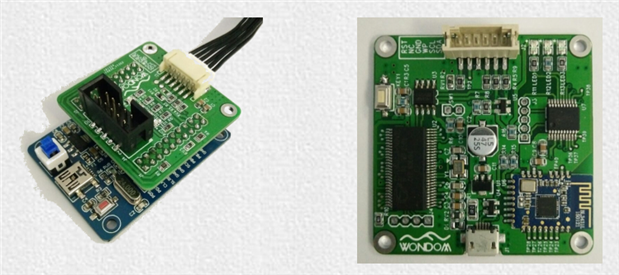
I have just placed the order for another ADAU1701 kernel, alongside 2 programmers. One as originally, one as a different design (original on left, new one on right)
Hello again,
Worked up the motivation to try getting these boards to work again, but still no luck.
Both USB boards show up as green in SigmaStudio (they should only ever be orange according to all the documentation I can find?) but upon compile & download I am just getting 'Compiled, comms failed'.
Tried another laptop, with new drivers and am getting the same issue.
Going to have to write it off as a failure before too long, and cut my losses - wasted too much time and money on these DSPs now.
Any final ideas would be great.. Thank you.
Hello B_arcbox,
The USBi should show up at Green in the SigmaStudio GUI for the USBi. So this is good. It means that you have a connection to the USBi.
The failed Comms error means you are not talking to the part. Or the part is not answering to be more precise.
When I have this issue it is usually because I forgot to power up the DSP eval board. Or sometimes it is because the board is setup for SPI and I am using I2C or the other way around.
I am assuming you are setup to use I2C? Or are you using SPI?
It would be a good time to break out the oscilloscope to see what you have where and what is going on.
Are there pull-up resistors for the I2C? What voltage is it getting pulled up to?
Do you see and clocks or data when you try to program or read from the part?
Is there a master clock going into the part?
Is the reset line being held down?
You should have the Sefboot pin be low for now. You are not trying to have it boot from memory.
That also gives me an idea. If there is an EEPROM on this board then you could simply try to program the EEPROM and see if the DSP will boot up from it.
Dave T
Please log in to reply.