multiple stimulus with single probe
I am trying to probe from the merge of 2 different stimulus blocks and looking for some clarification.
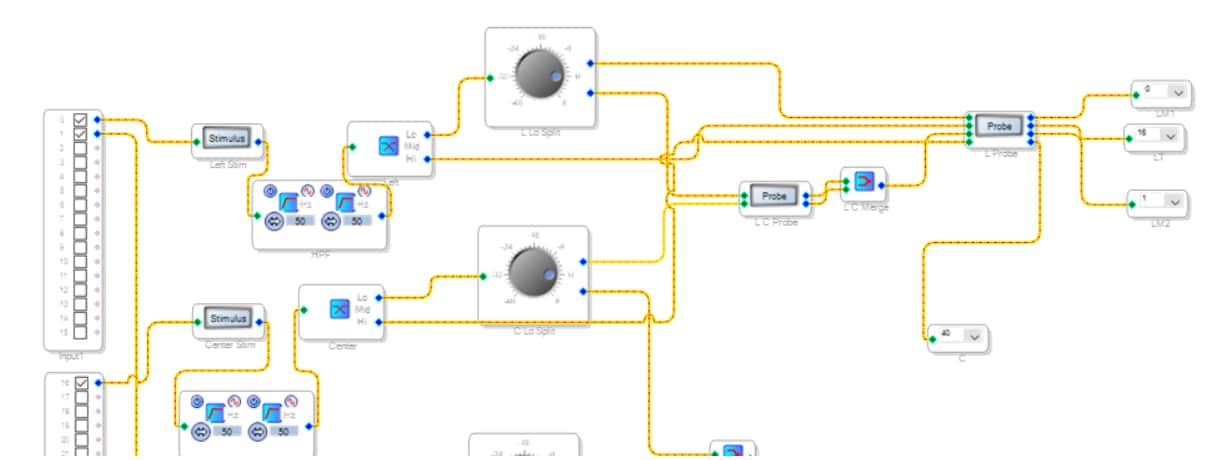
I click probe labeled 'L Probe', then the Stimulus labeled 'Left Stim' and see the response of everything from input 0 or Left Stim which includes a 50Hz High Pass filter, a 3kHz crossover. I see something like this ( took these screenshots before inserting the 50Hz HPF):
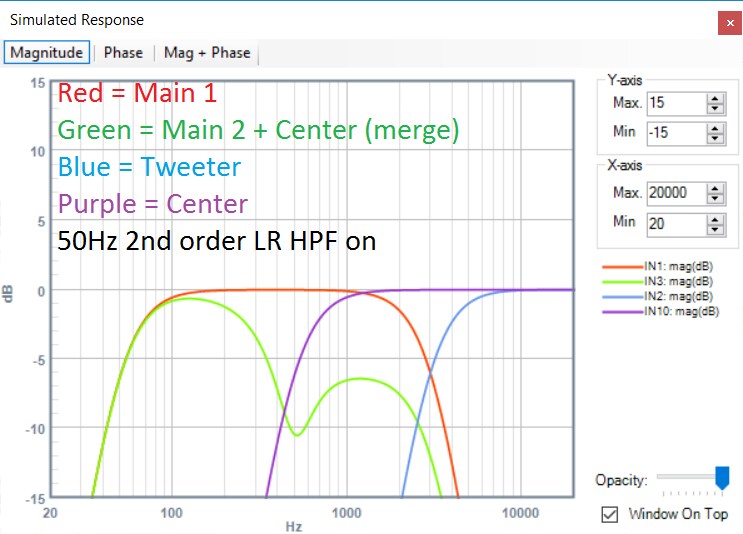
Then I click 'Center Stim' which invokes input channel 3 that has a similar 50Hz HPF, a different crossover than the 0 channel. I see something like this:
I am not sure what to have expected from the green trace, IN3, but wondering if someone could touch upon the effect of using 2 different crossovers and merging the signal. The 500Hz crossover I selected actually comes out a little higher in frequency and with a lower crossover point magnitude (~ -8dB). Is there a rule of thumb for using multiple crossover frequencies at different stages and merging?
I also notice the merge block will compensate the gain based on number of inputs whereas the arithmetic add block will sum without considering the number of inputs. Like this:
My ultimate goal is to have a 3.0 (L,R,C) audio output where part of the center ch. output is crossed over with part of the output of 1 of the main drivers in a 2x main 1x tweeter combo.
Project is attached..
Thanks
-Mike
Audio Signal Processors
adau1452
merge
sum
SigmaDSP Audio Processors
crossover
add
Show More



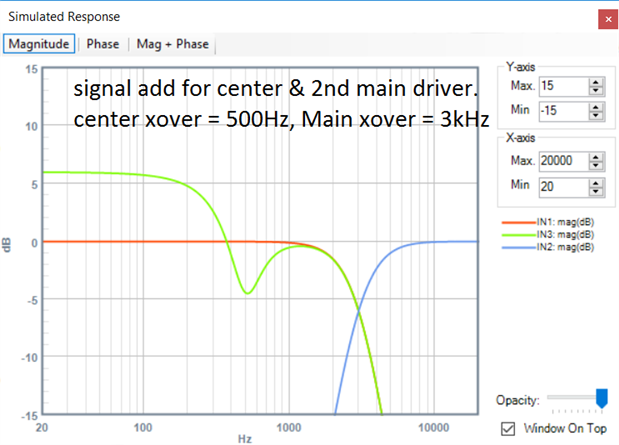
Hello Mike,
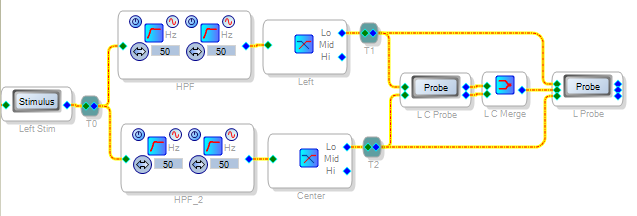
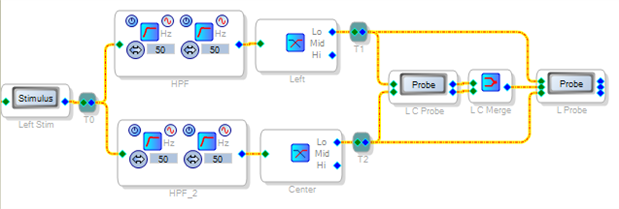
When results from multiple Stimuli are mixed together , the simulation assumes the sources are in-phase, as if all coming from one Stimulus. This is the correct way to model, for example, the subwoofer response of a 2.1 speaker system. Thus, the simplified schematic shown below has a response similar to that of the top portion of your project:
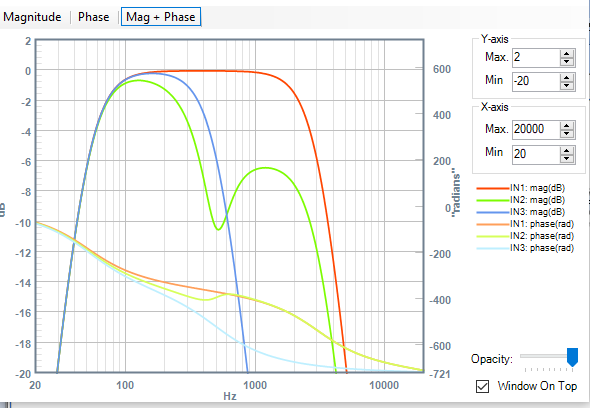
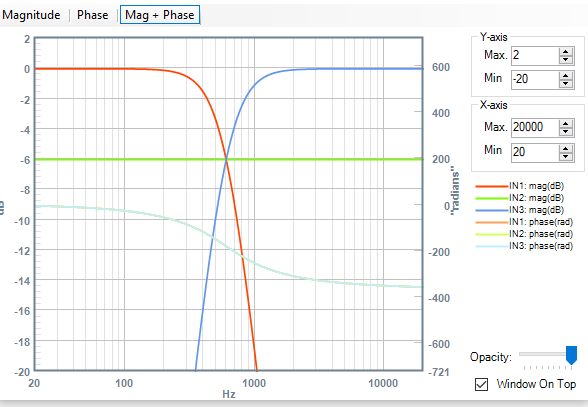
Choosing the Mag + Phase plot shows us the phase relationship between the Left (light red trace) and Center (light blue) crossover outputs. We see the red and blue phase plots deviate from each other at mid-range frequencies. Near 500 Hz the two are 180 degrees apart, thus working against each other. This cancellation causes the observed dip in the combined (green) response. At the extremes away from the crossover frequencies, there's less phase difference and/or a large amplitude difference, minimizing the cancellation.
Filters including crossover filters can exhibit substantial phase shift. The Linkwitz-Riley crossovers are designed so that phase shifts of same-frequency filters track each other -- thus can be safely mixed, as shown below:
Most often the mixing occurs acoustically at the drivers, but one can also mix them within a project such as in this speech processor: Limiting "ess" sounds in speech with ADAU1701
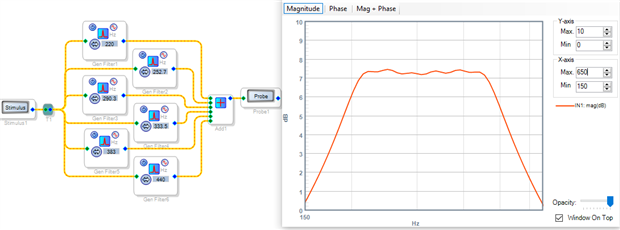
As a general rule of thumb, crossovers must match type and frequency to mix well. In devices such as equalizers, the parametric filters are cascaded, not mixed. Most often, filter outputs don't mix well due to phase mismatch. One exception I know of is that you can mix a bank of peaking filters of constant-octave frequency separation and an identical, optimum Q to get a passband response with tolerable ripple, as shown below. I've used banks of filters like this in projects more fun than useful, such as Huge project to fill up a ADAU1452 and make it do something :
The math behind filters and phase cancellation goes way over my head -- perhaps others here can offer some additional insight.
As you have noted, the Signal Merge block does attenuate according to its number of inputs. This guarantees that the mix of non-clipping signals won't clip as well -- a conservative approach. Note that adding the six filters above resulted in a 7 dB gain -- but a merger block with this many inputs would have given a huge loss. So I just compensate for this gain elsewhere in the system.
Best regards,
Bob


Thanks for that explanation Bob. Can you elaborate on safely mixing signals? Not sure what blocks in the de-esser project show this point.
A few general questions for schematic development:
1) I noticed you replace the splitter block with a 'T' block (tie?). Is that a more elegant way to split a signal?
2) How do you make those wet & dry bubbles in the de-esser project?
-Mike
Hello Mike,
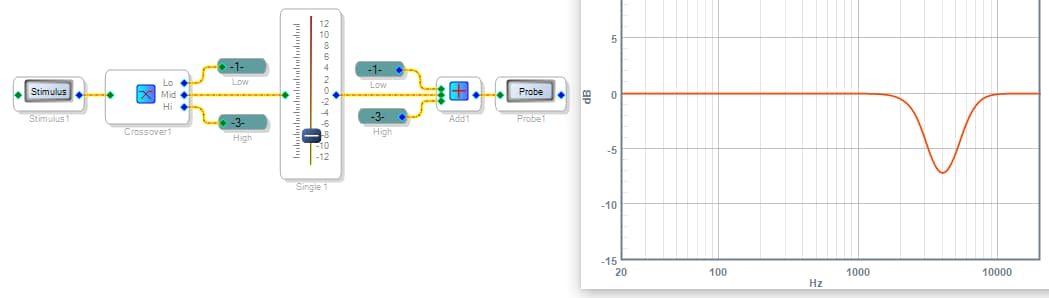
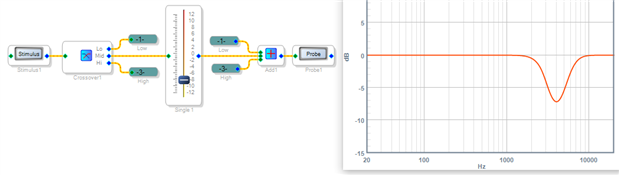
The de-esser project has a crossover split the incoming frequency range into the midrange band where "esses" occur, and the other two where they don't. The midrange is routed through its own channel to regulate its level before recombining with the other bands. Below I replaced the regulation with a volume control to illustrate the circuit's overall response when it detects a horrible "ess."
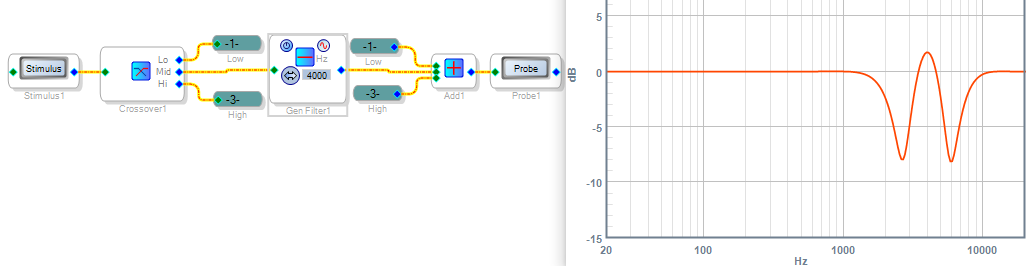
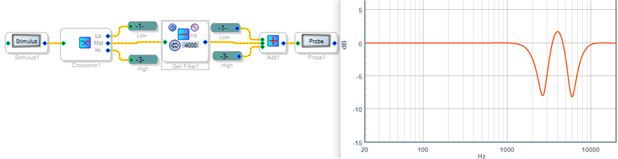
Absent the "esses," there's no attenuation so a flat response results. Thus it's OK to process the frequency bands separately before reuniting them, as long as the processing doesn't involve mismatched delays or filtering (anything that would affect the phase relationships). If for example we replace the volume control with an "allpass" filter -- which has unity gain along with a phase shift -- a jagged curve results:
When passing signals through various arrangements of filters, it's much easier to mismatch phase shifts than to match them -- making their combining problematic except under specific controlled conditions. Getting back to your original application, I'm afraid I didn't understand it very well. Perhaps there's another method to do what you need
Yes, the T-Junctions are another way to "split" signals. The Signal Splitters allow you to route audio to several places while adjusting their level(s). The T-Junction connects an output to multiple inputs -- essentially doing the same but without level control(s). T-Junctions are more compact and use no program instructions -- they simply get resolved when the SigmaStudio compiler links your project.
To use the net names (called "aliases" in SigmaStudio), please see: Alias [Analog Devices Wiki] . Copy an input alias in order to feed more inputs by Ctrl-dragging it. As you can see, alases make large projects neater and easier to follow.
Best regards,
Bob
Please log in to reply.