How to use Auto EQ filter coefficients in general 2nd order filter?
I am happy to find the Auto EQ module in Sigma Studio to generate filter coefficients for EQing a speaker but am unsure of how to implement those filter coefficients. The Auto EQ wiki says to use a General 2nd Order EQ filter.
I have found the Index Selectable Filter has a 'load all coefficients' button and when loading the .txt file generated from Auto EQ, the ISF displays the individual filters created by the Auto EQ.
I am unsure how to use that ISF as a multi-band filter such that all filters are enabled. Not just 1 filter selected by a DC block. Do I need to create 8 individual 2nd order filter blocks and parse through the 40 coefficients generated for each individual filter block?
What are the recommended filter blocks for the AutoEQ?
My Auto EQ generated coefficients for 8 filters (so 40 coeffecients popped out into txt file) for a 1-way speaker.
I am using a ADAU1452.
Thanks
-Mike
Audio Signal Processors
adau1452
sigmastudio_coefficients of 2nd-order iir
filter
SigmaDSP Audio Processors
automatic_eq
Show More
Hello Mike,
I think what you are looking for is somewhat hidden from view yet out in the open.
Drag in a general second order filter, I would use the double precision version.
Then you click on the blue square in the middle where you can select the type of filter you want.
Then you select "IIR Coefficient". Then you will see where you can enter the coefficients. If you want to cascade several filters you simply grow the cell to add more filters and do the same for those filters. The only hassle is that you have to enter these manually. There is no way to enter these from a file. The "Load" button you see will load in the coefficients into the DSP all at one time. They are not loaded as you enter them for obvious reasons.
Thanks,
Dave T
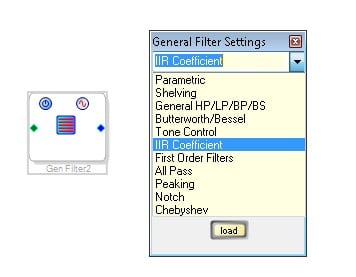
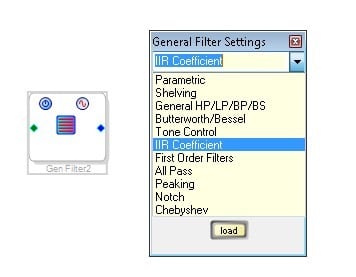
Great thanks. Will try that out. What is the difference between using those 2nd order IIR filters and the Auto EQ block as the filter?
Hello Mike,
From a filter perspective there should be no difference. What I am not certain of is the difference in the code size. So if you are getting close to the MIPS limit then it is something to look into.
Dave T
I think even the code size should be the same. The real difference is the GUI.
Regards
Miguel
This question has been assumed as answered either offline via email or with a multi-part answer. This question has now been closed out. If you have an inquiry related to this topic please post a new question in the applicable product forum.
Thank you,
EZ Admin
Please log in to reply.