Custom EQ Filter Implementation
I am attempting to implement a custom EQ filter from an old DSP in SigmaStudio and am not having any success.
The reason for doing it this way is so that I can use the same coefficient values as before and therefore not have to update any of the other software in our system.
There is an application note from the old DSP manufacturer which describes the filter and gives its block diagram:
http://www.wavefrontsemi.com/UserFiles/File/AL_Info/AL31/AppNotes/WavefrontAN3101-07%2020%20Band%208%20channel%20Equilizer.pdf
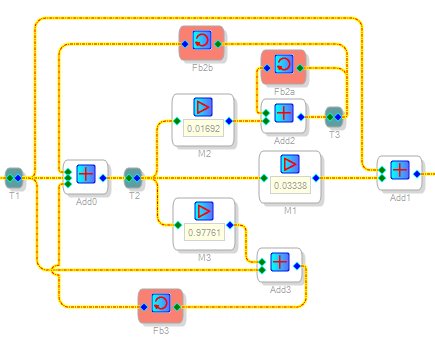
I've attached a diagram showing my implementation - the coefficients are just DC values and they have been calculated using the spreadsheet provided with the app note:
http://wavefrontsemi.com/products/update/AL3101/WavefrontAN3101-07.xls
With my version I get exactly the same signal out regardless of the value of any of the coefficients (never any gain nor attenuation). I've tried several different frequencies and input signal levels.
My suspicion is that there might be a quirk in how the Sigma deals with the top 'double' feedback loop?
Grateful for any help or suggestions.
Hi James,
In SigmaStudio, each feedback cell can only feed one output connection -- see https://ez.analog.com/message/225751?commentID=225751#comment-225751
Instead of a T junction, use additional feedback cells to feed multiple points as shown below:
Your implementation appears to faithfully follow Wavefront Semi's app note. Unfortunately, I could not get it to work even with the above fix as well with other random ideas I had tried. As you have noted, this filter is remarkably insensitive to frequency over a wide range of coefficient choices -- only the overall gain changes slightly.
When building filters from piece blocks, you're stuck with single-precision math -- which may cause quantization noise at lower audio frequencies (think bass boost). AD recommends double-precision wherever possible. If you decide to rework your uC code to calculate sets of five coefficients for the stock SigmaStudio EQ filters, you'll find that some good advice has been posted here on EZ.
Best regards,
Bob
Thank you Bob - it's good to have the feedback function confirmed and I'll remember its limits for future reference.
With your input and one other crucial piece of information I now have this working and the performance is very good.
I noticed that in the Wavefront example code they are actually subtracting the upper 'M2' feedback value and not adding it as the block diagram suggests.
Lesson learned and uC re-write avoided!
Hi James,
Glad to hear you got it working. I had a feeling that one or more of the signs might have needed reversing so I had tried a few randomly; apparently not hitting the right combination. This biquad implementation is quite interesting as it features only three named coefficients instead of the usual five or six. I've never seen anything like it in my DSP books (which doesn't mean much, as I'm 40 years out of college and no DSP expert). The adder feeding back to itself amounts to an integrator (see An Integrator Block for SigmaDSP ), something I wouldn't expect to see in a parametric EQ filter. Fascinating stuff!
Best regards,
Bob
Please log in to reply.