Links between 2 ADAU1701
I have already asked this question but I did not have any answers, I hope to make it more fortunate
Hello everyone,
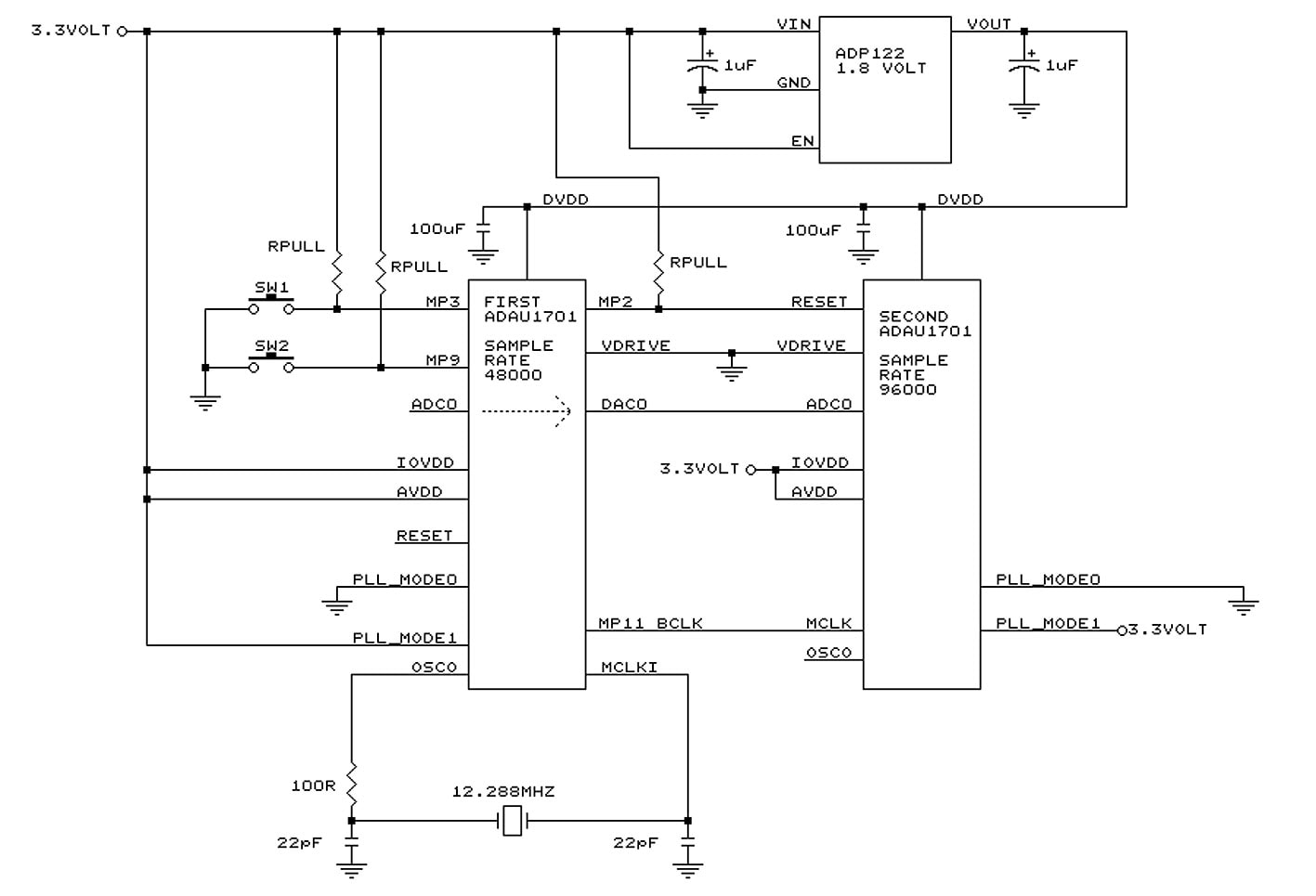
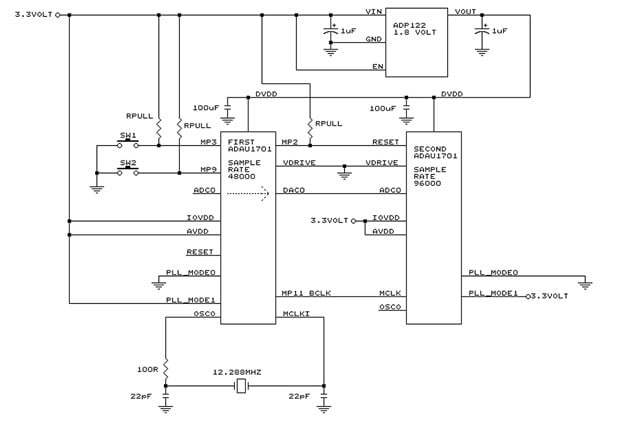
i need to know if these connections are accurate to work together 2 ADAU1701.
Some questions:
1) On the second DSP OSCO is left open?
2) What is the procedure for writing in the configuration register the value to have the exact generation of the clock for the second DSP and what do I write in this register?
Note that the first DSP has a sample rate of 48,000 and the second at 96,000.
3) When connecting from the first DSP DAC0 to the second DSP ADC0
I can avoid putting filters since then the second DSP will do the audio processing and then the filters
will be put on the output DAC of the second DSP?
The application is not HI-FI but simply phone band 300 - 3000 hZ, so it is not
necassary high quality.
Audio Signal Processors
adau sigma
SigmaDSP Audio Processors
adau1701 sigmastudio
adau1701
Hello Piero,
Sorry that no one has answered your first post. Though I cannot take responsibility for a comprehensive check on your design, I can help with your questions:
1) Yes, DSP2's internal crystal oscillator is unused, so OSCO can be left open (See data sheet, bottom of page 12).
2) a. In the -1701, the DSP core always operates at 50 MIPS regardless of the sample rate -- you simply get more instructions to use at the base 48K rate vs. higher rates. Thus, the hardware setup of MCLK and the PLL Mode pins is the same for both 48K and 96K.
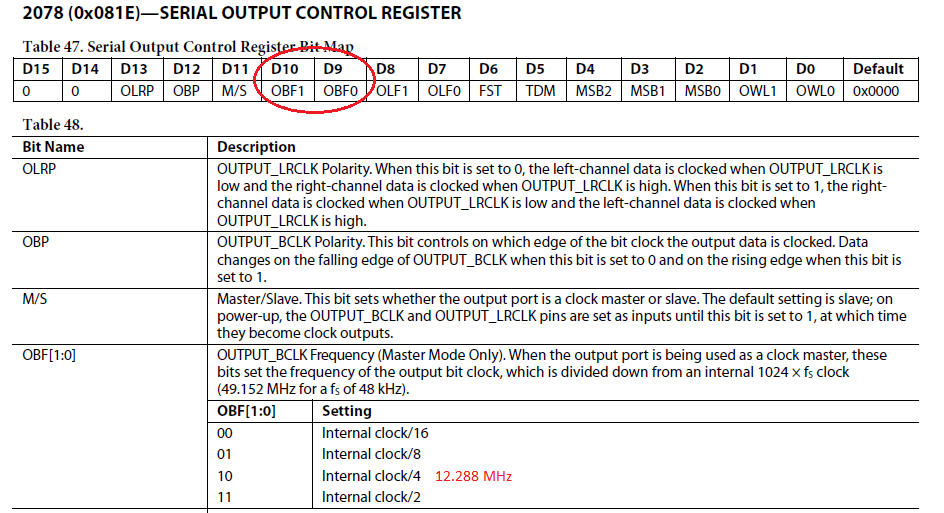
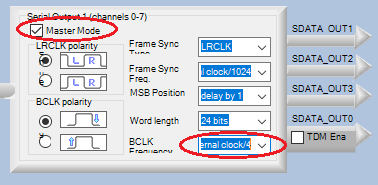
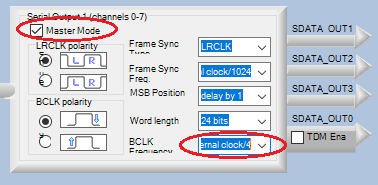
b. DSP1's register setting to output 12.288 MHz on MP11 is shown below...
... but you need not program this yourself -- SigmaStudio can include it in your initial program load:
3) The unfiltered DAC outputs appear like white noise on a scope (try it!). In one of our products, DAC outputs were used to provide low-frequency measurement data to a microcontroller's ADC inputs. When we originally neglected the filters, the resulting data at the microcontroller was too noisy to use -- we had to revise and put in the filters. Thus I can only recommend that DSP1's DAC outputs and DSP2's ADC inputs be set up exactly as the data sheet directs.
Best regards,
Bob

Thanks Bob,
The hardware connections to run the 2 dsp should be OK.
I hope David Tribb if he reads the post give me a confirmation.
Setting the parameters as you showed in the image should be all right, I do not have to do
anything else, do not I have to manipulate any register I suppose?
The concept is as follows:
DSP1 performs its but, DSP2 reset is held high through RPULL resistor, when DSP1 terminated
through MP2 low DSP2 reset.
DSP2 already has the clock coming from DSP1 MP11 and performs its but.
Thanks for the advice on the filters between DAC0 and ADC0.
What I can not do with SigmaStudio is to measure the duration of a push of a button
and accordingly do 2 different operations, in ASM with a few lines of code this measurement
is simple but with SigmaStudio?
Suppose you use S6 and the D5 and D6 LEDs to measure how long you hold down S6.
If S6 is pressed and released in a time between 200 and 500 milliseconds, turn on the D5 LED.
If S6 is pressed and released over 500 milliseconds turn on D6.
With SigmaStudio you can do it?
Hi Piero,
piero wrote:
...
Suppose you use S6 and the D5 and D6 LEDs to measure how long you hold down S6.
If S6 is pressed and released in a time between 200 and 500 milliseconds, turn on the D5 LED.
If S6 is pressed and released over 500 milliseconds turn on D6.
With SigmaStudio you can do it?
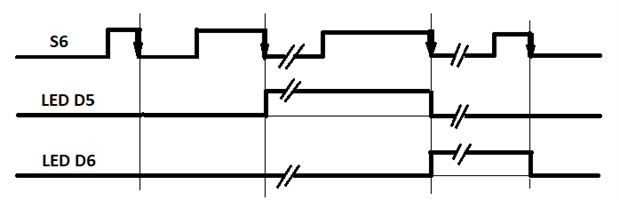
Yes, functions like this implement more efficiently in a microcontroller. Yet, you can perform it in SigmaStudio using a Stopwatch along with some additional blocks. The exact implementation is determined by precisely how you wish the logic to behave -- please have a look at the timing diagram below, whether this is how you want the LEDs to respond to short, longer, and longest presses of S6 (once either LED is activated, it remains ON until S6 is pressed again):
Let me know if this is satisfactory.
Best regards,
Bob
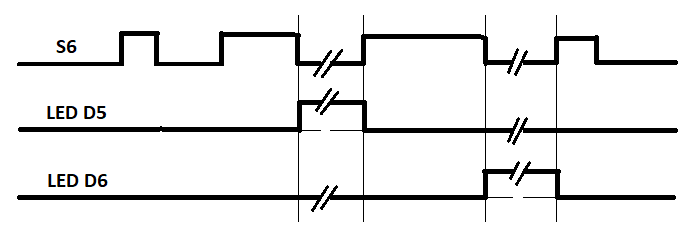
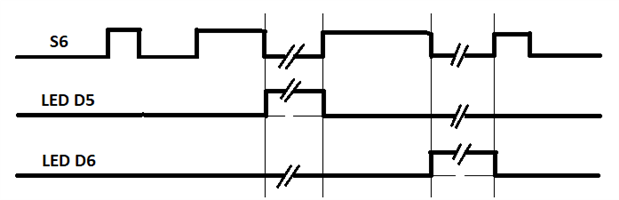
Thanks Bob, that's exactly what he needs.
But how do you do it?
With SigmaStudio I learned to do so many things, but not everything.
Best regards.
Piero
Hello Bob, thanks for your availability, something does not work,
S6 by pressing it for a short time will turn on the LED 6 and briefly turn it off, but if the S6 button is held down for a long time at its release, the LED 6 always lights but never lights the D5
Regards
Piero
Hello Piero,
Have a Stopwatch cell increment its count as long as S6 is held down, then capture this number with a Data Hold the moment S6 is released. Then a pair of ABCD Comparators operates LED 5 or LED 6 according to the held number:
Best regards,
Bob
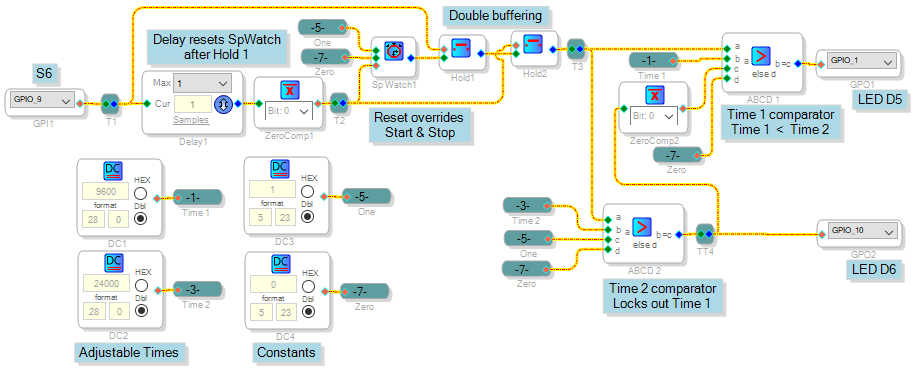
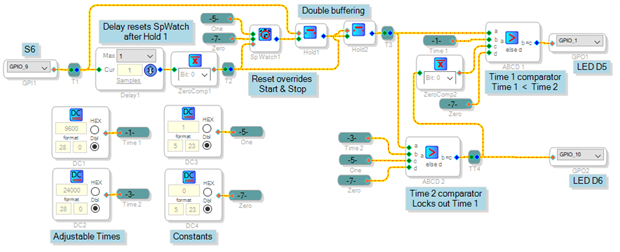
I checked Bob, and it is correct, even the design philosophy and correct, but unfortunately it does not work, whatever the S6 pressure time always lights D6.
D5 only switched on in random conditions
Hi Piero,
The project as uploaded works fine. My schematic, however, doesn't show the needed HW Register setting which may not have made it to your own version. Because the eval board's buttons are wired "push to ground," you need to invert the MP9 (S6) input so it goes "high" when pressed:
Best regards,
Bob
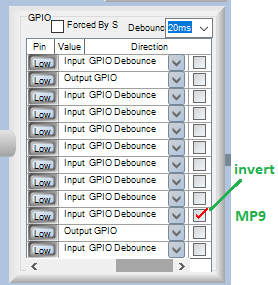
Please see the attached video, it works over here....
I've been trying to guess what might be different in your setup -- for example, I've got my GPIO inputs set up for debounce (the default condition) -- if not this may cause random results. And if MP9 is not set to invert, this produces exactly the results you found (but you already looked at that). So I'm coming up empty, unless you can provide any additional clues on what might be different on your end. I can't troubleshoot what's working in front of me.
Best regards,
Bob
Thanks Bob,
I use the ADI_SigmaStudio-Rel3.15_BETA-x86 version, and I opened the Two-Choice-Timer.dspproj file, did not change anything, the setup is the one in the file, unfortunately it does not work, it behaves randomly completely different from videos you posted.
If I find out the mystery, I'll let you know.
Thank you for your kindness.
P.Sanfilippo
Hi once more,
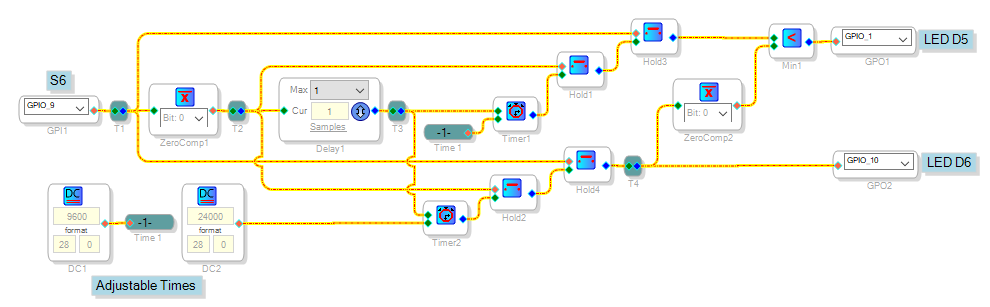
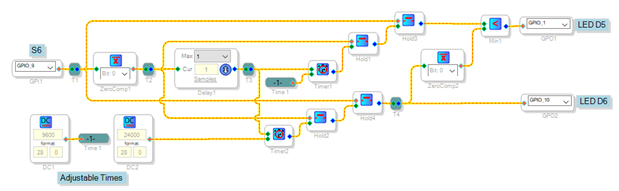
This is really strange. For fun you can try an alternative method which does more or less the same thing with two timers instead of a stopwatch. Perhaps it avoids whatever is giving trouble in the first one:
It implements a slightly different timing -- the outputs don't change until a final decision is made on how long S6 is depressed, after it's released:
This project was made with the version 14 stable release of SigmaStudio. If it acts the same as the other one despite using different blocks, I'd really be at a loss.
Best regards,
Bob

Hello Bob,
I apologize for the delay with which I answer, but yesterday I was out of office and did not consult the forum and the mail.
The second version works perfectly, the first one remains a mystery.
I wrote a post with which I ask for advice, the address is this:
https://ez.analog.com/thread/99404
you can take a look.
Thanks
Piero.
Hello Piero,
Happy it's working for you, sometimes it takes more than one try. I'm afraid I've got no ideas on how to store and play voice messages (your other post) -- SigmaDSP is simply not designed to handle this efficiently.
Best regards,
Bob
Always to eliminate all the components of the vocal synthesis I thought of inserting a number of different beeps instead of voice messages
With adau1701 sample rate 48000, I need to press a button, to generate an equal or similar sound as that playable in the 1.mp3 file.
Playing the sound the cycle ends and repeats itself only if the button is pressed again.
With file 2.mp3 you have to get a result like the previous, the difference is that the frequency and times are different.
I try to get these two results with Chime, but I can not.
Maybe the two sounds can be generated using timer and multiplexer oscillators, but how?
Thanks
In the attached project I can generate cadence beeps, but I do not know how to stop playback at the end of the 4 beeps.
Surely you can do it with less instructions, this is a basic idea.
Hi,
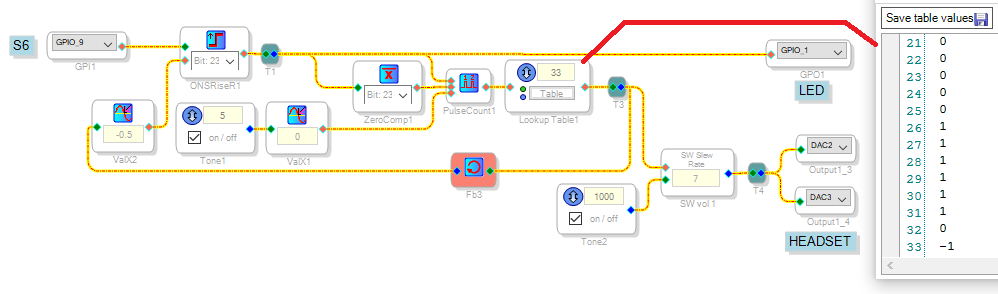
You're on the right track using a MUX as a sort of programmable logic. Even better, try a Lookup Table as shown below. A One Shot Rise latches the button press, allowing the counter to accumulate 10 Hz pulses (the Zero Cross Detector tracks both up and down). The counter output drives a LUT filled with the beep's volume info: 0 for OFF, 1.0 for ON. You can program intermediate values and different duty cycles as desired. Make the last table entry a negative 1 to reset the one-shot and counter This little bit of encoding saves a second LUT or other means to terminate the beep sequence.
Best regards,
Bob

Thanks Bob,
your advice has been very precious.
Considering that for space problems I had abandoned the voice synthesis to play some messages, but I found the way to build a small module to apply to the boardware, this allows me not to enlarge its size, but use the height of the container instead of the width, I have space in height.
I will use your idea to build one-line serial communication to tell the speech synthesis what to play by sending addresses built using your indexing idea and using PULSE WITH DINAMIC DUTY CICLE.
To do this, however, do I need information, the multiplexer is sequential, or can I send you a precise selection address?
Thanks again
Piero
Please log in to reply.