ADAU 1452 J2, J3 TDM input
what is the voltage on TDM input J2, J3 , 3.3V?
Same J2,J3 pin Which one is for the TDM Master clock input MCLK for slave sync ?
And the routing inside the sigmaDSP software?
Thanks
Hello ,
The voltage on the serial ports are whatever the IOVDD is coming into the part. In the case of the evaluation board, it is running at 3.3V.
For your other question I suggest you start reading the help files and tutorials.
https://wiki.analog.com/resources/tools-software/sigmastudio
Dave T
Hi
Unfortunately, your manuals and tutorials failed to provide informations that I need. I believe my questions are not big. I am asking simple I/O setup questions that is fundamental for providers I think. It should be easy fact to answer I am not sure why there is a struggle here. As I mentioned I had done programing which I think its more complex part. Now only need to know the competitivity of this board to other third party connections. It is a disappointment your company can't help. To be honest the other companies are giving me helpful and clear datasheets that I can easy to find what I need.
Just my bit feedback to your services here.
I am very sorry to hear that you have not found the documentation clear. We work hard to continually improve our standards for editing and presentation, and we would appreciate any feedback you are willing to provide that would make your experience designing with our parts easier.
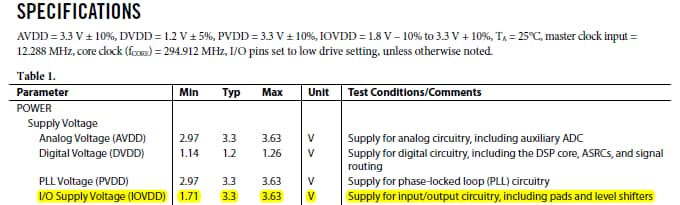
Since applications use range of I/O levels, we support a range of voltages on the digital pins. This I/O voltage (IOVDD) is supplied to the SigmaDSP as supply separate from the core voltage (DVDD), and there is an on-chip regulator for deriving the core voltage from the I/O voltage. The ADAU1452 supports I/O from 1.8V-5% to 3.3V+10%.
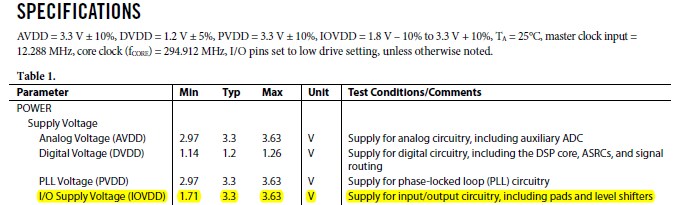
The first few lines of the first table in the Specification section of the data sheet (Table 1) describes the function of all of the power supplies:
:
The function of the pins for the I/O Supply Voltage (IOVDD) are described in Table 20, with the details of all of the pins:
Regarding an MCLK input, the evaluation board for this part is intended to be a reference design and an inexpensive platform for standalone development. Admittedly, it is not very well suited to bread-boarding since it does not operate as a clock slave without modifications. This was done to minimize cost and complexity.
We would very much appreciate your ideas for how we could make important design information clearer. Again, I apologize if this caused problems for you.
Ken M


Hello Newphantom,
Your questions about the internal routing inside the DSP, and SigmaStudio, can be answered by reading the Audio Signal Routing section of the datasheet. It starts on page 43 in Rec C of the ADAU1452/1451,1450 combined datasheet.
Figure 42 shows the routing of data from the pins to the core and how all that is designed.
Table 38 shows the serial port input pin mapping to the SigmaStudio input channels.
Figure 43 shows how the pins are associated with the GUI you will see in SigmaStudio.
Table 41 shows the mapping of the serial output ports from the core output channels.
Figure 46 shows how the SigmaStudio GUI object connect to the serial output port pins.
Figure 47 also talks about the register settings inside SigmaStudio for the serial output ports. Usually you do not have to change those but sometimes you do so you will need to become familiar with the routing tab in the hardware configuration page in SigmaStudio.
The ASRCs are further detailed and that can be a little tricky but it is all spelled out for the most part in the datasheet.
Now to move on to your questions about clocking.
The details about J2 and J3 can be seen in the user guide for the evaluation board. There is a schematic with all the details. J2 and J3 are not for master clock, they are serial input port connections. This evaluation board does not have provisions for accepting an external master clock. It is a low cost eval board. However, it can supply a master clock via the CLKOUT pin. If you use the ASRCs you will not need the master clock from an external source but that depends on how many channels you want to bring in.
As far as the clocking of the serial ports, I suggest you read the Serial Data Input/output section of the datasheet. That starts on page 53.
The Serial Clock Domains section starting on page 60 of the datasheet and has lots of good information. Read up to page 62 to get a good understanding of that is going on with the audio going into and out of the core when it comes to data formats.
Sorry that the datasheet is 180 pages therefore making it difficult to find the information. I hope I helped you find it.
Dave T
Hi Ken
Thank for details. Please if you read my initial questions carefully. I am all refer to elv board connectivity. Not the ADAU1452 itself. Actually I bought this IC is after I read the 180 pages manual before I order it. Because I know it will do what I need it to do. and it does succeed after 3 days of noon sleep design on it. It is perfect for what I need.
Now back to our discussion, I just want to clear that. I do in fact read all the informations in both manuals before I ask questions. On J2, J3 there are in charts and photos both has 6 pins each. (page 15) and 3 are darker than other 3 in blueprint (page 30). Now the manual did not clear enough to the connectivities. If you know what I mean. there are two choices for each connections if I would guess. Also the board has a arrow pointed Ground to BCLK pin as well. In the color photo of the ELV manual the wire actually connect to the pins that is opposite to the printed writing corresponding pins ? the drawing show thats gray out pins ? so which one should go to? should I just hook it up to see what happens?
For the master clock. I can see in the big manual there is input possibility.but I can not find how to do that on evaluation board that is why I asked. I need the suggestion of if this is possible to do that, not the answer of refer it back to manuals. That is not helping me at all.
However now it is clear after I actually did hook it up and see what happens (not best choice for me but no options I am wasted too much time on this communications).
The result, I did get audio inputs, but the volume and the quality is really poor. I am on to find out is that because the competitivity of the input voltage difference or the software setting in sigmastudio. I think it is not clock issue since I can hear the audio playback with no distortion but lower quality and lower volume. I am not sure if anyone here can be more helpful at this point? without have an attitude.
I do appreciate your efforts on writing to me tho.
Thanks
KC
Hello KC,
I apologize but the questions you are asking can all be answered between the datasheet and the evaluation board schematics. So this leads me to believe you have not read them. So this must mean that I am not understanding your questions.
So lets be more specific and see if we can start narrowing down the questions.
Regarding the master clock as a slave. You are correct that the part can, and needs, master clock as an input to the part. So the part has to have an MCLK source. The problem is that the evaluation board has a master clock source to feed to the ADAU1452. There is no switch or jumper to select an external source of a master clock. So if you have to use an external clock for your prototype then you must do some soldering and modifications to the evaluation board. Another option is to bring in the audio with only BCLK and LRCLK and run the audio through the ASRCs to synchronize to the internal sampling rate. Since I do not know the details of your application I do not know if this is an option or not. But it is a way to test things before building your own hardware.
Now on to the next questions, the serial input pins J2 and J3:
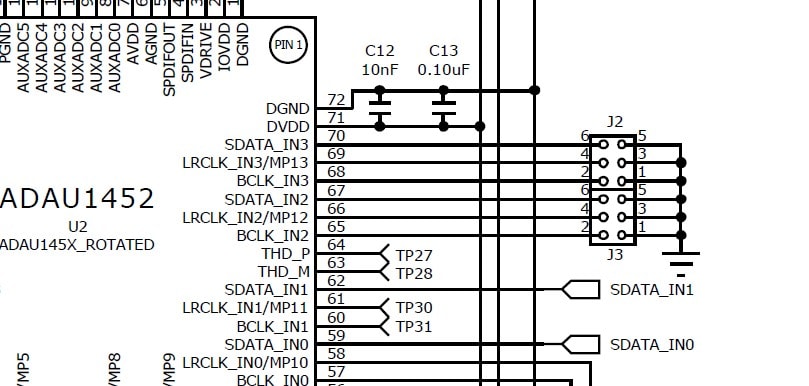
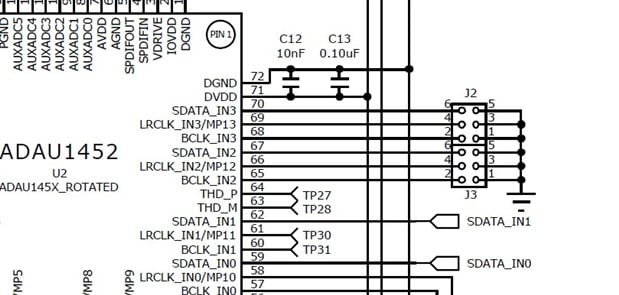
Here is a screenshot of the schematic:
As you see J2 and J3 connect to the serial port pins for serial ports 2 and 3. It is slightly confusing that J3 goes to port 2 and J2 goes to port 3 but that was the way the schematic was drawn.
The odd pins of the header are all connected to ground. This is to allow for connecting a ribbon cable with ground on every other pin to help with Signal transmission issues. Here in the lab we use these small 2-pin jumpers that are built using coaxial cables so the signal is shielded. You cannot run these signals very far before having issues with signal integrity which will show up as clicks, pops, or just loud noise.
So these serial ports can be used for up to 8 signals each if using TDM8.
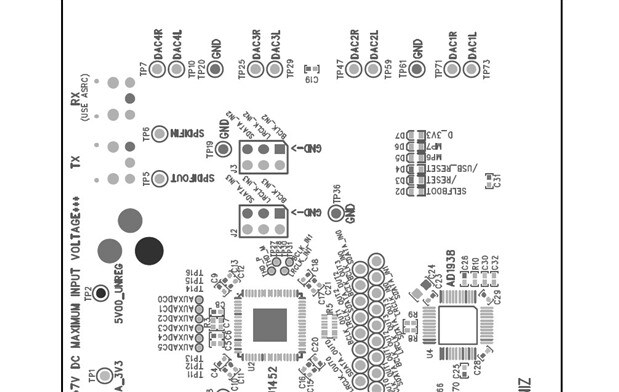
Here is a screenshot of the PCB layout:
In the middle of this screenshot are J2 and J3.
The square pin is pin 1.
The darker or lighter color is only there because the layout software we use attaches different colors for different nets. It would be clearer if this was a color picture but this is why the ground pins are darker and the signal pins are lighter.
As I mentioned earlier, I would recommend you wire these up using either good coax cables or ribbon cables and don't try to go more than about 25cm in length. If you try to run at higher sampling rates then this length can be a problem.
Speaking of sampling rates. To simplify this evaluation board the codec is running in standalone mode. In this mode it can only run at 48kHz fs so this means that the DSP has to run at 48kHz fs.
Dave T

Thanks Dave
It is very clear now. Thanks for the details and help.
Please log in to reply.