ADAU1452 & MCU connection using Evaluation Board EVAL-ADAU1452
Hello!
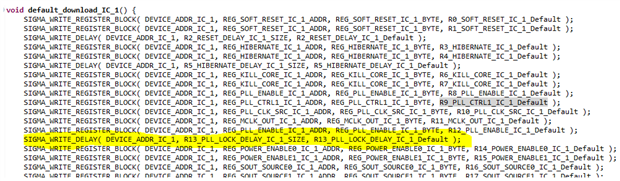
We are following the steps outlined in the Wilfrido´s Sierra 2010 document :Basic Microcontroller Integration Using Sigma Studio along with the ADAU 1452 datasheet. I believe that waiting for the PLL lock is implicit in the implementation of the default_download function (page 14 of the document). This part of the code writes the code exported by SigmaStudio to the MCU - it even has a delay after the PLL write (highlighted in yellow in the image below). As I understand it, that part is absent in this procedure:
Here we have a print configuration of the Slave Port, the three dummy writes. You need 4 blocks of 8 pulses in the SCLK: the first for the chip address, the second for the high byte of the sub address, the third for the low byte of the sub address, and the fourth (and subsequent, when necessary) for the data.
This is the print is the writes of the SigmaStudio exported code:
We can not access the registers in this procedure because they export the contents of the binary in vector form so that through the MCU its possible to write via SPI the binary in DSP memory.
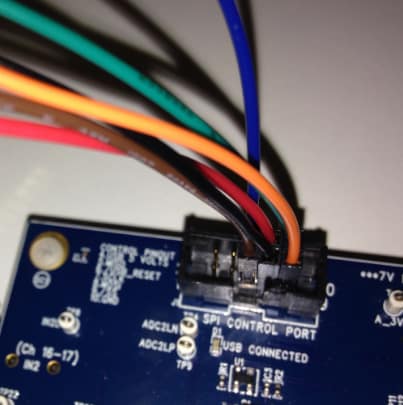
We are connecting the two evalboards, ST and AD, through SPI Port Control (attached one photo).
We only used the pins that, at first, seem to be necessary (pin 5 to 10). The first 4 pins, including the 4 (USB 5 Volts), were not connected.
Could you please advice if connections are made correctly, as well if the tutorial is still valid for the recent version of SigmaStudio and ADAU1452? Is there any procedure we have to make sure in the connections to make this SigmaDSP + MCU integration?
Thank you very much!!
Att
Juliano
Audio Signal Processors
adau1452
adau1452 spi
adau1452 + mcu
SigmaDSP Audio Processors







Hello,
Looking into digital signals generated by the uC output I could realize that the codes did not respect DS spec for the family at all, so I asked customer to manually adapt those.
Customer had to review the process of "System Initialization". By doing that it was noticed that the code generated by Sigma Studio when clicking on the "Export System Files" - in particular the function "default_download_IC_1" generate some writes in the registers that do not correspond to the one described in the datasheet. So there was the need to re-implement this part by following the "Example System Initialization Register Write Sequence" of the data sheet and it worked perfectly.
In addition to some seemingly unnecessary writings (it has been reduced from 60 writes to 19 writes to the registers) some values that needed to be set were different from those described in the example.
Additionally we had to add some extra time that is performed by the ADM811. Between reset and comms start we are delaying 600ms.
I hope this helps ADI to fix this issue on a new release of our SigmaStudio. We have other customer under development in Brazil and it would be nice to give them a typical good solution from the factory.
Everything worked perfectly but we bumped into this only step.
In my research I found this anomaly information at this EZ topic: Sigma300 (ADAU145x) Q&A :
http://www.analog.com/media/en/technical-documentation/data-sheets/ADAU1452_Anomaly.pdf
There it says new releases of the SigmaStudio could solve this issue, regardless the Silicon Version. Was that fixed? as TomC asked, how do we check that?
Thanks a lot
Best Regards
Juliano
Hello Juliano,
The anomaly document you pointed to and the EZ post have all been resolved. Revision D of the silicon came out back in 2014 and I am pretty sure it is written on the part. You will see a "D" near the date code.
SigmaStudio has long ago been updated so these issues are no longer a concern.
The bug was very difficult to produce and would only happen very rarely so usually it would not show up. However rare it was we fixed it so that it would never happen.
Now back to your questions about the SigmaStudio initialization instructions. I agree that there are many steps that SigmaStudio puts in that are not required. The reason is that it cannot make assumptions that the part is in a known state. You can reprogram the part at any time so it has to reset and write into all the registers. This is the thinking of the programmers. So there are many registers that do not need to be written to if the default value is desired.
You had highlighted the PLL lock delay which seems to be missing in the document. Please refer to the datasheet if there are questions. The PLL wait time is needed so that certainly was an error if it was omitted.
Regarding your delay between reset and comms. This seems like a very long time to wait. Once the power has stabilized and the reset pin has been released, then the next detail has to do with MCLK input. If that is delayed then you will have to wait for a stable MCLK and then wait the 650ns (if the MCLK=12.288MHz) for the initialization routine to run before trying to communicate with the part.
Regarding the three dummy writes to place the part in SPI mode, the SCL clock pulses do not matter at all.
What matters is that there are three transitions on the Slave Select pin. That is all that is looked at by the part to place it into SPI mode. The serial clocks and data are ignored. We just tell people to send three transmissions since that is usually easy to do with MCU software. Just toggling the SS line is sometimes not easy to do so just send clocks and data and it will work.
Now I know this post is late, are there any other concerns still open?
Dave T
Hello David,
Thanks for your inputs. I will be checking all the changes made and compare with what has been generated. If we conclude the fix was necessary I will post back exactly the changes made to make it work.
Best Regards
Att
Juliano
Please log in to reply.