Master Control Port Interface R/W
Hello,
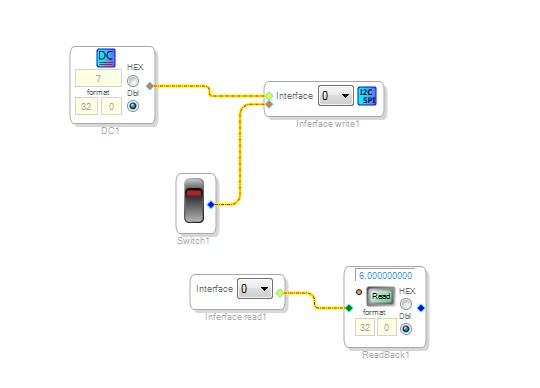
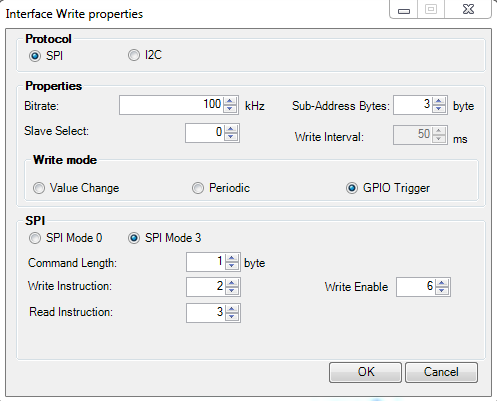
i'm testing Master Control Port Interface Read and Write through SPI with GPIO triggering. I'm trying to write a simple value then read it back at boot time but this seems not to work.
I opened months ago a bug report about Master Control Port Interface (perhaps i can't find it anymore in my messages history) and as said it should have been fixed with Sigma Studio 3.15, the report was made for I2C since SPI wasn't still available with Sigma Studio 3.14.
These are in brief the steps i'm doing:
- write 6 to DC block
- download then burn eeprom 25AA1024 with the program
- write 7 to DC block
- push the Switch to trigger the write block
- power off then on the device
I would expect to get 7 on readback block but i get 6.
Can you please check this and tell me what's wrong?
Thank you
Omar
Hello Omar,
I also tested it here on the bench and could not get it to work. I tried SPI and I2C and neither would work. Also, I noticed that when it was triggered it did perform a write but it would only do it once. After that it did not do it again until after I performed a reset.
I will inquire with the support team.
Dave T
Hello Dave,
thank you!
Let me know once you have news about it
Omar
Hi Omar,
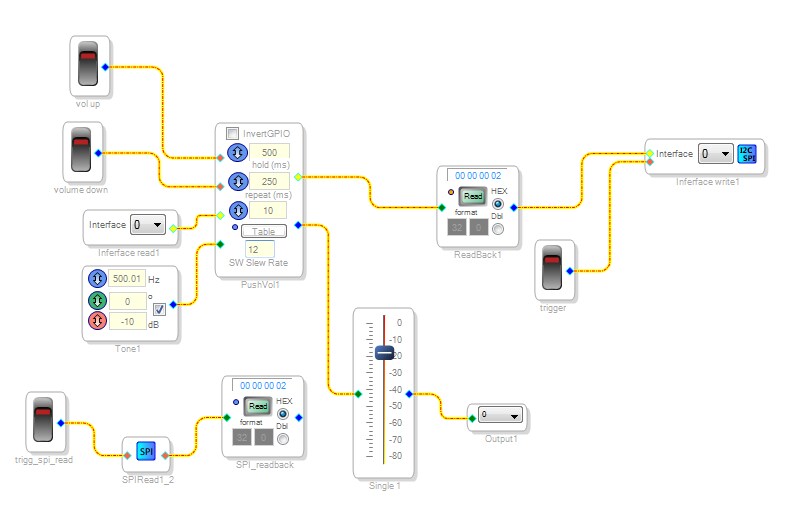
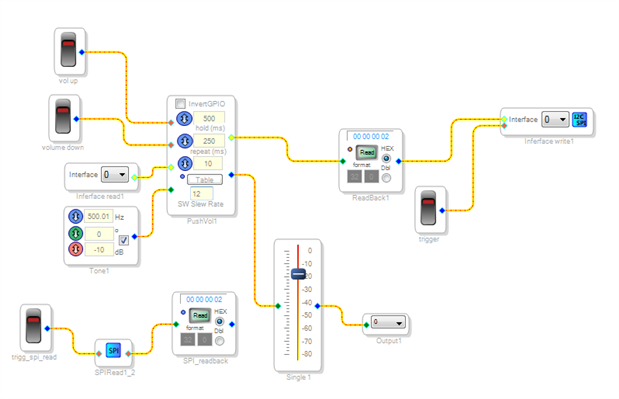
I have attached a sample schematic which is working with EVAL-1452-MINIZ board. I have used GPIO trigger mode in the module.
These modules are working only with the GPIO conditioning cells.
I have followed the steps given below to test the module.
1. Download the schematic and Flash the EEPROM using 'Write the last compilation through DSP option'
2. Enable the selfboot in Eval board then do a power reset.
3. Link compile Connect the schematic.
4. On 'vol up' (You should be able to see the value is ReadBack1 is changing).
5. Off 'vol up' at the desired value.
6. Switch on then immediately switch off 'trigger' (It should start the write operation to EEPROM)
7. Switch on then immediately switch off 'trigge_spi_read' (To read back and test the value written)
8. Press read button in 'SPI_readback'. Value written should be displayed here.
9. Power reset the board then 'link compile connect' the Schematic. (ReadBack1 should display the value which was written last to EEPROM after few seconds)
I will come back with the answer for why DC module can not be connected directly as you have created.
Thanks,
Venky
Hi Omar,
Yes. Use Case 3 in the Wiki page is misleading. I will remove the same to avoid confusion.
Thanks,
Venky
Hello Omar,
Here's an explanation to the problem with the master control port write and the DC module
write 6 to DC block
download then burn EEPROM 25AA1024 with the program
This writes the data and program to the EEPROM, which implies that the DC value 6 is written to the memory location allocated for DC module in the EEPROM (say ’X’).
write 7 to DC block
When 7 is entered in the GUI of the DC block, this value is not written to the EEPROM memory location ‘X’. (X still has the value 6 stored in EEPROM)
push the Switch to trigger the write block
When the switch is pressed to trigger the interface write, the data 7 is now written to the EEPROM in the address location meant for interface write data (say ‘Y’) . (Location X still has the value 6 stored in it and is not modified by this write).
power off then on the device
On Self boot, the DC module is restored with the value stored in its EEPROM memory location ‘X’ (which is 6, this does not show in the GUI as it is an internal change, and in the GUI the value is 7). This causes the Read back to display a value 6 and not 7.
Hope you find this helpful.
Thanks,
Prasad
Hello Prasad,
All is fine up to point 4.
but at point 5, if EEPROM has been stored at 'Y' with 7 by Interface Write than why when the device turns on Interface Read would output 6 and not 7? It's ok that 'X' is restored with 6 since that is part of program memory data but Interface Read should output 7 cause it should be reading the address 'Y' at boot time.
Interface Read should change its output at next power on and only read the memory location used by Interface Write (and if Interface Write has been triggered).
What is happening here is that Interface Read changes its ouptut costantly during runtime, however i don't know if this is happening just in the GUI or it's really reading it from EEPROM (this last one would imply that both Interface Write doesn't work since it would be doing the write operation without triggering and Interface Read is reading at runtime instead of boot time).
When i was testing this through I2C and opened a bug report (thread is now lost, don't know why) i remember that it was happening the same thing. Interface Write was working cause i could directly read the EEPROM through USBi and the stored value was there, so the issue was with Interface Read.
Let me know what do you think
Thank you
Omar
Hello Venky,
i tested your application and it works as expected. So that's the answer, they only work with GPIO Conditioning blocks which carry the yellow interface pins? I misunderstood that cause in wiki there's an example using a DC block straight to interface input pin of Interface Write:
Interface Write(ADAU145x) [Analog Devices Wiki]
However that appears correct since i added a SPI Read block (periodic or external trigger doesn't matter) set to read at address 40 and in facts it works.
It's just a bit misleading the wiki cause one may think that reading back straight from Interface Read may work the same as writing straight to Interface Write from a DC block.
Thank you
Omar
Hello Omar,
The interface read module on boot actually reads back 7 from the EEPROM location Y on the first sample, but this is later overwritten by the DC block value of 6(which is restored from the EEPROM location X).
The above mentioned happens because the Interface read gets the ‘read value’ from a local copy (not from EEPROM during runtime) which is updated when an input is provided to the interface write module irrespective of whether it is triggered or not. This is the behavior you probably observed. However this local value is not written to the EEPROM until interface write is triggered.
In conclusion, the Interface read module reads from the EEPROM only at boot time and is subsequently updated by any module connected as an input to the interface write module. This here is the intended behavior.
Thanks,
Prasad
Hello Omar,
Let me explain this a bit differently.
The value that you see in the interface read and interface write is the same memory location in the DSP. So every sample period it the interface read will read from that memory location and the interface write will write to it. This is the interface register 0 in this case.
So what will happen is that upon boot up the interface register gets loaded with the value from the EERPOM. Then the Interface read will output that value to the place it is connected to in the SigmaStudio schematic. Then the interface write will update that value in the interface register with the value that it is being sent.
So for normal usage this number will be the same. For a volume control or an index selectable filter the interface read will stuff the value from the EERPOM, let/s say #15. Then the volume control will switch to volume level 15 and therefore output 15 to the interface write cell. So they will both be reading the same number. Should you change the volume control the interface write will update the value in the interface register and you will see that the interface read will now display that new number because that is what is in the interface memory location. This all works fine. It gets primed with the EERPOM value at startup and then will always hold the current value waiting for the trigger to update the EERPOM.
So in your original program you were not using cells designed for interface read and write. There was a disconnect.
What was happening is that upon startup, the EEPROM value for the interface register is loaded and the interface read will read it and send it to the readback cell for a split second. Then the DC Cell value gets loaded with the value that was used when the original program was written to EEPROM. So now the DC cell in the DSP (not in the SigmaStudio GUI) has the original value in it. So now the interface write picks that up and writes it to the interface register location. So now the interface read reads this old value instead of the value that was in the interface register EEPROM.
So there was a combination of issues that made it seem like it was not working. The DC cell was overwriting the interface register, and SigmaStudio GUI was not showing the actual value that is in the DC cell in the DSP. Then there is the fact that there is only one interface register not a read and a write register. I hope that helps.
I did write two example programs that show how this works. I have readbacks on both the interface read and the interface write and you can see that they always will have the same value. The two files are one for SPI and one for I2C.
Thanks,
Dave T
To Dave, Prasad & Venky,
thank you for the elaborate explanations, now it's clear how Master Control Port Interface works and how it should be used. I tested it with GPIO Conditioning blocks within my application and it works fine. However i'm experiencing a different problem now and i'll open a new discussion since it involves Voltage Controlled SPI Delay too.
Thank you all once again
Omar
Hello Dave,
I tried your SPI example with my 1452_eval , but every time I make a download the value of Interface_read is zero again , no matter whats been send to interface_write before download.
Stephan
Hello,
I searched the forum regarding this issue and found that this post was the closest match to my problem. However, following the information from that thread, I was not able to achieve a working solution. Now, after understanding the problem in more detail, I have been able to implement a workaround that solves the issue in my case. I am sharing it here for reference.
I am working with an ADAU1463 and have been trying to implement a simple volume control that retains its last position when the system is powered off and on again. My setup uses the Interface Read and Interface Write blocks, with the latter configured to store the value into an external I²C EEPROM.
I am using an M24M01E-F 1 Mbit EEPROM, which is divided into two 512 Kbit blocks:
The first block (I²C address 0xA0) is used for selfboot.
The second block (I²C address 0xA2) is intended for storing parameters, in this case the volume level.
Following the behavior described in the related post I found, I tried several approaches to make the volume control restore its last value after a power cycle. However, the system always started at zero.
It is important to note that, using both an oscilloscope and the I²C Read block, I confirmed that the stored volume value was correctly written to the EEPROM. This means the write operation works as expected.
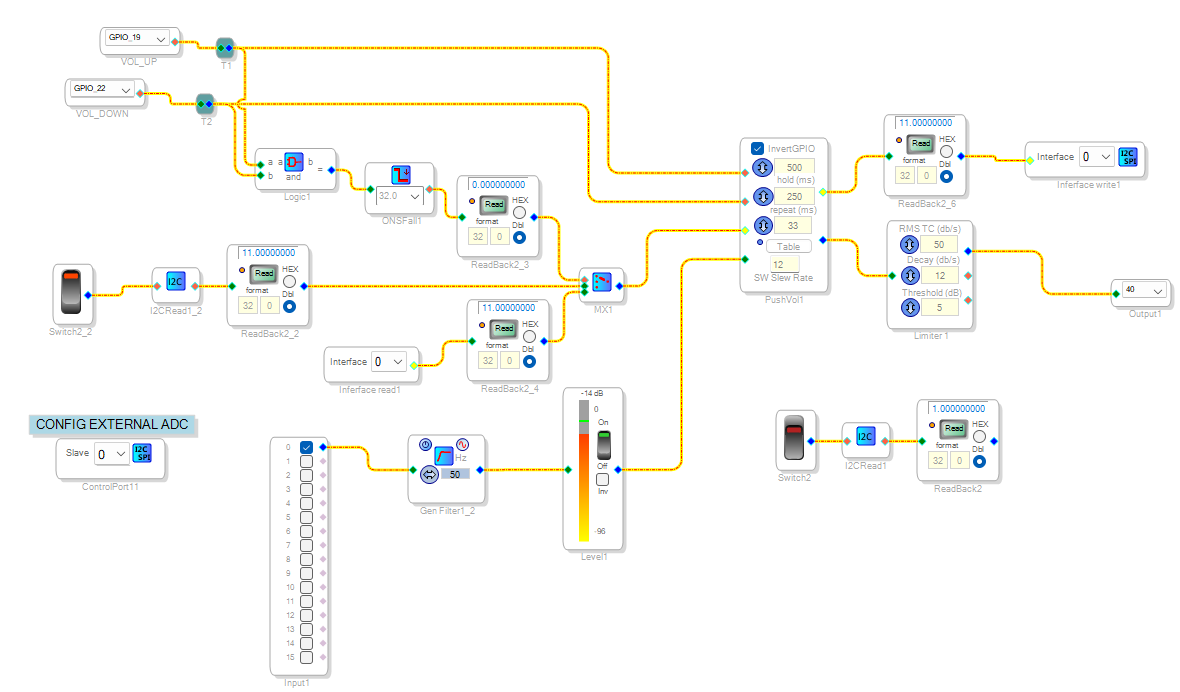
The issue I am facing is: after selfboot, the Interface Read block outputs a zero. When I press the "volume up" button, the volume index becomes 1 and is then written to EEPROM, overwriting the previously stored position.
Knowing that the stored value is correct in EEPROM, I tried a workaround: immediately after selfboot, I use an I²C Read block to read the stored volume from EEPROM. Once the first button press occurs, I switch to the Interface Read block so it continues to operate normally. This way, I load the stored volume initially, ignoring the zero that the Interface Read block outputs at startup. I have attached a schematic showing my test setup. The data read for first time from the EEPROM is replicated to "Interface read" immediately.
Conclusion:
This workaround works correctly in my case. However, it seems the Interface Read block should be checked, so that it outputs the value stored in EEPROM right after selfboot, instead of initializing to zero.
Thank you for your support.
Please log in to reply.