ADAU1701 how to use the data capture registers
Hi All,
I have a few questions regarding the 2 byte Data Capture 0 and 1 registers at adress 1x081a and 0x081B. I can't seem to find alot of information about these registers at all.
How much data can be stored in each register and how do I route data to the registers in Sigma Studio? Can I store more than one value at once in each register? Any more useful information would also be welcome.
If possible I would like to store at least 3 RMS table output values in each Data capture register, which will be read by an Arduino.
Audio Signal Processors
SigmaDSP Audio Processors
adau1701


Hello Jereon,
Updating this post with more detailed information. I just saw this earlier response from a search so here is the updated info.
These registers are used as part of the readback trap mechanism that is built into the core. What is built into the core is a way to grab one of four different values from the core at a certain program counter location. Pretty much all you will be concerned in grabbing is the contents of the MAC, the accumulator, output. The others are the X and Y registers in the core and the accumulator feedback which is really only needed for debugging assembly code.
This is all somewhat described on page 38 of the datasheet, the section on Data Capture Registers. There are two of them so you could grab two values each frame but usually more than one frame goes by before you finish asking for the first one. But I guess you could request two and then read back the two results.
So how do these Data Capture registers work?
You write to the address, either 0x081A or 0x081B, two things in one 16 bit write, the register you want to read, This is always the MAC so 0b10 are the two LSBs. Then the 10 bit program counter location of when to copy the MAC value.
How you get a program counter location is to either use a ReadBack cell or some blocks have parameters that report their Trap Values. Trap value is the program counter number. The Trap values are produced by the compiler and show up in the files that are created when you compile.
You can see my example file IC1 folder. My example file is called "ADAU1701 DSP READBACK Example", I will include the file at the end of the post.
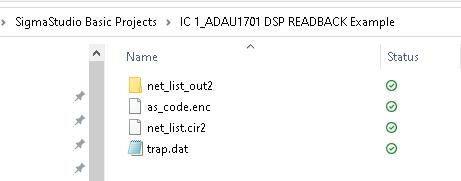
In that folder there is a file called "trap.dat". That file holds the trap values for anything in the program that can be trapped.
Here is what the file contains in this example program:
The two ReadBack cells are at the program counter address of decimal 11 and 17. ( Programmers just do not like Hex! )
So I setup the sequencer in SigmaStudio to mimic what a controller would do. Here is a screenshot:
So I setup a Write to 0x081A which is the first Data Capture register.
I wrote an 0x0046. This is the decimal 17 in hex shifted to the left two bits then the 0b10 added to the two LSBs.
So that is written, two bytes,
Then I perform a Read from the same location, 0x081A, you have to wait at least two sample periods because the request comes in during one and then it is executed during the second. The time it takes to send out the I2C read request will probably take more time than two sample periods but I need to mention it. You could have a slow sample rate and use SPI at a high rate but normally you do not need to put in a wait cycle.
Note that the read is a 3-byte read. This is because you read back the upper 24 bits of the internal 5.23 number. There is some sort of trickery going on internally since the register map only shows this as a 16 bit register yet you read back 24 bits. It must be Mary Poppin's suitcase in the silicon. :)
That said, it is only 24 bits of the internal 28 bit number. My ReadBack example file is to show that the bottom four LSBs are truncated so if you need to read the bottom four bits you have to multiply by 16 to shift the data left four bits. Then to add to the hassle you cannot represent a whole number 16 in a 5.23 number so you have to multiply by four twice.
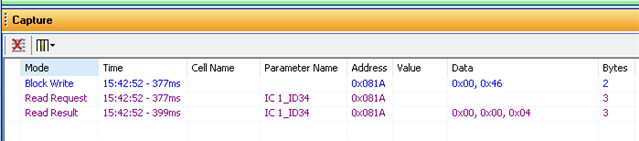
The Capture window looks like this when you run the sequence:
Note that the Read Request is something SigmaStudio puts in the Capture Window. It shows when you do a SPI or I2C read transaction you actually first perform a write of the address to read from. So that they call the Read Request. Then they clock in the 24 bits. The data I had in the DC cell that was feeding the ReadBack was a 4.
Here is my example program:
ADAU1701 DSP READBACK Example.dspproj
Thanks for listening.
Dave T


Please log in to reply.