Guitar reverb and ADAU 1701
Hi There, I'm using a ADAU 1701 to create guitar effects in my new product. I have 3 sounds: Distortion, Chorus, and reverb. The Distortion and Chorus sound great, but I can't seem to get the Reverb to sound anywhere near where I want it. It seems the more delay time I add, the more "latency" it adds to the sound...
I have done some research on the web and some have said that this chip just does not have enough on-board memory to create a good sounding reverb... Is this the case? Does anyone have any experience with this? I'm running out of time on this product and really need to find an answer on this.
Thanks for any help,
Kevin
guitar
reverb
adau 1701
Hello Kevin,
Your research is quite correct, the -1701's 43 mS worth of delay memory isn't enough for a good reverb. This is why there's no ready-made reverb block for this chip. However, we can multiply the available delay by four with the help of a two "synchronous multiplexer" blocks. By having the delay operate upon four versions of your signal, the intermediate delays add up. The overall effect is still not up to professional standards by any means, but at least it's serviceable -- about what you might find in a basic karaoke machine. I attached an example below, at least it's worth playing with.
Best regards,
Bob
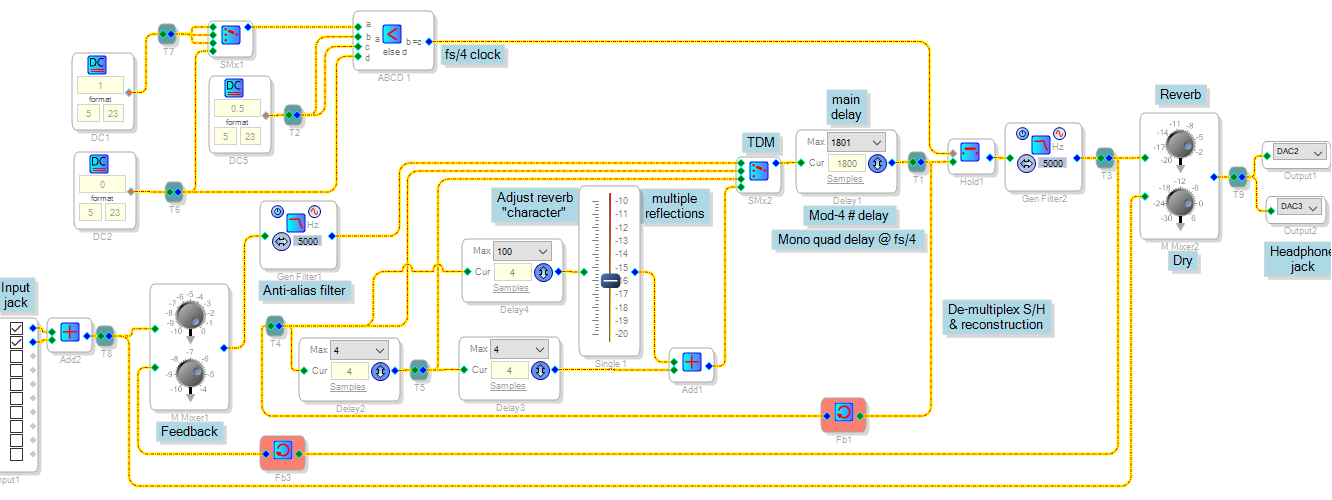
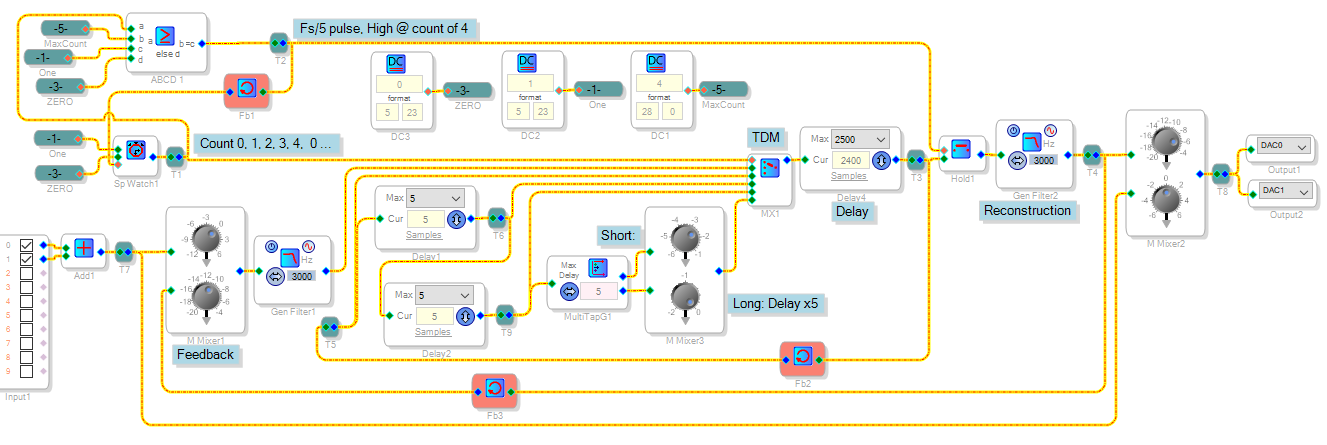
Here's a similar arrangement which works on the ADAU1761. There's no synchronous multiplexer for this chip, so here a homemade clock drives a standard index mux. I tested this with the ADAU1761Z eval board and a podcast audio source. Both this project and the above one operate by time-division multiplexing their main delay, thus multiplying the available delay time at a lower effective sample rate.
The ADAU1761's low power requirement might make it ideal for self-contained stomp boxes, etc. However, it cannot self-boot -- thus requiring a microcontroller to boot it as well as provide a user interface. Sometimes I wonder why there's no "do-it-all" SigmaDSP, with all of the following:
Built-in converters (4 each)
Self-boot, with GPIOs and Aux ADCs
A few ASRCs
Low power with sleep mode
100 MIPS @ 48 / 96 / 192 K sample rates
8 K data memory
But I'm afraid this is not a perfect world. I'd love to buy a Prius too, but I drive a beat-up Ford Focus.
Looks like there is a built in reverb in ADAU1452.
Hello neb,
Absolutely. With its 20K x 2 Data RAM, the ADAU1452 has plenty of delay available for a good reverb -- and its SigmaStudio stock reverb works well. Yet the -1452 lacks built-in converters and isn't the best choice for a self-contained, battery powered device such as the clip-on guitar amp that's the subject of this thread. In contrast, the ADAU1761's low power and internal converters makes it a neat analog-in, analog-out solution that applies well in a variety of applications. And if low power is not a necessity, the ADAU1701 is even easier because it self-boots. Striving to stretch the limited resources of either is in fact a lot of fun!
Best regards,
Bob
Thanks. Do you have an example also for distortion effect?
Hello,
I haven't played much with "fuzz" or distortion except for this project:
https://ez.analog.com/message/246628?commentID=246628#comment-246628
Best regards,
Bob
Hi Bob,
I was making some changes to my Sigma file that you helped me with, (just adjusting the volume of things) and now the Reverb doesn't work any more... Can you look at it and let me know what I'm doing wrong? I don't see a place to upload it here, but I can email it to you or whatever.
Thanks again for the help,
KZ
Hello KZ,
To upload a file you have to use the advanced editor. If you look on the upper right corner of the box when you are typing in a reply, you will see a link to take you to the advanced editor. With that one you can attach a file.
Dave T
I should have checked that... Thanks. See attached.
-KZ
Hello Kevin,
Your project loaded OK and its operation is in fact consistent with what's in the project file -- however I found some irregularities:
Once uncompressed the project file size is over 2.4 MB. This is quite huge for a SigmaStudio project for ADAU1761. I've rarely seen project files go bad after growing for no good reason. Yet, at least so far your project remains operational.
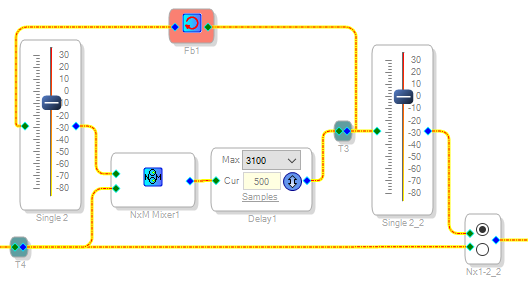
The project doesn't use the improved reverb I had devised for you -- instead it has the ordinary reverb shown below. It functions according to the way it's built, yet it doesn't sound very good:
To get better results with the present reverb, you can increase the current delay towards 3100 samples since evidently you've got room for this many. Or go back to my design.
Best regards,
Bob
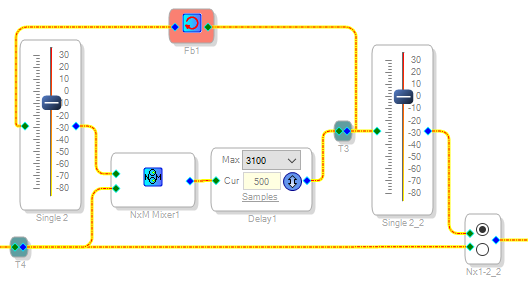
Bob, thank you so much for this. I'm making a headphone amp as a gift for a family member who is going through a rough time in her life. A quality reverb was the last piece of the puzzle and I was unsure how to proceed until I found your schematic which is working out very well.
Dear Bob,
Could you please advise me on below noob questions.
1/ What is the formula to calculate the extended delay base on your method?
2/ Can we implement echo effect base on this method?
Thank you.
Hello tuongnuyen,
Since the extended delay is based on feedback it is a little more difficult to measure the exact delay time. It will decay over time and so you have to decide on when it is done and when it is still decaying. I think the best way to do this is to actually measure it. Capture the waveform on a scope and see how long the reflections are present and when it decays into the noise floor.
As far as Echo, The difference between echo and reverb is the length of time between the reflections and how many reflections there are. If the delay is greater than around 15ms, if I remember right, the mind will hear it as an echo rather than integrating it with the direct signal. So by increasing the time of the delay and using reflections that are spaced apart more you should be able to produce more of an echo rather than a reverb-like sound. So by manipulating the settings you should be able to produce more of an echo rather than a reverb. It will be limited by the short delay memory in the 1701.
Dave T
Hi Bob. I'm using ADAU1701. I have two mono inputs, mic and electric keyboard. Both signals should pass through the reverb. And I want each signal has its external pot to adjust independently how much reverb they sound. But I couldn't build 2 reverb blocks because lack of memory resources.
Can we use just one reverb block you provided for both signals. Split each signal, one goes to reverb and one pass through, at the end cross mix them. It's just an noob idea. Any thought will be helpful for my project.
Hello Cliff,
As you already know, the ADAU1701 can't do even one channel of reverb without a rather unique arrangement. Two channels would push the idea too far. Here's why: if you look at either of the reverb schemes presented in this thread, you'll find a multiplexer at the main delay input. It connects to the input audio for just one sample, then ignores the next three or four samples before sampling the input again. This makes the delay work as if it were four to five times longer -- but at the expense of losing fidelity. We get away with it because reverb tends to muffle the sound anyway. Yet four out of five samples are about as much as we can afford to lose.
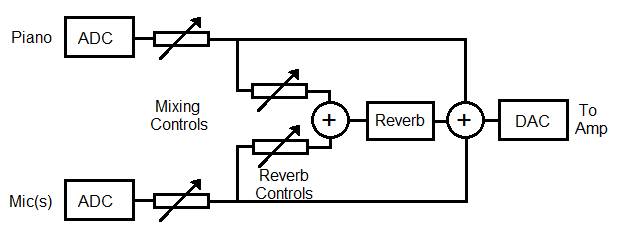
Your idea to share the single reverb between the two channels is a good one. Here's one way to do it: Place your reverb adjustments for both channels at the input end of the reverb tank, as shown below.
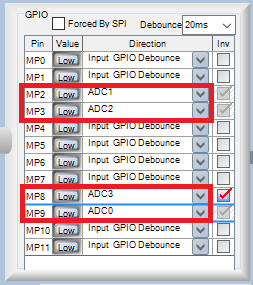
Varying the levels going in will adjust the amount of reverb perceived for each channel in the final mix. Note that to provide both mixing and separate reverb controls will require all four of the -1701's Aux ADC inputs. You'll need a different method to control the EQ selector discussed earlier (look in the GPIO Conditioning section of the Toolbox). You'll also need to make sure that the Wondom board leaves all these MP pins available:
Best regards,
Bob
Thank you Bob
It seems not a good solution. I need the other pot for master volume, mic and line in gain. And one AUX ADC for eq selector.
So I will direct mixing the mic and line in and use the same fixed reverb setting.
Best regards
Cliff
Thanks, Bob. I was using the wrong **** file...Sorry to bother you with that.
Best,
Kevin
This design became part of a miniature clip-on amp called the Strum Buddy. I bought one for a guitar-playing friend who loved what he described as the "concert hall" reverb!
Please log in to reply.