ADAU1452 How to transfer the length to delay time?
Hi all,
I saw some products that have one function like "length correction" I guess this is use on two different length
source line, and two device output will delay, so there is one function: choose the source line length and it will
map to one delay time to synchronize two device output time (ms or second).
If I want to use ADAU1452 to do this function, how should I do? My first idea is using MCU to calculate the length and mapping to the delay time(user defined). Does there has one block that can enter the time and the signal will delay the time which I input?
Example: 1 meter source line and the delay time will be 0.45ms
In the Sigmastudio, I only saw delay block that is using "Max" and "current sample", so if I want to make a delay time block how should I do?
thanks!
Regards,
Alvis.
Audio Signal Processors
adau1452
delay calibration
adau1452 sigmastudio
SigmaDSP Audio Processors
Hello Alvis,
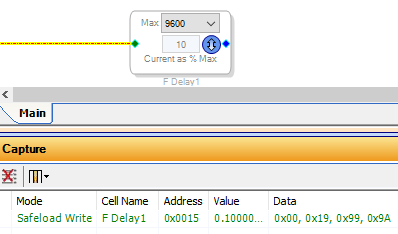
You could use the Fractional Delay block. Although it doesn't directly work with time, your microcontroller can handle the necessary conversions. First, choose your maximum delay time, then multiply by your sample rate to obtain the your maximum delay in samples. For example -- 0.2 seconds at 48K = 9600 sample delay.
Now, have your microcontroller find the ratio of the desired time to the maximum delay time. Do this by multiplying the desired time by the reciprocal of the maximum time. Example: for a desired delay of 20 mS, multiply 0.02 x ((1/0.2) = 5) = 0.1. Pre-calculating the reciprocal this way allows your uC to find this ratio by multiplication instead of division, saving clock cycles. Multiply this result by 2^24 to convert this to the 8.24 number format used by the ADAU1452 -- that is, 0.1 x 16777216 = 1677722 = 0x19999A. Finally, have your uC split this number into byte-size chunks -- that is, 0x19, 0x99, 0x9A. As you can see, this number matches that shown in the Capture Window above for a 10% delay.
Once you have your complete SigmaStudio signal flow working, manually change the delay percentage in the Fractional Delay block to observe the resulting write in the Capture Window. Note its address -- this is the address you'll use when safeloading the delay data into your ADAU1452's parameter RAM.
Best regards,
Bob
Hi Bob,
Thank you your suggestion, I will try it on my microcontroller .
If I meet the problem I will ask it again
Regards,
Alvis
Please log in to reply.