Custom design with ADAU1701
Hi,
Planning to use an ADAU1701 as an active crossover (3-way) as a first project. I have several questions:
1) What is the work flow when designing one's own custom board with an ADAU1701? From the evaluation board schematics, it looks like I could simply place a 10-pin header connector exactly like J8 in the evaluation board (is it enough to connect only pins 1,3, 6, and 10?). Is this a good approach for hobbyist projects? I do have an evaluation board, so I have the USBi interface.
1-b) What about just programming the EEPROM independently and then move it to the target board? Would I need to design a separate board that only has the EEPROM and connects to the USBi?
2) Do I need to bother with the WB (write-back) pin? It's not clear from the manual (either the ADAU1701 or the ADAU1701-EVAL) whether I need to deal with it. My design will be fixed and "set in stone" as far as the operation of the device goes (I could still one day decide that I want to change some parameters, add more functionality, etc., but I would then connect it to my PC to reprogram it with the new design from SigmaStudio --- then, it will be again "set in stone").
3) What's with the ADC_RES and the sampling rate? I have no clue about why the resistor value depends on the sampling rate. With the evaluation board, I just changed the sampling frequency from its default 48kHz to 96kHz, and then even to 192kHz and compiled and downloaded --- I didn't notice any change in the level (the volume) of the signal.
4) The suggested low-pass reconstruction filter after the DACs has cutoff frequency of 50kHz. If I'm using 48kHz sampling rate, doesn't that leave all of the out-of-band contents from 24kHz up? I'm thinking that maybe the DAC oversamples, maybe all the way up to 192kHz, regardless of the sampling rate of its input data? The datasheet does not say anything about this. I would probably like to set 192kHz sampling frequency for my designs, but I'm not sure whether this will be feasible once I start adding more "non-trivial" processing blocks?
Thanks for any comments or suggestions!
Carlos
--
Audio Signal Processors
usbi
SigmaDSP Audio Processors
adau1701
Hello Carlos,
You're asking some quite intelligent questions, about issues everyone needs to know to run a ADAU1701. Many of your queries have been answered in scattered posts on these boards, yet it doesn't hurt to put the answers in one place.
1. Yes, your custom board could receive its program from the USBi via the 10-pin connector. And all you need are pins 1, 3, 6, and 10. Although ADI may insist that your evaluation board is not a reference design, its schematic is a good starting point. A four-layer board is recommended for all SigmaDSPs -- but with very careful layout we have gotten away with just two layers (where I work we have a really good layout engineer). For general layout advice, see this post: SigmaDSP PCB Layout Best Practices
1-b. Once you have a programmed E2PROM that works, you can duplicate it off-board with a programmer or (for larger quantities) have your chip vendor program them for you. Making a dedicated programming board is an interesting idea.
2. Just ground the WB pin. BTW -- the evaluation board's write-back trigger circuit doesn't work anyway -- chip power is long gone before it triggers the write-back, if at all.
3. Assuming you're running any of the 48 / 96 / 192K sample rates, the default resistors are correct. You only need to change these resistors if, for example, running 44.1 KHz or its multiples (which uses a lower-frequency crystal). The data sheet is just plain confusing on this one. Have a look at this post: Setting the PLL mode for the ADAU1701 at different sample rates
4. The ADCs are equipped with oversampling anti-aliasing filters, and the DACs include oversampled reconstruction filters. These provide an amazing brick-wall response -- eliminating the need for an input anti-aliasing filter, as well as a brick-wall reconstruction filter. You only need the suggested 50 KHz filter (but you do really need this -- the DAC output appears like hash on a scope, the filter averages out the mess to produce audio).
The ADAU1701's DSP core runs at 50 MIPS regardless of 48 / 96 / 192K sample rate. At 192 K, there's only 5.2 uS from one sample to the next -- enough time for 256 instructions (actually about 250 as there's some overhead). That's still enough to do some pretty amazing things -- one engineer built an ultrasonic blind-assist device around a -1701. Yet, if you're handling only audio frequencies, you may not need 192 K. You'll get excellent sound at 96 K and quite good sound at 48 K. There's no need to add to the overkill that pervades the world of audio.
Best regards,
Bob
Thanks Bob, that was a great post, very clearly addressing my questions!
One comment: in the link of "Best layout practices", I disagree with figure 6.2 (related to bypass capacitors placement). From what I've been reading lately, the articles quite emphatically insist that one should NOT do that. They mention that the problem with the bypass capacitor going from VDD to the nearest GND pin is the parasitic inductance of the trace. The recommendation I've seen in several sources (from both Analog Devices and Texas Instruments) is that one pin of the capacitor goes as close as possible to the VDD pin, and the other one goes straight to the ground plane (in principle through a via).
Follow-up question/comment: also related to layout best practices, I'm under the impression that it would be better to have two separate ground planes (as two separate layers of the 4-layer board): one for analog, one for digital, and NOT stitch them, but just join them at a single point. If only one chip handles mixed signals (like in this case; the ADAU1701 will be the only one that handles both analog and digital signals), then the point at which the two planes join would be somewhere inside the footprint of that chip. Is this reasonable and applicable to the ADAU1701?
Thanks,
Carlos
--
Hello Carlos,
Not being experienced with PCB design myself, it's difficult for me to comment. I've seen boards with BGAs on top side and their bypass caps below -- naturally these connect with vias. The Sigma chips being LQFPs, the caps can be directly connected with short traces, as shown in the Best Practices diagram (with which I'm not qualified to contradict).
According to this post: ADAU1761 grounding , SigmaDSPs work fine with one common ground plane. Of course, you're free to make good use of your own experience and judgment in board layout.
Best regards,
Bob
Hello Carlos,
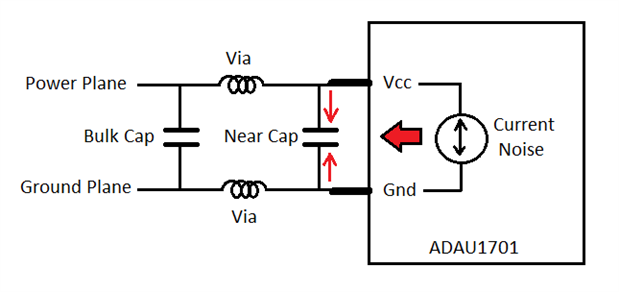
Regarding the placement of the vias and the ground pin. Think of it from the viewpoint of the pins and think of the pins having two cases:
1st case, The part is a noise source. The noise is between the VDD and Ground. Plus, the noise is high frequency noise from the clock edges. So the bypass cap is supposed to "short" out this noise and return the currents back to the source. So if the caps are right across the pins the cap will work perfectly.
So now place the cap to the VDD pin then through a via to the plane. Then the ground pin goes directly to the plane through a via. So now the path for noise to return to the source is this: Vdd pin --> Cap --> Via --> Ground plane --> Via --> ground pin.
Then replace the word "Via" with "inductor" because a via has inductance at high frequencies. So now the cap is in series with two inductors and will not be effective at all! Plus the part will be dumping noise onto the ground plane.
2nd case, There is noise on the ground plane or power plane from other devices on the PCB.
In this case the cap right across the pin will cancel out any HF noise present between the two planes. The vias, being an inductor, will actually help to isolate the part from the plane. If you have the cap setup with vias in series then it will not be able to short out the noise.
Bob's comment about BGAs is a good comment. It is a big issue and in that case you have to try the best to have the caps close. Often Chip makers will put the power and ground pins on the edges of the part but that is not always possible.
With my position here at ADI I have helped several large manufacturers solve issues with using our parts. I have seen issues where the problem ended up being ALL PCB layout related and mostly the way the bypass caps were implemented. It makes a huge difference and we have learned that this is the correct way to do it. I cannot comment on TI's recommendations but you can certainly look at our examples and advice from not too long ago and it was done the way you explained. We have learned and grown and we are sharing this knowledge.
The issue you bring up about the two grounds. This is actually very difficult question and I can see a couple of ways to do it. We have done single planes and it has worked quite well. I have seen customers with many split planes and have seen issues. In a large system I can see the importance of separating different ground paths. I have done this in my designs in the past. The problem is with these mixed signal parts. It makes it really difficult. I like to look at where the return currents will run and this is a problem. If you have an analog power supply and digital power supply you have to tie them together at some point and that really should be close to where the power enters a system. But I see your point that perhaps right under the part is the best place? For large systems with many PCBs I have designed some boards with DGND planes and others with AGND planes depending on what the dominate signals are on the board. I would analyze the return currents and think of how it will return to the power supply.
In the case of some of our small DSPs with converters on the device I would just use one ground and keep the digital circuits in a different area of the board. I am rambling a bit because I can see issues with both approaches and I try to find the balance.
A good resource into return currents and signal integrity is this web site: www.bethesignal.com. This will help see why one ground plane is best and why I suggest to implement the bypass caps the way I do.
Thanks,
Dave T
Your explanation of the cap placement makes lot of sense. I'll amplify it a bit with this graphic:
We observe how the circuit elements effectively make a pi-section filter.
Best regards,
Bob

Please log in to reply.