Maxing out the volume ADAU1701
hi,
im using a adau1701 as a controller for my private public adress system.
Also im using a bluetooth device as input but i'm not very happy with the maximum volume, i dont think i got the full 0,9v rms output for my amplifier.
Is there a way to auto detect the maximum or maxing out the volume without getting into clip depending on the input?
or should i just use +20db max gain and then put a single slew ext vol after it and "detect" the clip by my ears?
greetings
Audio Signal Processors
SigmaDSP Audio Processors
adau1701
Hello Danny,
You can always use a meter in sigmastudio connected at the signal that feeds the output and see what kind of level you have there.
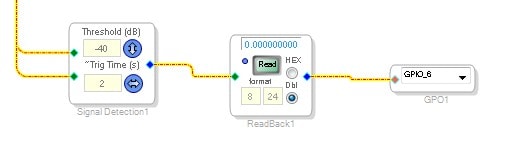
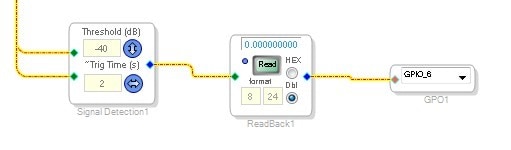
Another way is to use the Signal Detect cell:
This uses a peak detector for the signal. So if you set the threshold for 0dB it will send a signal out of a GPIO pin to an LED and show you when it clipped. Set the trigger time to 2 seconds which is the minimum. So if it is a quick clip the LED will go on for 2 seconds then go off. If it keeps clipping during the 2 seconds it will remain on until there is no clipping for at least 2 seconds.
There may be other issues going on here. Is the signal coming into the ADCs or into the serial ports as an I2S signal?
If it is the ADC then you can adjust the sensitivity of the ADC or amplify it externally before it gets to the ADC. This is better gain structure. As a last effort you can cascade two volume controls to obtain more gain but you will be bringing up the noise and DC offset. Which reminds me to suggest you use the DC blocking filter if you are using the ADC.
Since we know little about your project it is difficult to make other suggestions. Give more detail or attach your project if you need more assistance.
Thanks,
Dave T
Thanks for your help Dave.
I'll try it. Where should i place the Signal Detection? right before the DAC?
I dont know what to say about the ADCs.
Im using the Sure DSP and therefore im using RCA as Input and RCA as Output.
The Aux ADCs are 4 potentiometers on the board.
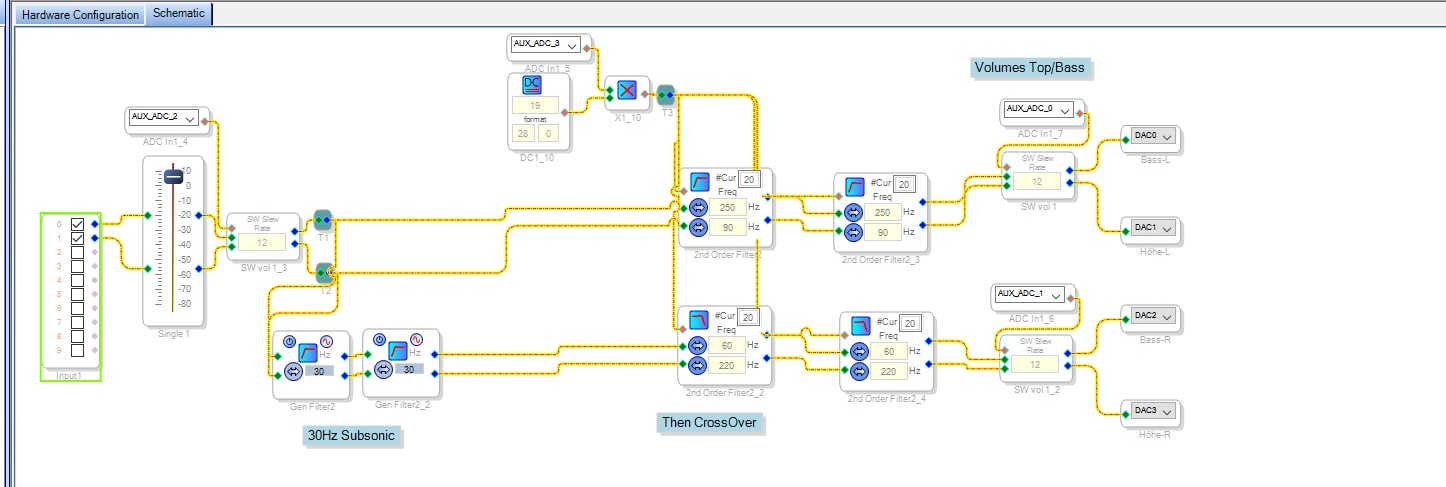
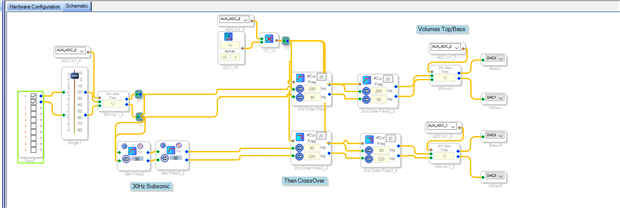
This is my project.
Im using a +7dB Gain because the Sure DSP lowers the Signal by 7dB.
Then there are two ways for top and bass.
Hello Danny,
I am not able to fully answer your questions right now but I can give you some answers.
Yes, place the signal detect just before the DAC if that is what you want to see clipping.
I am suspect about the 7dB loss. If it is an analog transfer then it may simply be a differential vs single ended signal interface issue. 6dB is the magic number there.
Your crossover should probably be done a different way. Your use of the AUXADC is suspect. Attach your actual project and explain more of what you want to do and why.
Thanks,
Dave T
Thanks again for your help dave.
Im using the DSP as a preamplifier for my public adress system.
It has a regulated low and highpass for tops and basses. so i can decide which frequencies the basses get and the tops get.
im attaching my project.
All i want is: To maximize the volume which COULD be low on the input, because the inputs are different(Laptops, smartphones, bluetooth receivers) as my pa system is mobile.
Furthermore i want to get a limiter and compressor for my system, but thats another thing. today, the volume is my main problem.
greetings
Hello Danny,
As Dave described above, you'll get the very lowest noise performance if you place an adjustment ahead of the Sure DSP's ADCs to allow each input device (laptop, iPod, etc.) to drive the ADCs close to their maximum range (just below clipping). However, adjusting the gain within the SigmaStudio flow is of course easier, and may be sufficient for your needs. If your two pots at AuxADC 0 and AuxADC 1 (the high and low volume pots) can be made accessible to the user, you could add some gain there. Starting with your project, I added lookup tables to provide a "log taper" feel to these pots as well as 12 dB additional gain -- simply turn the pots up when using lower-level input devices. See if the attached project works for you.
Best regards,
Bob
Thanks for your help bob.
I'll give it a try.
KJBob schrieb:
Hello Danny,
As Dave described above, you'll get the very lowest noise performance if you place an adjustment ahead of the Sure DSP's ADCs to allow each input device (laptop, iPod, etc.) to drive the ADCs close to their maximum range (just below clipping).
And, how do i do this?
Do i need a hardware pre amplifier?
the last days i just turned up the main gain by + 14dB.
But your solution looks definitly better as its more complex.
Hello Daniel,
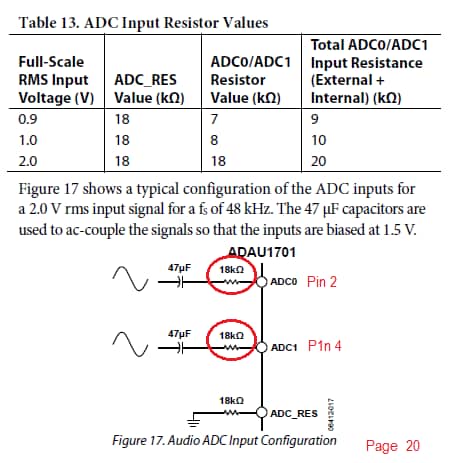
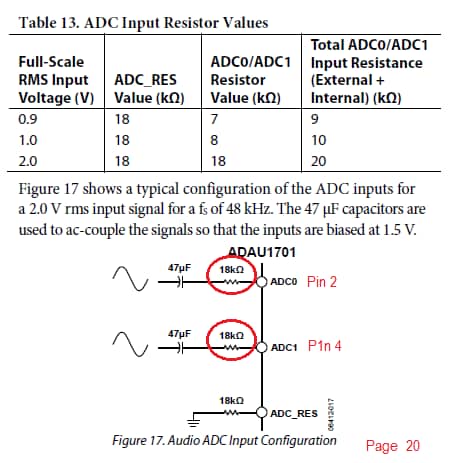
You could build a preamp, but there's an easier way if you don't mind modifying your SureDSP module. It's the method Dave T meant when he said, "adjust the sensitivity of the ADC." The ADAU1701's ADCs are current-sensing, which means their input gain is set by external series resistors. Change the resistors, you change the gain.
Page 20 of the ADAU1701 data sheet -- http://www.analog.com/media/en/technical-documentation/data-sheets/ADAU1701.pdf -- shows the suggested input circuit, which I assume the SureDSP has implemented. Likely you have 18K ohm resistors at Pin 2 and Pin 4. Change them to 8K for 6 dB more gain. This also reduces the ADC's clipping threshold to 1 volt RMS (2.8 volts p-p), but it's unlikely you'll encounter a device which puts out that much audio. You'll need to locate and replace these resistors on your SureDSP -- not difficult for those with surface-mount soldering experience and tools, but frustrating or worse otherwise.
Best regards,
Bob
Thanks again Bob.
I got lots of soldering experience and smds are not a problem.
but i rather would like to use a simple software solution as the dsp should be untouched.
i think, i'll buy a preamp or headphone amp in china and solder it by myself.
thanks for all your help guys.
Please log in to reply.