ADAU1701 AUX ADC
I use ADC0 and ADC1 with ADAU1701 to process analog signals.
I need to draw a third analog signal, if I understand correctly I can also use MP8.
From SignaStudio you must also select one of these boxes,
or simply set in the configuration pin MP8 as ADC3
Thank's
Audio Signal Processors
sigma studio adc
SigmaDSP Audio Processors
adau1701
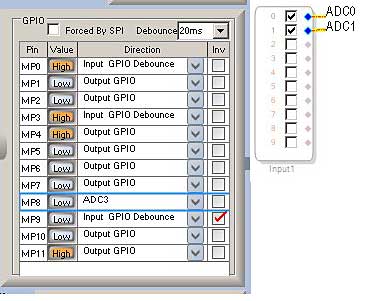
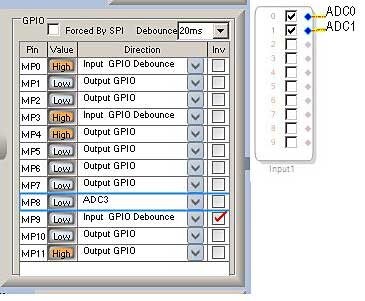
Hello piero,
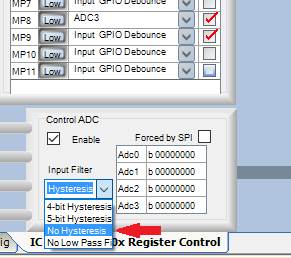
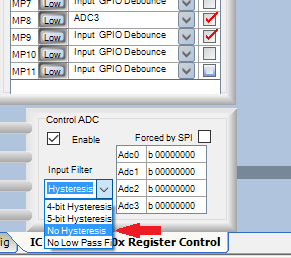
To get 8-bit analog audio into Aux ADC 3, set the GPIO-8 config to AuxADC3, just as you show above. Also capacitively couple your audio into the MP8 pin. In SigmaStudio, use the GPIO Auxiliary ADC 3 block to get your audio into your schematic -- the input pins 2 -- 9 shown above are for I2C / TDM digital audio input. Use a DC Block Filter to remove the half-scale DC (of course, if your analog signal is a DC level, you can dispense with the AC coupling and DC block filter):
Finally, be sure to set the Control ADC (Aux ADC) Input Filter to No Hysteresis, or else it will sound terrible. For more info on these settings, see
ADAU1702 hysteresis settings
Best regards,
Bob
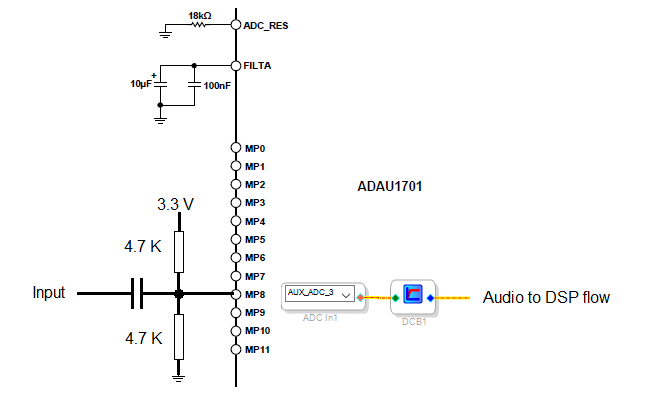
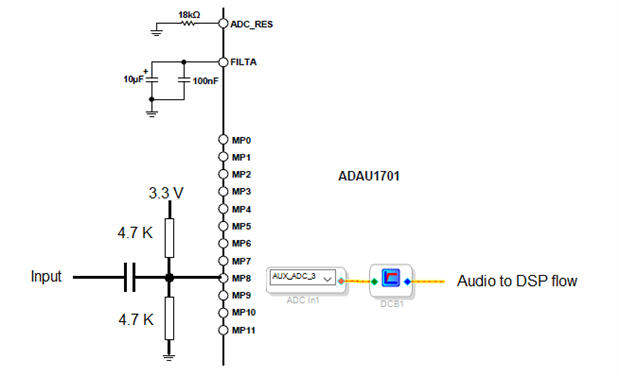
Thanks Bob,
not being able to simulate the function because in ADAU1701MINIZ. MP8 is used for the potentiometer, I did not make mistakes and so I asked for confirmation to the experts.
Good afternoon.
Thanks Bob,
I did a test by removing the potentiometer from the board and everything works very well
You could go ahead and set the on-board pot to its middle position, then override it with a sufficiently low-impedance signal to run your test. I've successfully done that for quick tests. Remember that the Aux ADC's input impedance itself is not infinite; it's as low as 17.8 K ohms -- thus in your final circuit you'll likely need an op-amp or similar buffer to drive it.
BR,
Bob
Please log in to reply.