Instabel 88 kHz S/PDIF output with the ADAU1452
Currently I'm working on an audioprocessor-design that incorporates the ADAU1452. The design is being made/tested/evaluated using SigmaStudio and the EVAL-ADAU1452MINIZ evaluation board.
The ADAU1452 runs in slave mode. Input is a serial I2S signal of various sampling frequencies.
Output is a serial I2S signal send to an added DAC-chip (the on-board DAC-chip of the evaluation board does not accept all possible sampling frequencies in its present configuration). As a second output channel the optical S/PDIF transmitter is used. The added DAC-chip runs in slave mode to the input signal.
This setup runs fine at all common sampling frequencies (32, 44, 48, 96, 192 kHz) with one exception. Whereas the output signal of the added DAC-chip looks fine at 88 kHz the output of the S/PDIF transmitter seems to be compromised. Using an external DAC-device (with a WM8804 S/PDIF receiver) results in loss of signal-lock several times per second, causing interruptions of the audio-signal. With other 88kHz sources this external DAC-device has never shown any problems. Also all other sampling frequencies lock fine without any interruptions.
I checked the signal chain
Chip output S/PDIF <> Optical transmitter <> Optical receiver
and found no problems. I also tapped the S/PDIF output signal directly at the ADAU1452 and send it by coaxial connection to the external DAC. The same problem occured. No continuous lock at 88kHz.
As only this specific frequency is involved my suspicion is that the problem might be related to a "clocking issue" but I have no real clue on how it can be solved. Do people have any suggestions??
Cheers
Jan Meier
Audio Signal Processors
adau1452
SigmaDSP Audio Processors
Hello Jan,
I think I need to see your project. The SPDIF output is tied to the core rate so you have to have the core running at 88.2kHz.
So when you say you are sending the signal to the DAC you mean you are sending to an external DAC evaluation board that has an SPDIF input? In that case you have to be certain that it is clocking off of the SPDIF receiver. For the DAC this would most likely include the MCLK out of the SPDIF receiver.
So I would like to look at your project and also if you could sketch out your clocking setup between all these boards.
Dave T
Dear Dave,
thank you for your offer to help.
Attached please find a very simple project-file that already shows the
phenomenon described.
Input is an I2S signal at serial input port 2. It is delivered by a
WM8804 SPDIF receiver (in stand-alone hardware mode).
The input port is set to be slave to CLK2.
The output on the S/PDIF locks stable at an external DAC at 32, 44.1,
96, and 192kHz.
However, no such at 88kHz.
The external DAC uses a WM8804 S/PDIF receiver inside.
I think I need to see your project. The SPDIF output is tied to the core
rate so you have to have the core running at 88.2kHz.
One of the first things that I tried was changing the core rate to the
various standard frequencies offered. 32, 44.1, 48, 96, 192 kHz made no
difference. Symptoms stayed the same independed of the various core
rates. 88.1 is not given as an option as a standard rate but 44.1 didn't
work either.
So when you say you are sending the signal to the DAC you mean you are
sending to an external DAC evaluation board that has an SPDIF input?
No, it's a commercial audio-DAC device. It's analog output is monitored
on my scope.
Fortunately I may have a solution, sending a serial signal back to the
WM8804, which not only has a S/PDIF to serial converter built-in but
also an "independent" serial S/PDIF converter. Haven't tested this
method yet but I have good hopes. Nonetheless, it would be fine if you
had a solution that allows me to use the S/PDIF output of the ADAU1452.
Have you also seen my other "problem"?
https://ez.analog.com/message/283778
For this one I haven't found a real simple solution yet. Why is there no
access to register values from within the programm? The only solution
seems to be the use of an external microprocessor or to set the WM8804
to software control mode and read the emphasis register value using the
ADAU1452. However, this would make the design considerably more complicated.
Thanks for your cooperation,
Jan
---
Diese E-Mail wurde von Avast Antivirus-Software auf Viren geprüft.
Hello Jan,
Give this project a try. I was not able to fully test this right now and I did not want to delay my answer so I could test it. I did look at the clock outputs on a scope to confirm some of this.
Ok, So I see in your project that you are slaving the core off of the input clock domain and that is slaving off of the SPDIF converter IC. I assume you were sending an 88.2kHZ fs signal into this SPDIF converter correct? However, I think it is best to just not slave off of this clock and have the DSP be its own stable clock "island". It should make switching sample rates a bit easier in your application.
I sugest you run the SPDIF input through an ASRC. I see from the settings of your project that you had tried this at one time. So have the SPDIF input go through the ASRC...
Now on to getting the core to run at 88.2kHz fs and 44.1kHz fs. This is the tricky part. It is fairly easy to have the serial ports run at this rate but the core start pulse is a bit more tricky. You can slave it off of an output or input serial port rate that is set to use the correct clock generator, that is one way, or you can simply use the clock generators directly. That is what I did in this project.
Now please follow me on this one. This is also for others reading this post.
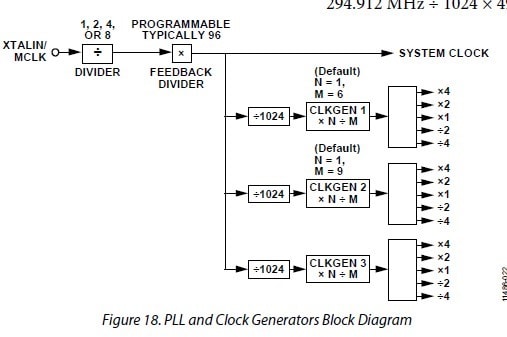
Figure 18 shows the three clock generators. The fractional dividers are used to divide the system clock and obtain a base rate for that particular clock generator. This rate will be the x1 which can be divided or multiplied by 2 or 4. OK, so far this is super simple...
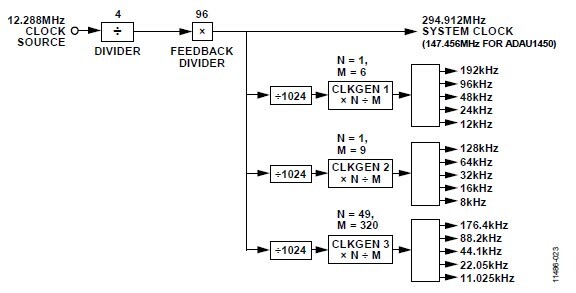
This figure, Figure 19 in the datasheet shows some handy values for these clock generators and it shows the resulting sample rates.
Note that clock generator 3 is setup to generate the 44.1kHz fs combinations.
Now we could simply change clock generator 1 to have N=49, M =320 and be able to get 44.1 and 88.2kHz fs. But I am certain that you would want to be able to switch back to the standard 48kHz ranges.
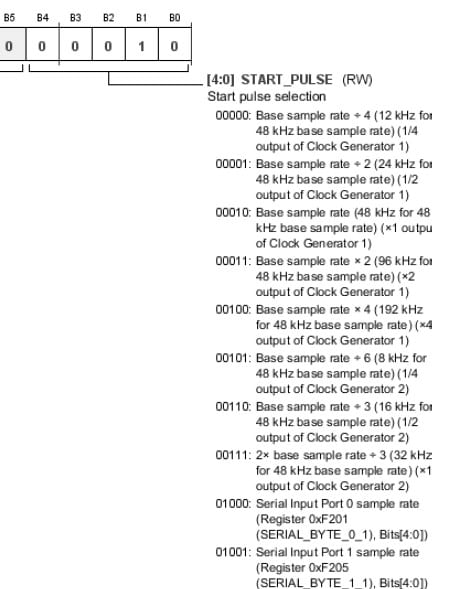
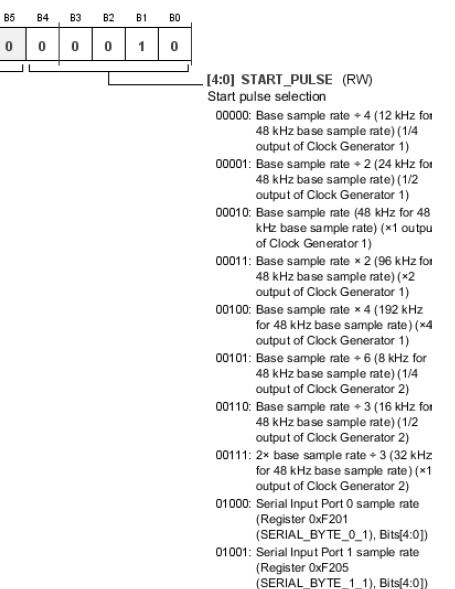
Now I will jump over to the Start Pulse Register settings. Let's look at those options:
There are some more settings below this screenshot but it is not important to this discussion.
You can see that all five settings of Clock Generator 1 are available but only three of Clock Generator 2 and none of Clock Generator 3.
For Clock Generator 2 the settings available are the divide by 4, divide by 2 and the x1 base rate. None of the multiplying rates are available.
So we will need to change clock generator 2 so that the base rate is 88.1kHz so that the divide by 2 rate will be 44.1kHz.
So I set Clock generator 2 for N=98, M=320 and now the base rate for CLKGEN2 is 88.2kHz fs. Unfortunately, the text in the pull down window of SigmaStudio do not show the clock generator that the setting pertains to. So you have to look at this register detail on page 119 of the datasheet. So set it for "2x base sample rate /3 (32kHz...)" and you will be set for 88.2kHz fs for your core rate.
So try the project I attached and see if it works. Sorry I could not fully test it right now. Let me know how it goes.
Dave T

Dear Dave,
thank you for the very detailed explanations.
It is true, in a first stage of the project an ASRC was used. However, the project I'm working on is an ultra-high-resolution headphone system and testing by ear revealed that the ASRC does have a negative effect on sound quality. Not a big effect but noticable with this very revealing system. Therefore this solution was abandoned.
It is a pity really, because the use of an ASRC would have made the design much simpler. Now I had to design/implement a sample-rate-detector (which runs CLK2 at its lowest frequency and counts the number of samples between two rising edges of the clock signal. If interested I could send you the details) and to use different filter parameters for the different sampling rates. But within my design the sonic results are well worth the extra efforts.
As the situation is right now, I will try the solution to send the serial output signal of the DSP back to the WM8804 (in master mode) and have the WM8804 do the conversion into S/PDIF. I will let you know the results.
Meanwhile, should you have an easy algorithm to read the pre-emphasis information on a signal that is input to the S/PDIF receiver of the ADAU1452, please let me know. It would be of great help (Unfortunately the WM8804 in hardware control mode does not pin-output this info :-(
All yours,
Jan
Dear Dave,
today I tested the solution to send the serial data to the WM8804 for conversion to S/PDIF format and I'm happy to report, that this solution works like a charm. No interruptions of the audio signal. No problems with locking. For me this is a fine solution as I don't have to add any extra hardware. The WM8804 already was part of the design.
I will no longer explore the problems that arouse with the S/PDIF output of the ADAU1452. Clearly the present implementation is not optimal but it's up to you whether you like to attack the problem or not.
Please let me express my thanks for your willingness to help. It is highly appreciated.
And should you ever have a solution for an easy access to the (de-)emphasis bit, please let me know. It would save me a lot of extra work and hardware.
Sincerely,
Jan
Hello Jan,
The problem would be solved by using the ASRCs and that is why they are built into the part. But, I certainly understand your reason for not using them. There are plans to include the functionality of reading and writing to registers soon. I am not sure that it will make the March release.
Dave T
Dear Dave,
that's very good news indeed. The ability of reading registers will facilitate my design considerably. I will adapt (simplify) my hardware design accordingly. March or even a little bit later will do fine.
:-)
Jan
We are roughly on a three month new release schedule so the next full release after March would be around June. We often come out with beta versions in between so keep watching for it.
Dave T
Please log in to reply.