DSP / Sigma Studio
Hi,
I want to know how can I remember variables across samples calculation in the DSP processing?
That means I want to have 3 variables that I use each time I calculate the output for a given output:
# Global variables to remember
PHASE, omega
function calcOutput(sample) {
PHASE = PHASE + (omega * 0.0000104)
lastError = sample - cos(PHASE)
gradPhase = -2.0 * (lastError) * sin(PHASE)
PHASE = PHASE + phaseShift
gradTimePhase = (gradPhase)/0.0000104
omega = omega + gradTimePhase
return cos (PHASE) # That's the output
}
That's a very simple function (very quick) that need to use two variables that are being saved across samples. What is the way to do it? (since I don't see the option to write custom code in the ADAU1701 processor I bought)
Audio Signal Processors
dsp
custom code
variables
SigmaDSP Audio Processors
adau1701
Show More
Hello nb123456,
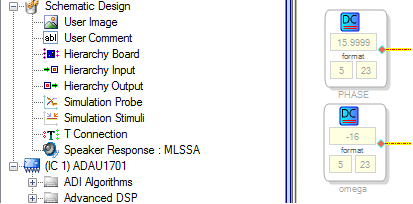
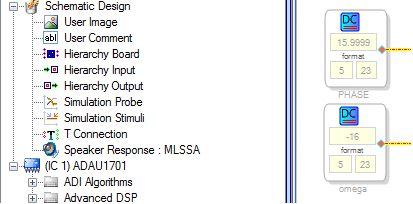
You can insert a value that remains constant across samples by using a DC Source block, as shown below. The values shown here are the minimum and maximum possible with the ADAU1701's fixed-point 5.23 format -- five bits before the binary point, and 23 bits after. The latest SigmaDSPs (such as the ADAU1452) use an 8.24 format, thus can handle larger variables. In any case, you can conceptually handle a wider range by suitably scaling your variables.
Since SigmaDSPs are intended for audio applications, thus both the chips themselves and programming via SigmaStudio favor such use. They certainly can operate in other realms -- I've seen some rather interesting uses -- but generally, the more you can frame your application in audio terms, the more likely you can implement it with SigmaDSP. For your case, I attempted to build a signal flow that could perform your specified function, but quickly ran into difficulties. Perhaps I don't understand what you need, so let me go through a few lines of your C code. For example, the line:
PHASE = PHASE + (omega * 0.0000104)
appears to add the amount (omega * 0.0000104) to PHASE each sample interval. This would eventually cause an overflow, so evidently my understanding is incorrect.
Several of your lines invoke trig functions. There must be a sine lookup table inside the ADAU1701 -- otherwise, it couldn't implement a sine wave source -- but it's not directly accessible within SigmaStudio. Since your code appears to be taking the sine of an increasing number, I thought of implementing this with the VCO block. This would be a whole lot easier if the VCO had two input pins -- the frequency input it already has, plus a phase input pin (which in effect, would give direct access to the internal sine LUT). Unfortunately, it doesn't. Come to think of it, a VCO with Quadrature Outputs is available -- with some clever scaling and mixing of its two outputs, you could achieve a variable phase.
You're right, custom SigmaDSP programming is not generally available. There's no C compiler at all. Within Analog Devices, as well as some certified third-party developers, programming is done in (gasp!) assembly language. The whole idea of SigmaDSP is to free the engineer of such stuff so they can build signal processing schemes in an analog-like environment. Many "analog" functions beyond what's already provided, such as phase-locked loops, modulation schemes, and many more are easily built within its GUI programming model -- and I haven't burnt my fingers soldering these blocks together yet!
Perhaps your application would be better served either with a high-end microcontroller or with a floating-point DSP, such as a SHARC. Both offer a familiar C-programming paradigm.
Best regards,
Bob
Please log in to reply.