Sure DSP - Crossover function
Greetings from Germany and sorry for my bad English.
I am using the Sure DSP with ADAU1701 and Sigma Studio for programming. Everything works fine so far but there is one problem I can´t solve.
I want to build up a standard 2.1 System (2 Sattelite Speakers and one Sub)
Is there any Chance to use one of the Sure Potentiometer to adjust the Crossover Function?
Regards
Audio Signal Processors
SigmaDSP Audio Processors
adau1701
Hello,
It appears from its website that the SureDSP is a ADAU1701 on a board, equipped with pots to set parameters via the -1701's Aux-ADCs, as well as the needed external components. There's no Arduino or other micro with which to control the -1701's parameters digitally, so we're limited to what we can adjust within the SigmaStudio schematic itself. This knocks out adjustable versions of the best crossovers in the toolbox -- the phase-accurate Linkwitz-Riley crossovers. Of course you can place one of these in your project, but the only way to adjust its crossover frequency at runtime is to calculate sets of Second-Order IIR Filter coefficients, then safeload these into your DSP. The -1701 simply doesn't have the horsepower to handle these calculations -- instead, SigmaStudio does them for you at compile time. The way to adjust filters at runtime is with a microcontroller within your system, programmed to do the same thing. If this sounds complicated, it is -- as I've commented elsewhere, it's like a rite of passage for engineers working with these wonderful chips.
So whether you can make an adjustable crossover for your SureDSP depends upon the ultimate application. If your intent is to a design a commercial product, forget it -- such devices do the heavy math with a microcontroller, enabling the best filters. On the other hand, if all you're after is optimizing your home theater, DJ system etc., you have some room to play. There's at least two ways to cram a variable-frequency crossover into a barefoot ADAU1701 -- and both are described below:
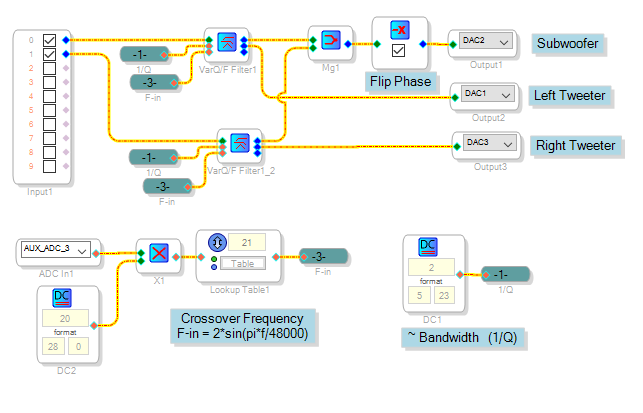
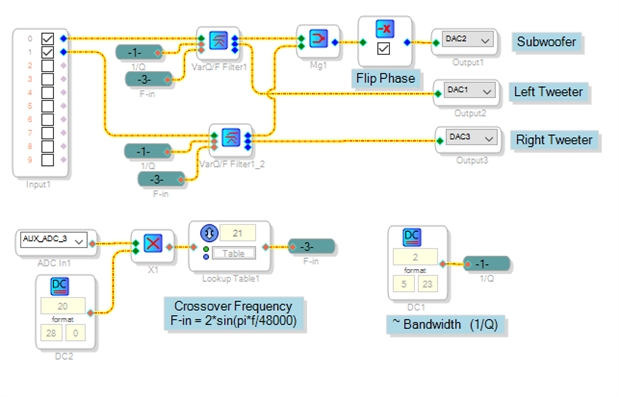
The first and simplest one uses the State-Variable filter as a crossover. It has both lowpass and highpass outputs, plus control pins for "Q" (actually (1/Q) or approximate bandwidth), and frequency. All we need to add is a Lookup Table, which converts the Aux ADC's output (pot position) to match the filter's frequency input.
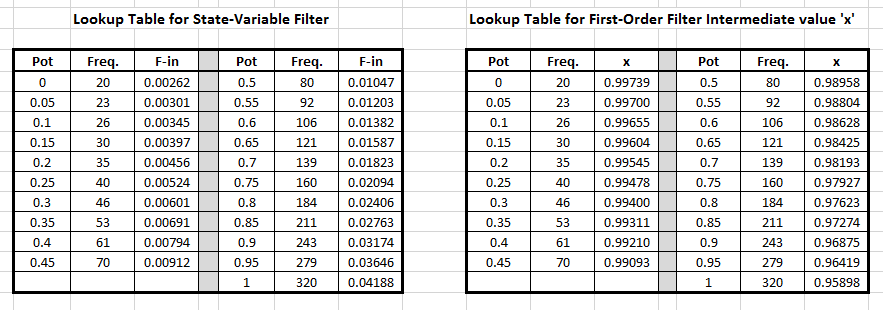
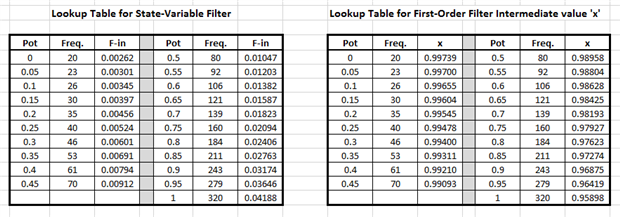
The -1701's Aux ADC puts out a level from 0.000 to 1.000 in the 5.23 format -- the same format used for audio. We multiply this with an integer 20 to feed the lookup table input. The table contains the values corresponding to desired crossover frequencies, in the form that the State-Variable Filter needs. These I pre-calculated with a spreadsheet. This chart shows the frequency range available from the pot, for both this and the following project:
The second method involves home-made versions of First-Order IIR Filters. If your're curious how these work, check out this reference:
http://www.analog.com/media/en/technical-documentation/dsp-book/dsp_book_Ch19.pdf The whole book is quite suitable for anyone wishing to learn some DSP theory from scratch. I used this stuff to pre-calculate the coefficients for the crossover filters in the project, with the same spreadsheet.
This project is way more complex than the first, so its diagram won't fit here -- download it to examine its innards. Its Lookup Table provides the intermediate variable x, from which the DSP calculates the lowpass and highpass first-order filter coefficients for the homemade filters built with Delay, Multiply, Signal Add, and Feedback blocks. Because first-order filters have a sloppy frequency response, I cascaded two for each channel -- making a 12 dB per octave crossover. You can do the same with the State-Variable filters if you wish.
Although both these crossovers could be modified for 96 KHz operation, I don't recommend it -- DSP filtering for bass frequencies involves precise numbers out to many decimal places, which become even more demanding at higher sample rates -- and unfortunately, both the State-Variable and the homemade filters are single-precision. If you desire more phase control than the simple 180 degree inversion in these projects you could make a phase control using the Hilbert Transform block -- for an example, see
How to use sigmastudio software to realize an external potentiometer to control phase, the phase of the range is 0 ° to 180 °?
I tested these projects on a stock EVAL-ADAU1701MINIZ board -- you may need to modify them according to what's where in your SureDSP board. Have fun with your DSP!
Best regards,
Bob
What about a much more simple version with a few lookup filters to design a phase-accurate Linkwitz-Riley filter out of two butterworth filters?
For a LR filter you need two butterworth filter in a row, if you use loopup filters you can change the crossover point with a potentiometer. It is not infinitely variable, but with 30 different points there are almost no steps audible.
In this design, the four lookup filters are controlled by one Potentiometer, so all the filters change at the same point.
This design works great with my sureboard with ADAU1701.
If you need more informations, let me know, i am also from germany
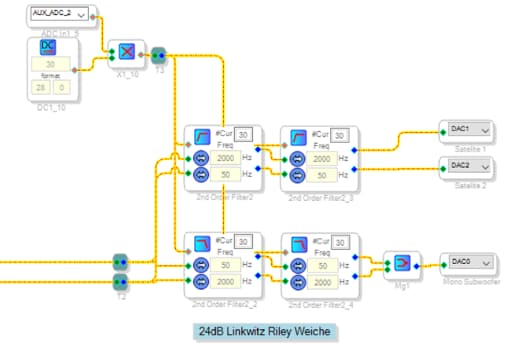
Hallo IPv6,
eventuell können wir uns auch über andere Kanäle kurzschließen?
Grüße aus Bayern
José
Hello IPv6,
Great idea! A fine workaround for the lack of an "index-crossover" block in SigmaStudio!
Might it save instructions to add L and R channels before the woofer filter instead of after as shown? Or is there an advantage to having separate filters for the low-frequency channels before mixing them at the subwoofer DAC?
Best regards,
Bob
Hi Bob,
Thank you!
To be honest, i got this project already finished like this, it was designed for stereo 2-way speaker systems (therefore the crossover frequencies between 50 and 2000 Hz).
I just modified it quick so it fits the needs of Jose_M (2.1 system).
I don't see any advantages in two seperat low frequency channels, so merging the signal before the filter could safe some instructions.
Best regards
Dear Bob & IPv6,
thank you very much for your great response. erything works great.
@IPv6 Sehe ich das richtig das die beiden Frequenzen die man in deinem Setup eingibt den Spielraum definieren, in dem dann der Poti arbeitet?
Kind Regards from Bavaria.
José
Hi IPV6
thanks for your post - I tried this and it works well for me - I have a pot on ADC controlling all 4 elements of my crossover filter creating a LP/HP LR4 filter, The question I have, is I have adjusted the crossover by the external potentiometer (I have limits 1.5kHz//3kHz) and now I have a good setting I am just trying to figure out how to actually find out the value that my pot has 'selected'... I had a probe and a stimulus connected to the filter but it does not seem to work (it's blank) when using lookup filters (it doesn't seem to 'see' the potentiometer values). Is there any way I can check the frequency that the crossover is running at, or somehow get the probe window to display in realtime while the filter frequency is being set by the external potentiometer...?
thanks in advance
Jason
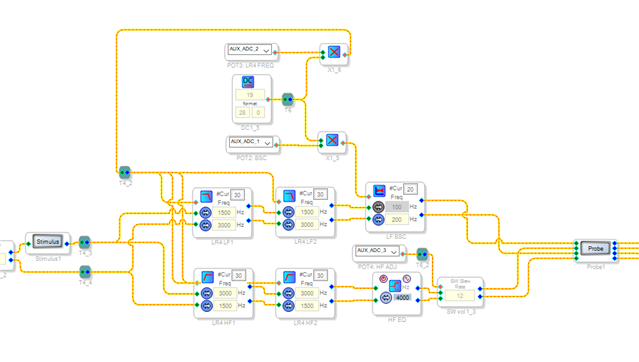
Hello Jason,
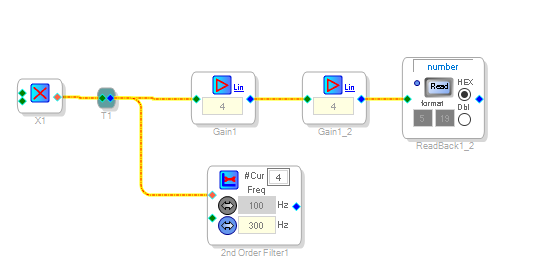
The index filters will work using an integer value starting with zero. The core has 28 bit wide data and on this part the Readback is only 24 bits. So the bottom four bits are truncated. So to "see" those you have to multiply by 16 to see those lower bits. Then the readback will tell you which filter number is selected.
Here is what it will look like:
( I placed a multiply block so you know where in your program to place this. )
The Probe feature does not work because SigmaStudio does not know which filter is selected in a runtime controlled object like the index controller filter.
One other observation. You added an additional filter with only 20 filters and all the others have 30. You must limit the value going to these filters to a valid value. If it is 20 filters then the value must stay between 0 and 19. If the other filters are only using 20 filters then save yourself some memory by reducing the number of filters from 30 to 20.
Dave T
Please log in to reply.