Controlling the ADAU1701 using a microcontroller - documentation?
Hi!
I'm doing a project where I've created a simple project in Sigma Studio, and added a few components, like a tone generator, volume, mute, single band EQ and mute. I can adjust all these block in Sigma Studio, but I want to control these using a microcontroller over i2c; an Atmel AVR.
By using the capture mode in Sigma Studio, I've been able to figure out what registers and data simple blocks like mute and volume writes to the DSP. However, blocks like clickless volume and EQ doesn't just write data to one registers, but six! The data that gets written is also quite cryptical to me. What does 1.00562930107117 to address 0x06 means?
Does there exist some kind if documentation that tells the user how registers the different blocks are writing to, and more importantly, what is the actual content of each register?
In my current setup, when I adjust my single band 100 Hz EQ to the gain from 9.8 to 10 dB (one step), A total of six addreses is written to (see attached pic). I have no idea which of these register contains parameters like Q, "regular" gain, dB gain and EQ frequency. How can I figure this out? Does there exist some kind of documentation on this? That would be really helpful.
(Capture data is one step on the equalizer, 9.8 to 10dB)
Audio Signal Processors
sigma studio
microcontroller
avr
arduino
registers
SigmaDSP Audio Processors
adau1701
Show More
ADI had a powerpoint about microcontroller controlling the DSP's via I2C, I'm not sure where it is.
But ultimately it's good to understand the protocol if possible. Sniffing and reproducing values as if from SigmaStudio is a reasonable approach. The system files generated do include header files so you can write data to specific blocks by name, rather than address (which will change).
As far as understanding the specific register parameters for filters and such, this is unfortunately not well documented. In general, though, you'll be sending filter coefficients directly, not frequency/Q data. They are usually second order sections, and the coefficients will be labeled a, b, etc. Expanding the "parameter name" column might be instructive. If you need to adjust frequency only, you need to have your microcontroller handle the filter coefficient calculation.
Hello mcudev,
The ADAU1701, as do most of our SigmaDSP processors, do not calculate filter coefficients inside of the DSP. The GUI you see in SigmaStudio for phase/frequency/Q etc, are all controls within the SigmaStudio program on the PC and once you select and change something, it will calculate the filter coefficients and then download them to the DSP using the Safeload feature to allow stable changes of filters while the DSP is running. Watching the capture window will help you see what is going on. So your MCU has to do the same thing. Calculate the filter coefficients and then send them to the DSP.
There are some EQs that are handy if you do not want to do this. The index controlled filters are really great. You setup several different curves and each one is assigned an index number. Then all your MCU needs to do is send a new index number and the filter is changed. The downside is that you need a lot of memory to hold all these filter coefficients if you setup a large number of curves.
Now in our newest Sigma300 core, we have math accelerators built in so those parts have a filter choice in the library that will calculate the coefficients and all you send is the basic parameters for the filter. It does take up some MIPS to do this but it is a great tradeoff for most applications.
So have a look at this post for some documentation on how to proceed with the ADAU1701. These docs are for a different part but they are very similar for what you are trying to learn about.
https://ez.analog.com/docs/DOC-1806
There are other posts on the forum about this subject.
Dave T
Watching the capture window will help you see what is going on. So your MCU has to do the same thing. Calculate the filter coefficients and then send them to the DSP.
Does there exist any documentations on these algorithms, so I can calculate them on the go in the microcontroller, rather than having a look-up table? The application isn't time critical, so calculating these values using the MCU will not be a problem. I've already found a pre-made function that takes a float number as parameter, and returned the four-byte hex values the DSP takes.
Oh, while I'm at it; does there exist such a thing as "snap to grid" in Sigma Studio? I'm used to PCB design, and it's really annoying not to have a grid where the block and wires can snap to.
Hello MCUdev,
a few hints to help you with your question.
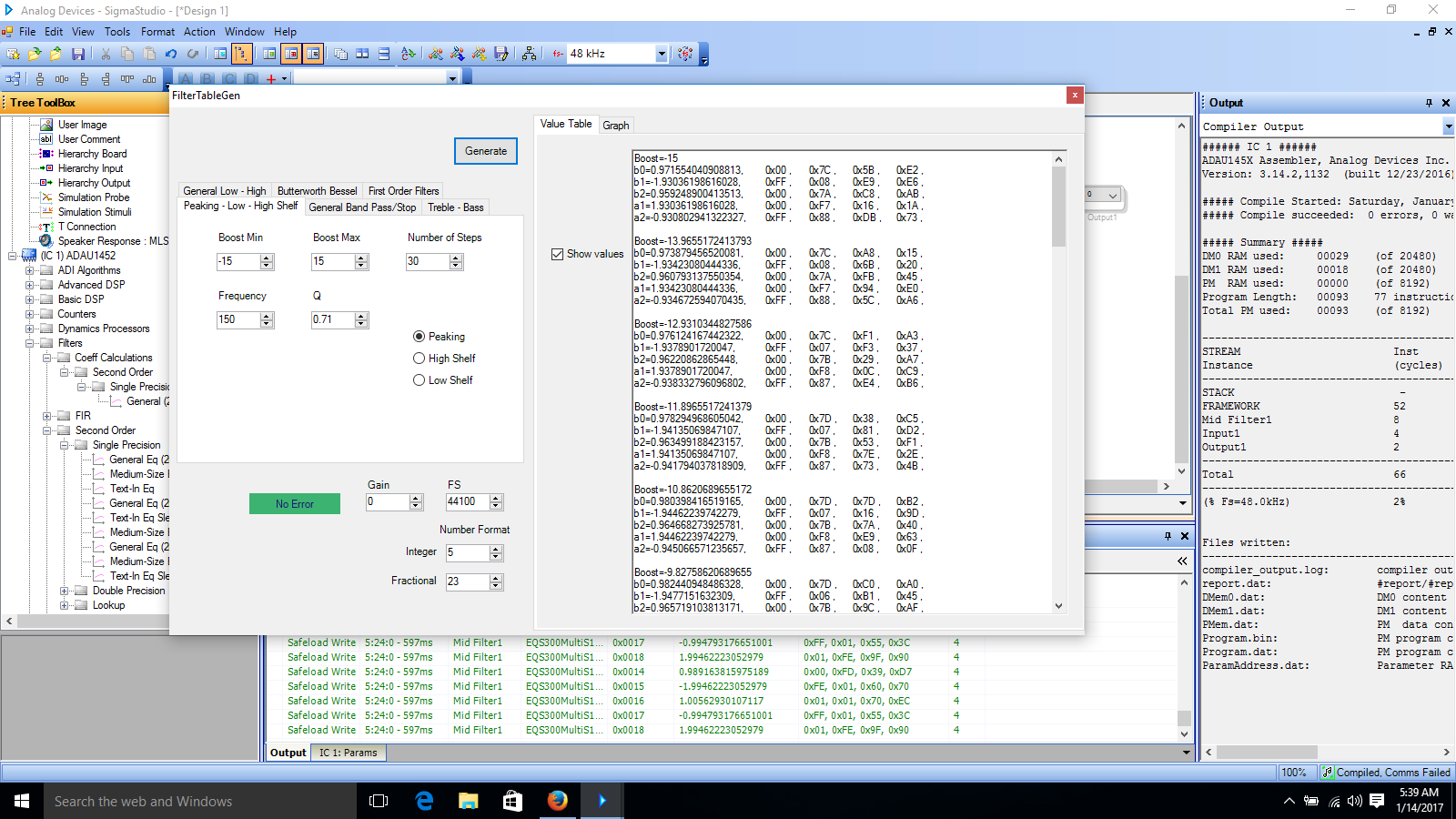
It looks like those filters are general 2nd order iir filter implementations - so that's pretty straight forward. I don't know how familiar you are with filter design but in general there are not too many options to implement a 2nd order iir filter (Digital biquad filter - Wikipedia ). And actually there is no difference between a shelving, band-pass, or peak filter structure except the value of the filter coefficients itself. To get an idea how the filter coefficients should look like you can use the sigma studio filter generation tool (see picture). If you don't have too many options you could also copy those values to a lookup table.
However since you want to calculate the filter in your controller on the fly anyway I would recommend the following very simple approach:
Don't use the implemented filter-block (since you're anyway not using the Slider and the UI) and implement the iir filter directly (as you can see it is only a handful of delay, multiplications and additions). The structure (DirectForm 1 or 2) is most likely at the beginning not really relevant for you. I think that's also a good way to understand what the filter in SigmaStudio is actually doing.
(Pictures: wikipedia.org)
As you can see in your example it is actually only 5 filter-coefficients (that's because a0 = 1 and you can ignore it).
Putting the filter together should take you only a few minutes.
So the only remaining task is to calculate the coefficients: To keep it simple at the beginning I would recommend to use a bilinear transformation. That's a very easy and direct way to transform an analog filter design into digital filter coefficients: Here's some example (the shown matlab code explains it very nicely!): Peaking Equalizers And that's actually pretty much it... So now you only use the I2C to send your coefficients and overwrite the memory address and it should work. BTW... it is possible - but I haven't tried that... that you can also use the calculated coefficients from the billinear transformation directly with the filter block in your example and you don't have to go the extra route to implement your own iir - if it's a standard 2nd order iir it should work without too much tweaking.
An easier/other way to find the memory address for your coefficients is to use the SigmaStudio export function. One of the exported files (I think the xml?) Will show you very nicely the memory address, actual applied value and also data-format of your block. When you change your DSP code those memory addresses might change - so make sure you check them every time you change your DSP code and adjust them in your controller code. You could also use the xml file to do this automatically.
Hope that helps & Good Luck!
...or to keep it very simple you read this:
Calculating Filter Coefficients to Store in a Microcontroller
Alex
Hi all,
Why do we need all these numbers to make one filter? The filters work by adding and subtracting several delayed versions of your input signal to achieve the desired result. The coefficients regulate their respective amounts. The math involved is too much for a -1701, as well as over my head to derive -- but folks far smarter than me have derived cookbook formulas to obtain these coefficients using ordinary log & trig functions. So you have several ways to go:
If your device only needs to select from among a few curves, Dave's Index Filter suggestion works well.
For a larger number of still well-defined filter choices, pre-calculate the coefficient sets (perhaps using the Coefficient Generator) and store them as a lookup table in your micro -- safeload them as needed..
If you need fully arbitrary settings, have your micro calculate your coefficients on-the-fly and safeload them.
Here's a few of the posts which may prove helpful with this:
Calculating coefficients with a downloadable spreadsheet:
Why do I see only 5 coefficients change when I adjust Medium_Size_EQ?
Safeloading coefficients (and parameters generally) into a ADAU1701:
Real Time Control TUTORIAL: SAFELOAD, Fixing and Breaking variables
The SigmaStudio Toolbox Wiki has some info on where the coefficients come from, as well as how the various blocks work:
SigmaStudio Toolbox [Analog Devices Wiki]
SigmaStudio is designed for use by engineers with or without DSP knowledge, yet it's even more rewarding for those who know, or are willing to learn, just a little DSP theory. Here's an excellent, approachable resource:
The Scientist & Engineer's Guide to Digital Signal Processing, 1999 | Education | Analog Devices
Best regards,
Bob
I don't know how familiar you are with filter design but in general there are not too many options to implement a 2nd order iir filter
Absolutely no experience. I'm just the poor guy that got the task to implement a microcontroller DSP library for adjusting the parameters.
Thanks for all the info everyone! I'll dig deeper into this on monday The code I'm creating is for controlling a digital amplifier w/ an ADAU1701, using an RS485 bus. The microcontroller would have to be able to change parameters on many various blocks, so if this calculation turn out to be too time consuming, I might just stick with a lookup table, stored in the micro's flash.
I know this is a total newbie question, but here it goes: What is the difference between a 1st order and a 2nd order equalizer? I found a C library (Github) for controlling some of the DSP functions, and I think the EQ1stOrd and the EQ2ndOrd functions might be helpful implementing and actually understanding all this.
.. Which brings me to the next question; why haven't anyone (Community, Analog Devices inc.) created a microcontroller library/API for doing such things? Isn't microcontroller interacting a common thing with Sigma DSPs?
Hello,
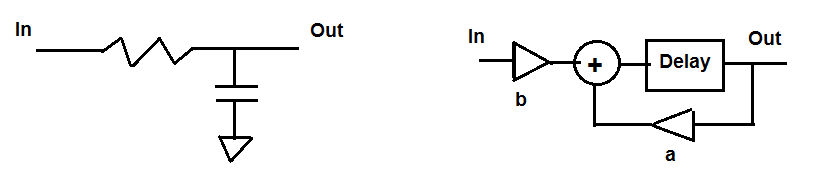
I'll use the term filters as they can be used for many more things than audio EQs (which are filters). The familiar RC analog lowpass filter at left below is an example of a first-order or single-pole filter. It does lowpass filtering with a 6 dB/octave slope -- not a very sharp response. Switch the R and C to make a highpass filter. Single-pole filters inherently cannot perform bandpass or parametric EQ functions at all, because they have only one energy storage element (the cap). At right is the DSP equivalent of this filter, using only a one-sample delay, two gain (coefficient) settings, and an adder. Like its analog counterpart, it can only do lowpass as shown, or can be re-arranged for highpass. Still no bandpass or parametric EQ functions.
Second-order analog filters have two energy storage elements, a capacitor and an inductor (or more commonly, two caps with amplified feedback, an "active filter"). This allows for the resonance needed to achieve the more complex functions. Alex@@@123 shows an example second-order digital filter above -- notice it has more delays, additions, and coefficients. The second-order filter, with the right coefficients, can do all the usual EQ functions.
It seems as if interfacing a uC to a SigmaDSP is a rite of passage for engineers; as you have observed there's little in the way of cookbook libraries out there. It appears that the folks at AidaDSP have done some good work in this direction, and as a matter of fact, as part of this community -- see Aida DSP project is born I didn't check all their code, but their first-order coefficients are spot-on. One minor math issue which pervades much DSP literature is the use of the number 2.7 for the natural log base e ~ 2.718...... I'd use the actual e^x function if available in your C compiler, or at least several decimal places for e.
You can do it, as others have before you!
Best regards,
Bob
i like a lot the "interfacing a uC to a SigmaDSP is a rite of passage for engineers.." :-)
moreover this forum is really showing the "oral transmission" between those "in the know" and newcomers.. (who'll become experienced in turn).
so, let me add my own experience about this topic. me, i'm dealing with an ADAU1452 setup and finally i've been able to make the EQ/biquad/safeload setup working.. i found a couple of pitfalls that would like to share, to get a feedback, too.
1. the "value" to be put on a ADAU1452 DSP param for transparent pass (no gain, no att..) is 0x1000000 (i.e. 1b<<24) and not the traditional 0x800000, (1b<<23), as shown in a lot of example referring to ADAU170x device. (this can be easily checked on Sigma Studio, making up a couple of designs each one with those components and have a look at the I2C regs written when switching some selector module).
2. the above issue (value format difference between ADAU1452 and ADAU1701) hit me hardly when i tried to use the examples found on the web for biquad coefficients on parametric filters.
the provided sample fn is "double coeffs[] = f(double freq, gain, Q)" and is working ok, then a conversion To523() format is supposed to bring out an "integer" value ready for the DSP biquad registers.
anyway the net effect have been a 6dB x 3 attenuation (as i've three stages for BASS MID HIGH, chained..)
everything has started working smoothly as soon as i added a *2 to each of the 5 biquad coefficients, the 5 "32 bit words" to be written in the DSP reg. [*]
this lead me to think that ADAU1452 has a 4.24 format instead of the typical 5.23 one. let me say it's hard to believe, because can't find info about this topic, on the web. it DOESN'T look like a trascurable bit of info!
the only place where there's someone talking about a 4.24 format for SigmaDsp is here, but looks a bit casual..
freeDSP - an open source 2-in 4-out digital crossover board - Page 6 - diyAudio
if this is true, this would lead to the consequence that the "headroom" for positive gain is 4 bit only, i.e. 4*6dB = ~24dB. that's still enough for our use case, anyway.
sorry for the lengthy reply; could someone shed some light on the topic. am i over-sighting grossly something?
bests
Andrea
[*] also the higher 4 bits (pos 31-28) raise some concerns if they are meaningless or not for ADAU1452, expecially on biquad filters coeffs where you could manage "negative" numbers. somewhere i read the sign bit is still the bit at pos 27 (for a DSP like ADAU dealing with 28 bit wide values), but in my few tests (and looking at SigmaStudio prints on I2C transactions), i see the 4 bits "should follow" the sign bit too. and this way audio works!
Hi Aventuri:
The datasheet
page 76 "SigmaDSP Core" and other sections talk about the Fixed Point Number used in it's core. The Sigma300 cores (145x and 146x) use a 8.24 fixed point number. This is different from the 5.23 number used in the Sigma100(1940,1701) and Sigma200 (1761, 1781, 144x) cores.
There is evan a "Numeric Formats" section on the datasheet.
Hope this helps.
Regards
Miguel
Please log in to reply.