SIGMA STUDIO ADAU1701 TIMER
hi,
I realized this simple cyclical timer, I should modify it so that you can start by pressing a button, and with the same button you can stop at any time.
Some idea.
Thank you
Audio Signal Processors
sigma studio
SigmaDSP Audio Processors
adau1701
Hello Piero,
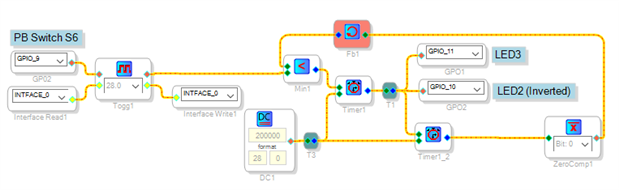
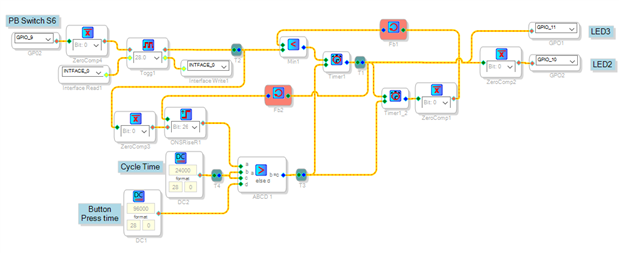
You can add the highlighted parts shown below to your timer circuit. The GPIO Conditioning block Toggle On-Off provides the Push-ON, Push-OFF function. You must connect the Interface Read and Interface Write blocks as shown. The Min block forces your timers to reset when the Toggle output is low, while allowing them to free-run according to your original design when the Toggle output is high.
Best regards,
Bob
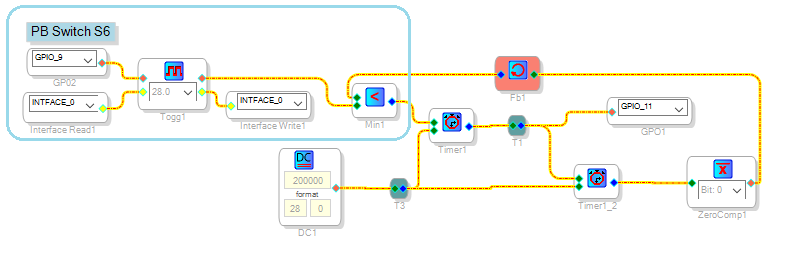
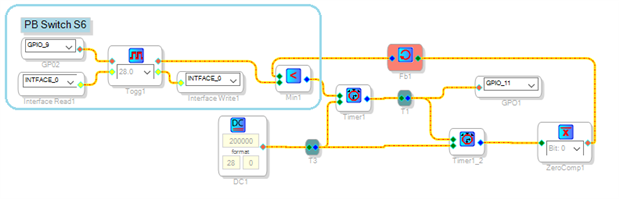
Hello Bob, thanks for the reply and good new year.
The design you posted works perfectly, but yesterday I forgot
to write some functions that are necessary.
If you can offer a new design with these features I thank you
in advance.
I now know SigmaStudio well enough to make filters and modulations,
but still little to utilize the logic in an optimized way.
Since my sampling is at 96 kHz and therefore the number of
instructions is halved, the optimization is always a priority
This is what is needed.
When pressed for the first time the button, LED3 it should go
off after a second and must immediately turn on the LED2.
At this time the cyclic counter starts working, so every X
seconds will perform the ignition reversal LED.
In any of the cycle time the button is pressed again, it is
necessary that the 2 LED will reposition themselves as when
the circuit is powered up for the first time.
Thank you
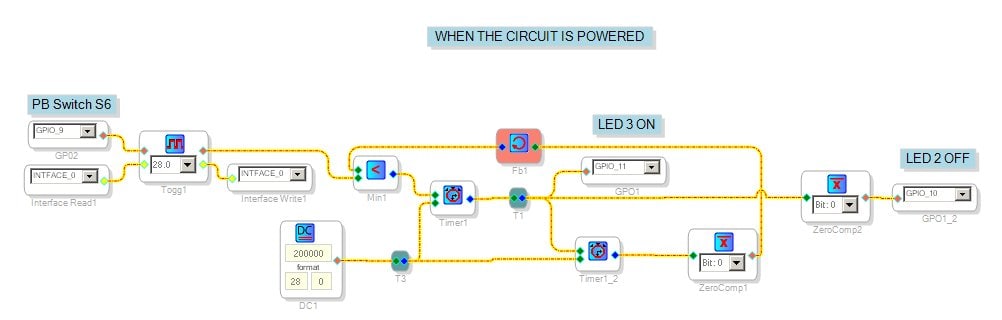
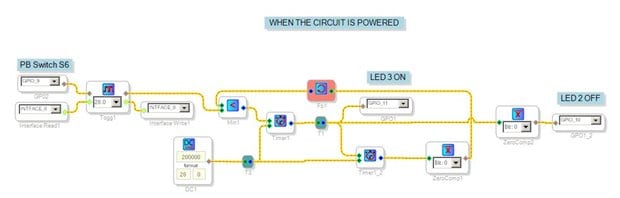
Thank you Bob and congratulations for the cat. Quietly and when you have time if you can do something for your cooperation we will be greatly appreciated.
Hello Piero,
As you're aware, you've got limited instructions at 96K and the ADAU1701 has no multi-rate processing capability. This makes it inefficient to use precious 96K instructions for slow-moving manual inputs. If your application is very tight on instructions, consider including a small microcontroller in your system to handle the buttons. It would provide simple ON-OFF GPIO controls to your -1701. In turn, the -1701 won't need a lot of instructions to work with these direct inputs. Some PIC processors come in very small, inexpensive packages. Choose the right microcontroller, and you can also have it boot up your -1701 instead of running self-boot. In other words -- have two processors, with each doing what it does best. Reminds me of my cat, who quite efficiently does what he does best:
Nonetheless, there are valid reasons for a one-chip design. Let's see how compact it can be made in SigmaStudio. It will take me awhile, what with my regular job and such. Thanks in advance for your patience.
Best regards,
Bob


Hello Bob,
You are always very kind, the timer works well, however because of my
poor English I have not explained the problem well.
The moment the button is pressed must wait 1 second before the 2 leds
change of state, when this second wait is finished the cyclic timer
begins to run.
If I change the time of the cyclic timer the second standby when you
press the button should not be changed.
At any time by pressing the button, it all comes back to the initial
state.
By the number of instructions can get to 125, audio is optimized and if
the logic is in the 125 instructions I still remain 50 instructions
available in case I were to add something, this means that the timer
can also have more than 125 instructions.
The hardware of the project is yet to be realized so no matter how it is
set GPIO 9 - 10 - 11
Thank you
Hello Piero,
Does your present circuit work as desired, so all you need is to reduce instructions? If so, then we can use it as a reference to compare with any alternative circuit, which would be helpful.
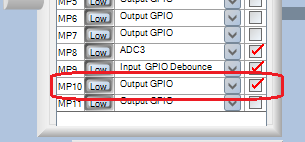
You'll save a few instructions by moving the inversion of ZeroComp2 to the GPIO output, as shown here:
Please let me know whether this operates properly, so I can start thinking about how to further reduce its 74 instructions.
Best regards,
Bob

Hi Piero,
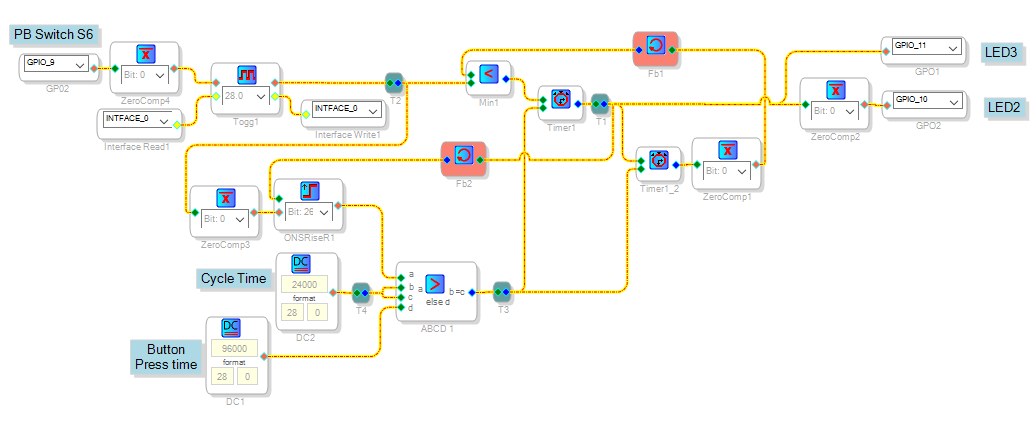
It appears that you're looking for an initial one-second delay, then a separately adjustable cycle time. The circuit shown below adds this feature:
OneShotRiseR1 keeps track of which state the circuit is in (wait mode or cycle mode). ABCD1 selects which DC source the timers use. Though a MUX would also work here, the ABCD Comparator uses fewer instructions. This is a very handy block for all sorts of logic problems.
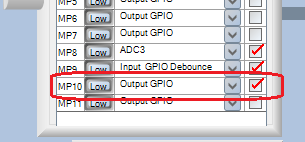
I restored your output inverter in case you need the negated signal elsewhere in your project. When I first tested this circuit as a self-booting project, it would wake up in its active state (cycling the LEDs). Changing the GPIO9 Register Configuration to non-inverting, then explicitly inverting this input in the schematic, fixed this problem. It's not as pretty as I would like, but at 109 instructions it fits within your budget.
Best regards,
Bob
Hello Bob, thanks
The two times are not independent and do not understand why,. should be.
If you increase the length of time of the cyclic timer to 30 seconds, which is what I need to, also reducing the other's time timer you can not have a waiting time of one second after pressing the button, this time increases so not understandable. I use the SigmaStudio 3.14.1 Beta version, it is possible that this version has some problem?
thanks
Hello Piero,
No, your beta version of SigmaStudio is not at fault. I tried the project again after changing the Cycle Time to 30 seconds, and sure enough, it delays the start just as you said. And I'm using the stable SigmaStudio version, 3.13. My testing had the Cycle Time very short -- which effectively masked this problem.
Initial troubleshooting suggests that possibly, the Timer blocks don't respond as expected when changing their count inputs on-the-fly. Previously I have only used these timer blocks with fixed counts. To test out this theory, I'll go ahead and build some trial test circuits to explore their exact behavior. This is always a good idea when working with an unfamiliar block, or when using any block in an unfamiliar way.
What I'm hoping to do is to find a way to do the steady ON-OFF cycles with only one Timer block instead of two, since the desired ON and OFF times are the same. Then I could dedicate a second Timer block to just the one-second start delay. Or possibly come up with another method. Sometimes you don't see a good solution until diving in and playing with it.
Best regards,
Bob
Hi Piero,
I believe the attached project works as desired, please try it and see. It uses 131 instructions, hopefully it will fit.
Best regards,
Bob
Thanks Bob, works perfectly and also the number of instructions is fine.
I'll have to invite you to a fabulous grilled fish or meat, it depends on your preferences.
We all owe Bob a nice meal!! KJBob, I think you could eat dinner for a year on other forum users tabs!
Dave T
Aw, thanks piero and DaveThib. Like many others here I'm happy to help where possible. As for meals, I'm a herbivore that eats the tops from tall trees (only kidding). You can see more of my silly dino-themed "art" (in quotes since I'm not an artist) here:
Bricabrach's Art Thread | The Official Dinotopia Message Board
Best regards,
Bob
Please log in to reply.