How to design a FM modulator using ADAU1401?
Dear all,
I am trying to use ADAU1401AEBZ board to design a modulator. I finish the AM modulator already, and try to design a FM modulator next. I usually use a VCO IC to design FM modulator. Is there any way i can do the same thing using SigmaStudio? I found the VCO in the software is very simple. I don't know how to modulate the message to the carrier. I think maybe i can change the VCO oscillating frequency and then add a message at the input pin of VCO. But i don't how to change the oscillating frequency.
Could you please teach me how to design FM modulation or give me some suggestion?
Thanks,
Shu
Audio Signal Processors
adau1401
fm
SigmaDSP Audio Processors
Hello Shu,
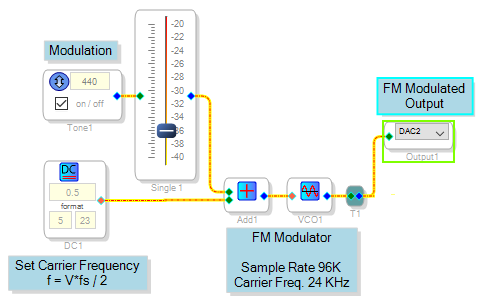
Here's one way to do FM modulation with a VCO. The VCO's output frequency vs. input "voltage" is: f = V * fs / 2. Thus, set a DC source to feed the VCO according to the desired carrier frequency: V = 2 * f / fs. For example, with a sample rate of 96 KHz, use a DC source of 0.5 to get a carrier frequency of 24 KHz.
Then add in your modulating input. Your deviation D is related to the modulating input V by the same VCO relationship:
D= V * fs
Best regards,
Bob
Hi Bob,
Thanks a lot!
I have one more question. I want to show my project to my boss. I have to connect the computer and the board together always. If I disconnect the computer and power off the board, i cannot get the design and results when i power on the board. i have to active and download my design to the board again. Is there any way i can show my design directly after i power on the board?
Thanks,
Shu
Hello Shu,
The ADAU1401's self-boot option allows it to boot its program from an external E2PROM. Your -1401A evaluation board includes this E2PROM at U14. For instructions on loading your compiled SigmaStudio project into the E2PROM and setting the eval board to self-boot, please see page 7 of the ADAU1401AEBZ User Guide:
http://www.analog.com/media/en/technical-documentation/user-guides/UG-072.pdf
Best regards,
Bob
Dear Bob,
Thanks very much for your help.
I can use the self-boot option now. But I have to use the USBi at the same time. I mean If I only use the power supply J14 and disconnect the USBi, the self-boot doesn't work. If I connect the USBi to my computer or any 5V source, the self-boot work well. Could you please tell me why i have to use the USBi for the self-boot option or what is the function of the USBi for the self-boot. I will design a circuit for the 1401A later, so I don't want the circuit does't work because i miss some necessary condition.
Thanks,
Shu
Hello Shu,
Sorry to take so long, but I had to try it myself to work the problems out. The troubles appear around LK7, the Write-Protect jumper on the -1401 Eval board:
Connect the jumper in order to write your compiled code to the E2PROM -- Jumper Off = Write Protected. This is the opposite of what UG-72, the ADAU1401AEBZ User Guide: says!
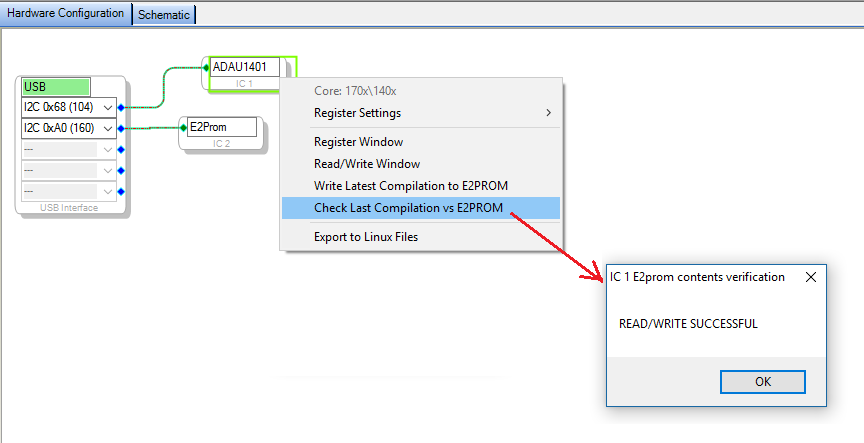
Check your E2PROM contents by selecting the option shown below:
Set your Self-boot switch S3-1 to the left to choose the self-boot option. Also disconnect the Write-Protect Jumper LK7 -- I could only get self-boot to work with this jumper Off.
Your project should now self-boot with the USBi disconnected.
The above-mentioned User Guide includes the board schematics. I also suggest you download and read the Application Note AN-923, Designing a System Using the ADAU1701/ ADAU1702 in Self-Boot Mode.
Best regards,
Bob
Hi Bob,
The self-boot option work well now. I found if I disconnect the USBi only from computer and keep another side on the board at J8, the project still cannot self-boot. But if i disconnect the USBi from the board at J8 directly, the project self-boot well. I cannot explain this, i guess the USBi mini board affect the self-boot of the main board.
Thanks a lot. I can design my circuit now!
Shu
The USBi is capable of resetting the DSP(s) on your target board. It has a 10K pullup on its BRD_RESET line, which becomes a pull-down when no longer powered by your PC. As a result, removing the USBi's power may reset your DSP. Avoid this by disconnecting the USBi's business end before unplugging its USB cable from the PC.
Bob
Hello Bob;
I'm working on this project right now. What kind of output will we see on the oscilloscope as a result of this circuit? I just want to make sure the output is correct. Thank you from now.
Good work,
Beste
Please log in to reply.