How to measure the total time from input to output in the SigmaStudio?
Hi all,
I have a question is about how to measure the total time from input to output when there is a buffer before the limiter?
My question is: if there is no buffer before the limiter, the signal can not limit perfectly, because the signal enters to the limiter too fast, so placing a buffer before the limiter will solve the issue.
But I want to know one thing, does the buffer will delay output the signal?
If my system is mono, maybe I can not feel the delay, but if I use n-channel, that delay may cause the sound not synchronized.
Question is : Buffer for limiter has impact on delay, but how many?
So I want to measure the time, does the SigmaStudio have the block that I can put at the tail ( before output ) to get the total time when signal from AP signal input?
Thanks!
Regards,
Alvis.
sigma studio
total time measure
measurement block
audio measurement
Hello Alvis,
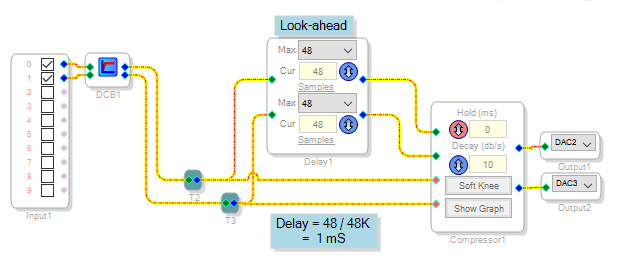
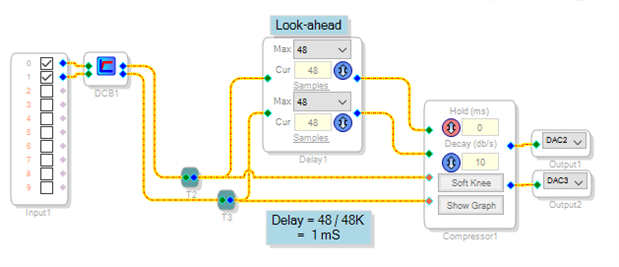
When you add a look-ahead delay to a compressor, it directly increases the overall system latency. Thus in the example below, one millisecond of extra latency has been added.
The system latency depends on which processor you're using, the sample rate, and the input-output path. For example, at 48 KHz sample rate the ADAU1701's latency measures 1.07 mS from analog input to analog output. The latency from I2S input to I2S output is only 0.063 mS.
The thread latency ADAU1701 describes a way to measure system latency without using test equipment.
Best regards,
Bob
Hello Alvis:
Please make sure your hold time also matches the look ahead time (samples) that you use. If not, depending on your decay rate, it is possible that your compressor might start recovering (and therefore overshooting) before the signal being measured goes through.
Please see attached presentation
Regards
Miguel
Miguel, thank you for this clarification. In addition, the Hold feature can be useful even without a look-ahead delay. For example, some applications call for a peak compressor with relatively fast attack and decay dynamics. In this case I suggest using a Hold time of approximately 1/2f, where f is the lowest audio frequency presented in significant quantity to the compressor. Thus if this minimum frequency is 40 Hz, use a Hold time of 12 mS. This prevents the compressor from beginning its recovery before the next waveform peak comes along, virtually guaranteeing no audio-frequency gain modulation (and thus, no added distortion). Another way to reduce such possible distortion is to minimize bass frequencies in the sidechain by inserting a highpass filter (about 50-100 Hz) before the compressor's sense input. This filter also minimizes the annoying effect of a bass beat ducking the audio level. However, it does allows higher audio peaks to exit the compressor -- which may not be appropriate, for example, in a radio transmitter or similar application.
With SigmaDSP it's so wonderful that we can add refinements such as sidechain compression without budget-busting additional circuitry!
Best regards,
Bob
Hello Mike and Bob,
Thank you for replying this question! You guys information are very useful for me!!
I will try it out and to find the great solution for me !!
Best regards,
Alvis.
Please log in to reply.