Delay noise when controlled by aux adc
Hello,
i've just found that, when i try to control a delay time parameter through an auxiliary adc input with a potentiometer connected, i get a noisy output; i don't get any noise when i control the delay time through Sigma Studio.
My suspect is that this is happening because the DC voltage at the ADC input of ADAU 1452 is slightly changing, however i 've found this by observation and experimenting but i don't know the reason behind it.
So, is this correct or there is more to it? What can be done to fix it?
Thank you
Omar
delay time
Hi Omar:
Can you please add the SigmaStudio schematic that you are looking to use?
Thank you
Miguel
Hello Omar,
If the DC value is changing then the delay time is changing and if it is periodic and fast enough then it will be audible.
I guess there are several approaches you can try.
In a thread you started, you and Bob did come up with an interesting method of detecting when the pot is changed and you setup a threshold to make it hold until there is enough change.
https://ez.analog.com/thread/89076
So that is one approach.
Another one would be to divide down the ADC output (thus dividing the noise) and then adding it to an offset to place the control in the range that you want your delays to be used. If you need the entire range then this will obviously not work.
Another method is to use a look-up table to map the ADC output to a number of discrete outputs. So you setup the table with enough steps to perform well in your application and then the ADC values moving around are less likely to dither between steps of the table. You could also implement a hold of the data.
How did you figure out it was noise? You can try an experiment where you route the ADC output out of a serial port as audio and look at it on a scope. You would have to look at the output of the DAC before any coupling caps. You also could use a DC block on the ADC output and then gain it up to listen to the noise on the line. An FFT might be useful if you have an audio precision. Otherwise, just using an RTA in SigmaStudio may give you some information. I suspect you might be picking up 60Hz from the room so looking at your wiring and grounding may help to find a solution.
Dave T
Hello Miguel,
schematic is a simple serial in --> delay --> serial out
Thank you
Omar
Hello Dave,
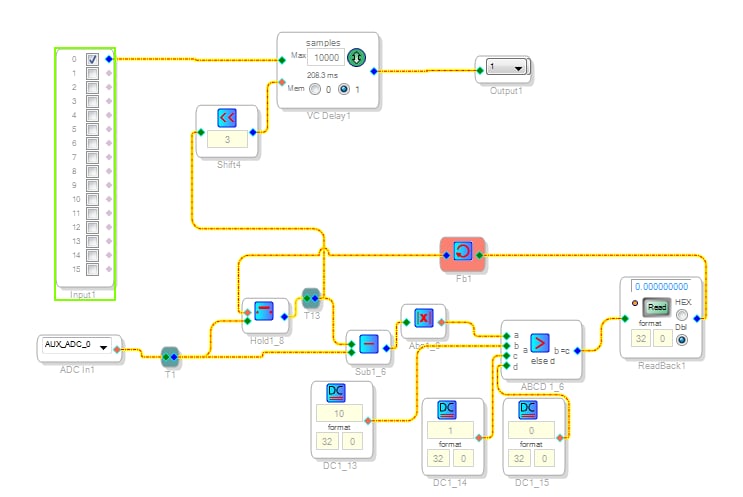
thank you for your precious informations. I will try to investigate more on the subject but for now i'm happy with a variant of Bob's circuit. This fixes the problem of nasty noise when trying to control the delay time from auxadc connected to an analog pot.
If someone should find it useful here it is.
DC1_13 acts as the tolerance window, it could be lower or higher, depends on what's happening at your adc input. If you hear no noise you can make it lower, if you still hear noise while pot is in a rest status you can make it bigger.
Shift4 depends on your max samples.

Please log in to reply.