adau1452 external SPI delay memory- how do I connect and configure?
Hi:
New guy here using the EVAL-ADAU1452MINIZ.
My application requires more delay memory (I see many discussions about this here...but...).
I will use the external SPI delay block (or maybe the VC delay block, not sure yet).
I see this discussion a lot, but: specifically, I need help to use the 23LC1024 memory chip:
1) How do I connect it on the above mentioned eval board?
2) What are the config settings for it on the above mentioned blocks?
3) Any other config required in SigmaStuio to make it work?
4) Can I connect more than one of these chips and use it on another SPI delay block?
Thanks very much. I can't seem to find answers to these questions.
-Gary
Audio Signal Processors
adau1452
SigmaDSP Audio Processors
Hi Gary:
How much memory do you need and what's the timeframe of your project?
Thank you
Miguel
Hi:
My need is immediate and I'd like to use two of those parts...
Thanks,
gary
On Sat, Sep 10, 2016 at 7:32 AM, mmmike <
Hi Gary,
I have added my responses below.
>> 1) How do I connect it on the above mentioned eval board?
Please replace 25AA1024 with 23LC1024 in the Eval board.
>> 2) What are the config settings for it on the above mentioned blocks?
Configure the parameters shown in the wiki page. External SPI Delay (ADAU145X) [Analog Devices Wiki]
>>3) Any other config required in SigmaStudio to make it work?
No other configuration required.
4) Can I connect more than one of these chips and use it on another SPI delay block?
Currently only one instance is supported. We will add this feature in the future.
Thanks,
Venky
Hi Venky:
Thanks for your reply, this helps a lot!
But: I don't want to pull the chip on the eval board, as I need to load
code and boot from it...so, I want to ADD the sram memory chip.
I assume I can go in and assign a chip select for it and leave in the boot
chip ?
-Gary
On Wed, Sep 14, 2016 at 5:32 AM, venkatesan <
Hi Gary,
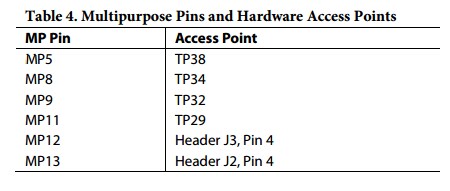
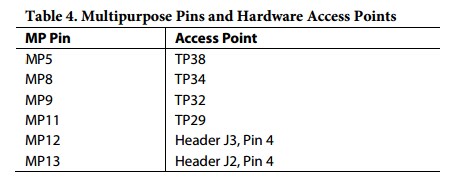
Yes, You can assign a different Chip Select. You can use one of the following Multipurpose pin as the chip select in the board.
Some more configurations in SigmaStudio are required when different chip select is used.
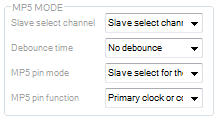
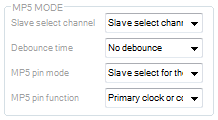
1. Configure the selected Multipurpose pin as SPI Slave Select through register controls. (Hardware Configuration -> IC1 - ADAU145x Register Controls -> MULTIPURPOSE/ AUXADC)
Slave Select Channel -> 'Slave Select Channel 0'
MPx pin mode -> 'Slave Select for Master SPI port'
MPx pin function -> 'Primary clock or control port function'
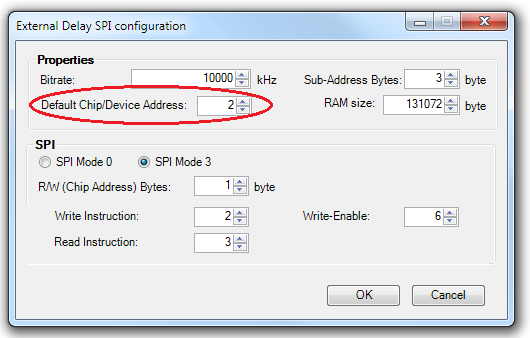
2. Update the 'Default Chip/Device Address' field in the External SPI Delay module's configuration window.
I found that there is some inconsistency between register control and the 'Default chip/Device Address' in the module. We will fix this in the future release.
Assign 'Default chip/Device Address' as 2 for 'Slave Select Channel 0' in register control. The following table shows the mapping between module's parameter and the register control window.
'Default chip/Device Address'
'Slave Select Channel' in the Register control
2
'Slave Select Channel 0'
3
'Slave Select Channel 1'
4
'Slave Select Channel 2'
5
'Slave Select Channel 3'
6
'Slave Select Channel 4'
7
'Slave Select Channel 5'
Then Link Compile Download the Schematic.
Thanks,
Venky

Hi Venky:
Great information, Thanks! I think all of the help you have given will
help a lot of others who have had the same questions.
I will try these ideas today.
The final question (for now... : ) ):
Regarding adding another chip or two and using multiple instances of an
external SPI delay in my product.
What can I do, as we need to release the product for production within 45
days....this means my work and testing has to be done ASAP...
It looks as though I will need up to a total of 4 delay lines with external
SPI memory in order to achieve the effects I am after...all to use the same
chip we have been discussing.
I have also heard rumors about a new chip coming out w/more ram memory than
the 1452...true? When?
Thanks again!
-Gary
On Thu, Sep 15, 2016 at 4:22 AM, venkatesan <
Hi again:
Well, tried to get it working based on the great answers received here...
I used MP11 at test point 30 for the chip select and followed the correct set-up in the registers.
I can't figure out what the proper config settings in the SPI delay block should be...I tried some settings based on the Microchip data sheet for the part, but, I don't know enough about how the ADAU1452 wants to see the settings.
Can anyone that was able to get the 23LC1024 chip working with the external SPI delay module share the settings with me?
Thanks !!
-Gary
Hi Gary,
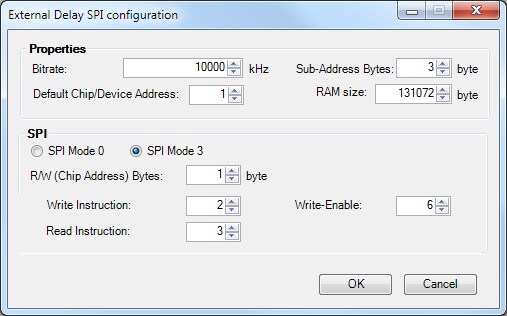
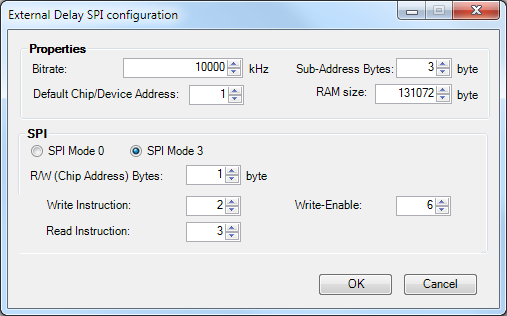
I have replaced 25AA1024 with 23LC1024 in my board and the delay is working with the following settings.
I will try without replacing 25AA1024 ( by using use MP11) and update the status.
Thanks,
Venky
Hi Venky:
Thanks!
Those are the settings I used as well, except I set the address at 2 to use
MP11, test point 30.
Perhaps my method is not good: I just piggy-backed on the 25AA1024, except
for the chip select which is on MP 11...maybe I need to do separate
pull-ups, etc.?
Another thought just now and maybe a problem: I did not use a pull-up
resistor on my chip select...perhaps i should?
-Gary
On Mon, Sep 19, 2016 at 4:40 AM, venkatesan <
Hi Gary,
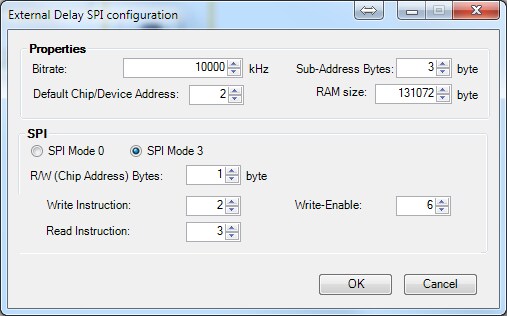
I am able to use 23LC1024 with MP11 as chip select. I have used the following settings.
SPI Settings in Module:
Register Controls Settings(MP11 Mode):
Slave Select Channel -> 'Slave Select Channel 0'
Debounce time -> No debounce
MP11 pin mode -> 'Slave Select for the Master SPI port'
MP11 pin function ->'Multipurpose fucntion (MP11)' // This was wrong in my previous reply.
I have connected a separate pull-up resistor in the TP30.
Thanks,
Venky
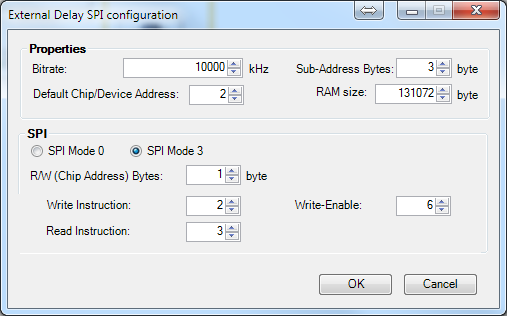
Hi Venky:
Thanks, it works! Looks like max delay time is about 1.5 seconds @ 48KHz
sample rate. I'll likely run my system at a lower sample rate, probably
around 44 KHz on my design, but looks like I am stuck w/the 48 KHz sample
rate on this board.
Now the question is: can I run multiple memory chips...as I really need to
get my max delay time around 4 seconds or so...or, a single chip w/more
capacity?
-Gary
On Tue, Sep 20, 2016 at 1:10 AM, venkatesan <
Hi Gary,
Currently only one chip is supported for this delay module. We are planning to add support for multiple chips in the upcoming release. You can use single chip with more memory for now. I will communicate the expected date for next SigmaStudio release once I have the date.
Thanks,
Venky
Hi
I want to use the External SPI RAM also, But I do not need the Boot EEProm
I assume that I use SS_M/MP0 for the CS .
Also is the Audio bit width 32 bit through the external SPI Ram?
Thanks
Hi Venky:
OK, thanks, this is very urgent situation for us now.
I have not been able to find larger SPI SRAM- do you know of any?
Somewhat related:
I need to do longer FIR's- is it possible to assign an FIR to use external
memory?
Thanks again for all the great help!
-Gary
On Thu, Sep 22, 2016 at 10:38 PM, venkatesan <
Please log in to reply.