Documentation for SigmaStudio parameters
I am trying to find some documentation for the parameters in the different blocks in SigmaStudio. For example I have an Input Source Select block. When I change Mix# I can see SigmaStudio writing the values 0, 9, 18 or 27 to a parameter register depending on what I select. Is there any documentation on such parameters? Or is the only way to find the format of the parameter registers to see what SigmaStudio is writing?
Best regards
Ivan Johansen
Hello Ivan,
You'll find some parameter info in the toolbox wiki SigmaStudio Toolbox [Analog Devices Wiki] as well as by searching this forum. If the needed adjustment involves DSP core settings, these are detailed in the chip's data sheet. Often, however, you'll do well with the method you described -- adjust something in your project and observe the Capture Window for the associated parameter change. I've experimented with several of the blocks to discover an explicit relationship; often sharing these findings in various posts here.
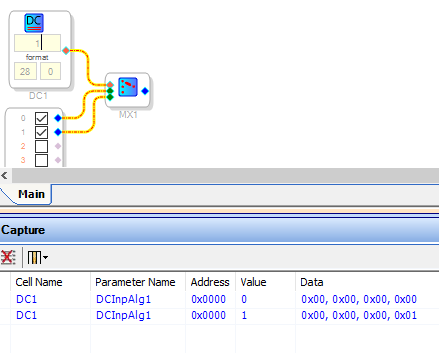
In a rather complex audio mixer design involving six ADAU1701s and a PIC processor, we have many audio selections controlled by safeloading parameters. We often found it easier to use "DC" sources driving index-controlled audio blocks. This kept the parameters consistent among a variety of functions, as well as easy to handle. Setting a DC source to an integer index is quite trivial, as shown below:
Best regards,
Bob
Thanks for answering, Bob.
I was hoping for a document describing all the parameters, but I will try to make do with seeing what SigmaStudio is sending.
However I am trying to use a Single Level Detector, but I cannot figure out how to read the detected level from I2C. SigmaStudio doesn't show anything in the capture log.
Hello Ivan,
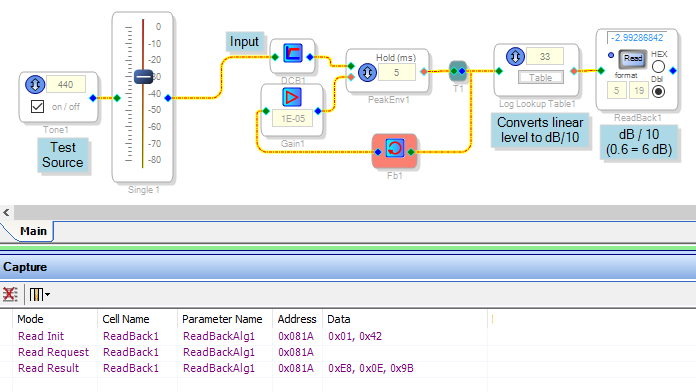
I'm not sure how to read a Single Level Detector via I2C, I'll try to look that up. In the meantime, some folks have used an arrangement like the one shown below. Feedback around the Peak Envelope External Decay provides an exponential decay for more natural level meter dynamics. The Log Lookup Table converts to dB/10 with its table inside -- its output of -9 to + 0.3 fits the 5.23 format of the ADAU1701. If you prefer to have your uC perform the dB lookup you can omit this table. When you press the Read button on the ReadBack cell, the Capture Window shows how to request the readback via I2C as well as the resulting data. This procedure varies some per the SigmaDSP model being used.
Best regards,
Bob
Thanks, Bob
I will take a look at your suggestion. It looks like something I can use.
Best regards
Ivan Johansen
Please log in to reply.