Auto EQ, How to save the filter parameters?
I am very pleased with Auto EQ for the design of active speakers.
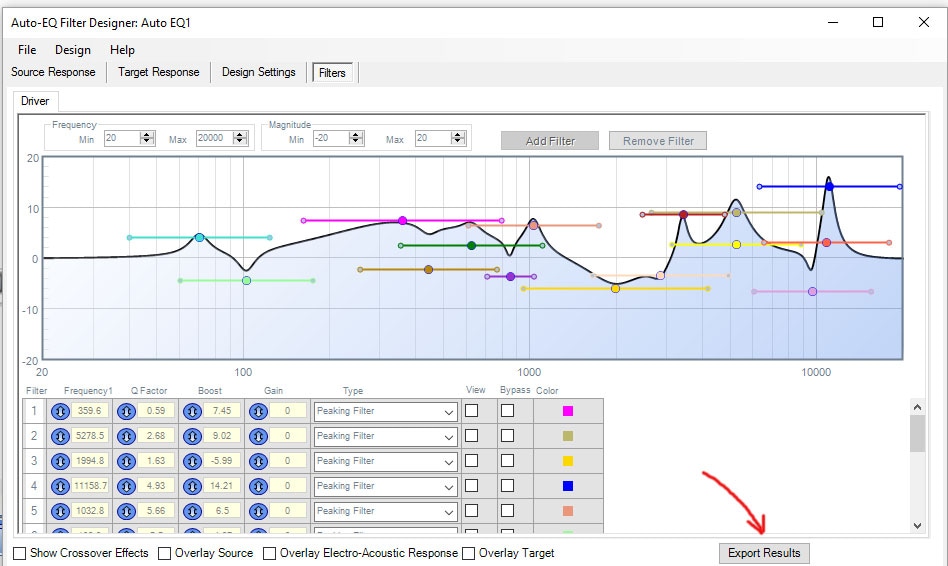
After I got out filters as shown in the picture, I go in and make some changes.
I save filters by pressing the button on the bottom right.
However, I am unable to read the saved file later.
When I shall produce amplifiers do I only obtain the unedited filter file.
What should I do?
Fykse
Hi Fykse:
I suggest you simply use the coefficients generated on SigmaStudio/ for the SigmaDSP instead of attempting to export the results. We assume you are using a SigmaDSP in your product / amplifiers.
Is this correct?
Thank you
Miguel
Thank you for the answer.
Yes I use ADAU1701.
So I'm interested in getting back the changes I manually do the Auto-EQ.
To use these later and also program for production.
Helge Fykse
Are you suggesting to use the Auto EQ block itself as the filter? I notice it does have input and output pins but I was unable to notice its EQ on the speaker output.
What filter blocks do you recommend to import the filter coefficients?
Thanks
-Mike
Please log in to reply.