Write EEPROM through ADAU1452
I am evaluating the ADAU1452, and I am looking into how to update the self boot EEPROM after shipping the product. I know how to write to the EEPROM from Sigma Studio, but how do I write to the self boot EEPROM through the ADAU1452 from the host MCU connected to the slave I2C on the ADAU1452?
Audio Signal Processors
adau1452
adau1452 code download
SigmaDSP Audio Processors
Hello,
It is possible to export the binary/hex files to see exactly what gets written to the EEPROM, which would allow you to program the part using an MCU. However, if you have a compilation written to the EEPROM already, it should be static, and you should be able to self-boot from it without modifying anything. What are you trying use the microcontroller for, as far as changing parameters goes?
Regards,
Tyler
I just want to program the EEPROM without using SigmaStudio. I basically just want to know what SigmaStudio is doing so I can do the same without SigmaStudio.
We have an MCU controlling the ADAU1452, but we are looking at using a self boot EEPROM to boot the ADAU1452 faster. But we want to be able change the content of the EEPROM after shipping.
Hello padowan,
There is a small program that SigmaStudio loads in that takes the data coming into the slave port and sends it out of the master port to program the EEPROM. You can see this program in the capture window. So try this:
1) Compile your program
2) Clear the capture window by clicking on the "X".
3) right click on the ADAU1452 icon on the config window and select to program the EEPROM through the DSP.
4) Select the proper EEPROM settings
5) click to program the EEPROM.
6) Look at the capture window and you will see it loads in a small program, then it sends your program's hex file to be programmed and then it reloads whatever project you had running before you started.
So identify the program that the DSP uses to program the EEPROM and copy that. You will see how it sends the data in blocks that are the page size you specified. This data will be your program's hex file. Then after this is done all you will need to do is perform a soft reset and it should boot from the EEPROM.
SigmaStudio does a lot of extra stuff because we have no way to know the state of the DSP. It might have just powered up so we kill everything and start up fresh. You will not need to do that. I have attached a screenshot of the capture window showing the program and the EEPROM write sequence. If you highlight the lines like I did you can right click and you will find options for exporting this data in many different formats.
Have a look and ask more questions if needed.
Thanks,
Dave T
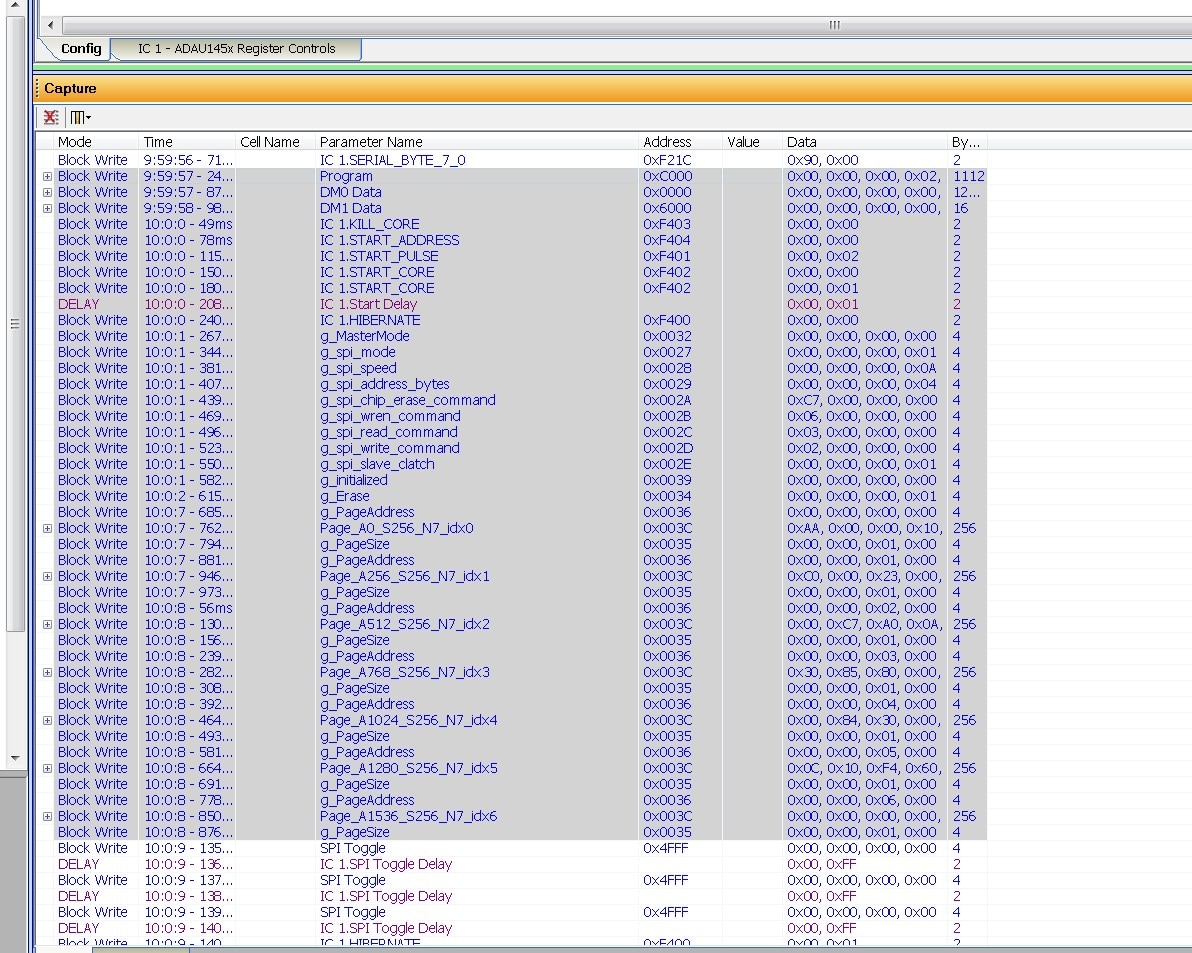
Thanks for the response, Dave.
I will try you suggestion a copy it from the capture window. I will get back if I get more problems.
Regards,
Ivan Johansen
Is it possible to connect the master and slave I2C on the DSP so the MCU will get direct access to the EEPROM? Will the DSP interfere with the communication when another master is writing to the same bus where the DSP is master? We can keep the DSP reset while writing to the EEPROM as long as the DSP does not pull down the bus when it is reset.
Best regards
Ivan Johansen
Hello Padowan,
You could use a bus repeater that has a tri-state mode (an enable) to connect the two together. I am pretty sure the master port will be tri-stated while the part is held in reset but I have not verified that personally. I think it is something you will have to experiment with but I think it can be done. Worst case you would need two, one to connect the two busses and one to disconnect the master port.
I think I recall seeing an I2C switch/router that would let you connect to one bus or another bus. If your design can withstand these costs then it can be done.
We have an internal engineering eval board where we have two connectors for the USBi. One to connect to the slave port and one to the master port. So I have looked at the contents of the EEPROM while the DSP was on and running. The caveat to this is that the DSP was NOT trying to access the EEPROM and it had aleady booted. For I2C this is easy to do as I think about it. For SPI it is a problem. So you could use an I2C bus switch to talk to the slave port and put the DSP into sleep mode. Then switch to the master port and program the EEPROM. Then switch back to the slave port and reboot the DSP. This way you would not have to hold the part in reset. I think this will work out.
Sorry for the stream of consciousness post but I think I figured out your answer as I was writing this.
Dave T
Thanks a lot for the help. I think we would like to avoid the I2C bus switch, but we have used something similar before. We will do some experiments and see how it works.
Best regards
Ivan Johansen
Hello,
Sorry for updating the discusion. I need help with programming EEPROM through DSP core.
I got hex output when I use SigmaStudio function "Write latest compilation through DSP", it works, but I want to write EEPROM from STM32 MCU with SPI.
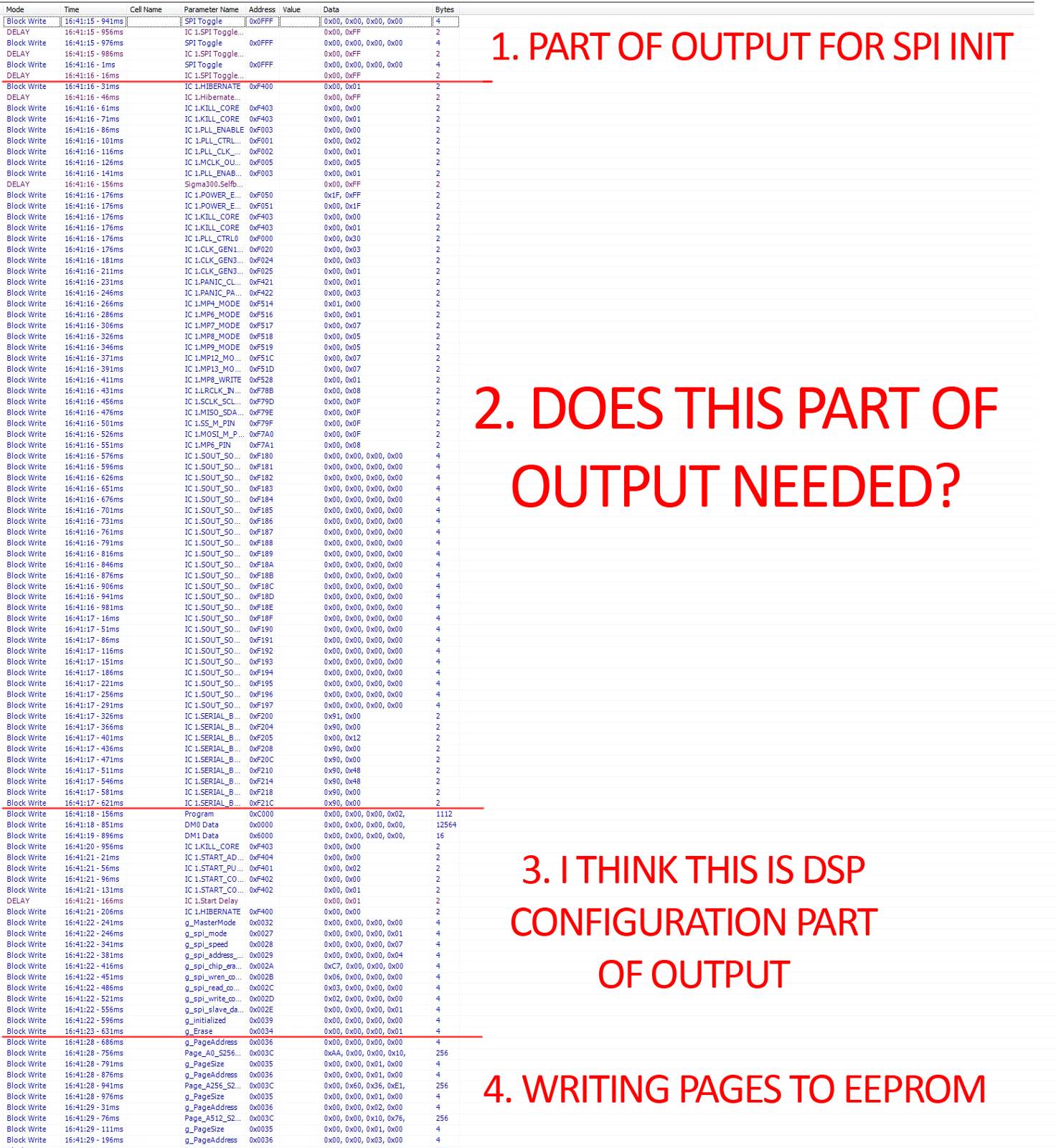
Here is screenshot of output. Could someone comment about which part of output is needed which not?
Regards,
Dovydas
Hello Dovydas,
section 1 is where the DSP slave port is set to SPI mode by sending three dummy writes.
Section 2 is where the DSP is cleared (reset) and a program is loaded in that is only for the purpose of writing to the Master port. It sets up the port and then transfers data that is sent to the slave port over to the master port to then program the EEPROM.
Section 3 is where the program for transferring data is configured to the details of the EEPROM.
Section 4 is your program being loaded into the EEPROM as a hex file.
So you pretty much figured this all out.
Now what happens after the part shown in your screenshot is that once the EEPROM programming is completed, the DSP is again reset and your current project that was running in SigmaStudio will be loaded back into the DSP.
So if you want your controller to program the EEPROM through the DSP then you have to repeat all of these functions.
Remember that the part will remain in SPI mode as long as power has not been removed. So you do not have to do the three dummy writes everytime. We do this in SigmaStudio because we do not know if power has been removed. Normally, if customer applications that is a known thing.
So you will have to capture this small program and have your micro load this into the DSP then do your writes to the EEPROM. Then it will have to reload the program for your application.
Now this is important. While typing this I realized a possible issue. What you are doing is not very common. Normally there is no uC when you are selfbooting and if there is then the uC usually does not have to access the EEPROM.
What I need to investigate is what happens when you do a soft reset when the Selfboot pin is high? Does it try to load in the program from the EEPROM. I will do a quick test on an eval board and post the results shortly.
Dave T
Hello Dovydas,
It was as I thought might happen. When you trigger the soft reset it is just like toggling the reset pin and so the part selfboots. Since the PLL is already up and locked it seems to happen a bit faster but it does boot off of the EEPROM.
So therefore, you will have to be aware of this and wait for it to boot before doing anything to the DSP. It may be a good idea to have a GPIO port setup as an output from the core. Then have the SigmaStudio program set this pin low. This will be a flag to the uC that the booing is complete and the program is running.
Then to load in the program for writing to the EEPROM you will not be able to use the soft reset command. You will need to set the core to hibernate and wait long enough for all the block processing to complete. Then stop the core. Then you will need to know that nothing will be changed in the registers and memory. The reset will set the registers to default values. The fact that this will not happen might be a good thing. The important thing to remember is that they will not be in the default state.
So load in the program and program the EEPROM. Then to restart your program it will be easy, just toggle the soft reset and it will boot off of the EEPROM. No need for you to load it from the uC.
Let us know how it goes.
So what are you actually programming into the EEPROM? Keep in mind that there is a checksum so you cannot go into the hex file and make some small changes in the SigmaStudio program. If you are simply going to use some of the memory addresses above where the program is loaded then that is no problem.
Dave T
Hello Dave,
Thanks for explaination.
Now we program EEPROM chip (using Intel Hex file) before placing it on the board. The idea is to be able to program then chip is placed on the board.
The .hex which I program to EEPROM is E2Prom.hex from porject folder, so fisrtly I want to initialize SPI comunication and then load the .hex file.
Using USBi programmer sometimes I can program and sometimes I can't. I have used beta and stable versions of SigmaStudio, but got the same results. The chip is ADAU1450. Also I can short Selfboot pin to GND, there are pads on board to do that.
Here is little plan what I want to reach:
1. Enter settings of EEPROM to custom software (clock speed, write, read commands and etc.)
2. Set COM port of uC custom board (in software)
3. Load E2Prom.hex file
4. Connect custom uC board to target board
5. Turn on power on target board
6. Hit "Program EEPROM"
7. Wait till all pages will be written to EEPROM
8. Show "Finish programming" on screen
9. Turn off power of targer board
And repeat this process for more the 600 target boards.
Regards,
Dovydas
Hello Dovydas,
Thank you for the explanation. Now I understand what you want to do.
What you want to do is simpler than some of the things I was imagining you were doing.
So you pretty much want to program what you saw happening on the capture window. It would be good to short the selfboot to ground and remove that variable.
So follow what you see in steps 1,2 and 3 in your screenshot. Then load in your hex file. Then after that you do not have to worry about loading in another program. I suppose it would be good to reset the part then shut it down so that it does not try to write garbage to the EEPROM as it is shutting down.
Then you can remove the short and reset the board and check that it properly loaded.
Another option is to look at how the Check Last Compilation through DSP function works. It is very similar except it is reading from the EEPROM not writing. Then you can check to see if it was written properly.
But, I think it is faster to just see if the DSP boots up and operates.
I know what you mean about sometimes the program does not seem to program properly. On one PCB I designed I find I often have to program it twice for it to actually be programmed. I think this is due to data transmission issues but I have not been able to capture it with a scope yet. As soon as I can figure out what the problem is then I can go about solving it.
Thanks,
Dave T
Hi Dave
I would also like to program the DSP's EPROM over SPI. Mainly to be able to compile a new program at home and then upload it via a raspberry pi on the DSP that is standing at a completely different position. I've followed your instructions and read the datasheet. As far as I understand it, the SPI port is then configured to master (on the DSP) which means, that my raspberry needs to be set to slave to load the hex file. Is that correct? If so, how exactly do I load the hex file (I didn't find any documentation on that, or maybe I just missunderstood the problem).
Thanks M
I think I was able to find the solution myself (or at least a workaround). It seems, that Sigma Studio is waiting a fixed time after each instruction instead of waiting for an answer from the dsp. I measured this time and am now waiting for this time as well. This works perfectly fine and up to now has never caused any issues.
Hello Dave,
Thanks you for this!
Also I got other issue, that when I try to use function "Check Last Compilation through DSP" I always read 00. No matter if EEPROM programmed good or not. Is this a bug or I am doing something wrong?
Regards,
Dovydas
Hello dovydas,
Do you have the MISO/SDA pin from the slave port connected to the USBi? Are you able to read registers in the part using SPI? This is the first most obvious reason why.
Have you looked at the transmissions on a scope from the EEPROM to the master port and then from the slave port to the USBi?
Dave T
Hi Dave! pls help me too, can i use FM25V10 and FM24V10? for fast working...
Hello insert,
These are interesting parts. You certainly do not need the speed but the reliability and repeated writing is interesting. It looks like they will work. On the SPI part I did not see a "Chip Erase" command and I did not look for it on the I2C part. But I do not think that will be a problem. It may not erase but then a new program will be written over it. For the I2C part, we do not support the 17 bit addressing so you will not be able to use the upper page for selfbooting. However, I think you could use it for other functions that use the master control port. Certainly a system controller could use it once the DSP is booted.
Dave T
Thnx Dave! Just i have other several I2C slave devices on ADAU i2c master port, and i need control them from ADAU, like a ADA1938. Where i can reading about write code for I2C ADAU master or control slave devices?
Hello insert,
I have attached an example project that boots up an AD1938 codec.
There is a cell that lives in the master port part of the library which is for booting up external parts just after the DSP boots up. It requires an XML file that holds the commands that are sent to the codec.
I have attached the XML file as well. You will need to adapt it to your needs.
Now, that said, this will not work. You cannot have I2C devices and SPI devices sharing the same master port. They all must be one or the other if you are using a Sigma300 and the ADAU1452 is a Sigma300. So you will need to make certain your bootup EEPROM is an I2C device. The AD1938 is only SPI but you can use the AD1937 instead that does have an I2C port. The register settings are exactly the same so you can still use this AD1938 XML file.
If you absolutely MUST use a SPI EEPROM for fast booting and be able to control some I2C parts then you will have to move over to the Sigma350 parts and it will have to be the 88 pin versions. So the ADAU1463 and ADAU1467 are the parts that you would need. They are capable of splitting off the I2C master port over to two MP pins so both can be used.
You can read these help pages for more info:
If you have more questions about this then start a new thread. This has waivered from its original topic.
Thanks,
Dave T
Please log in to reply.