SPI Routing / Eprom Multi-DSP ADAU1452
Hello!
we want to use 2 (probably 3) ADAU1452 in a multi-DSP design. There are some questions remaining after looking at the forum and also USBi AN:
- Do we for SPI communication connect the SPI Master ports of each ADAU1452 in parallel to the USBi? Of course clatches assigned to the DSPs
- Does each DSP require its own EEprom on its slave ports?
.....
-Or do we connect master SPI (DSP 2) on slave SPI (DSP1) and EEProm on slave SPI (DSP2)?
- Master clock will be provided by first DSP and routed through the others to keep in sync. Should be ok?
Thanks for your help!
Audio Signal Processors
adau1452
SigmaDSP Audio Processors
Do we for SPI communication connect the SPI Master ports of each ADAU1452 in parallel to the USBi? Of course clatches assigned to the DSPs
Yes. This of course might create some concern about signal integrity if operated at the highest SPI clock speed supported by the ADAU1452, but SigmaStudio with the USBi seems to use very low speed.
Does each DSP require its own EEprom on its slave ports?
If you want them to be able to self-boot, then yes.
Or do we connect master SPI (DSP 2) on slave SPI (DSP1) and EEProm on slave SPI (DSP2)?
No. In theory one ADAU145x might be able to program another via SPI or I²C but I don't know if SigmaStudio can (currently) produce the code to do so. If it can then the appropriate topology would be to have the "master" DSP selfboot from an SPI EEPROM and use auxiliary slave selects of its MCP to program the "slave" DSPs.
Master clock will be provided by first DSP and routed through the others to keep in sync.
Why do you think you need to? Audio signals already have LRCK for synchronization
Hi matthijs,
thanks for the fast and comprehensive reply! The Master clock is generated once on the board and then distributed to all DAC/DSP to have all in complete sync. I assume that is the better solution than generate several local clocks and it also saves some parts on the board...
Thanks!
Hello Freddy071,
You must supply a master clock to all the DSPs. They must all be synchronized and using just LRCLK will not work properly if they are all on their own MCLK. So since you have a master clock just run it to all the parts. Use some buffers to distribute the clock.
If you want them to all boot up their own program then you will need to put an EEPROM on the Master port of the DSPs. You can keep these all seperate since the communications to the part from SigmaStudio is using the Slave port. So you can tie all the slave ports together to talk to all three parts in the same project while keeping the master ports seperate.
It sounds like you know about the SPI latches but for others reading this you will need to modify the USBi to add extra SPI latch outputs to control the other parts. This is all explained in App Note AN-1006.
There are some more details that I have wanted to investigate but have not have the time. SigmaStudio is not setup to be able to program multiple EEPROMS directly from one project. However, this part is different in that the EEPROM is programmed through the part because it is not on the same SPI bus. I have done some testing to know that to have SigmaStudio to produce the HEX file image you have to place an EEPROM in the project even though you cannot actually program directly from the USBi to the EEPROM. (You have to go through the DSP). But this tells SigmaStudio to produce the HEX files. The one thing I have not tested is what happens when you have multiple DSPs. I assume the HEX file with be in the folder for each IC.
So if you have questions please ask as you move along on this project. I would like to know what issues you run into.
Dave T
Hi Dave,
- clock issues are understood and yes I am going to use buffers as well as the DSPs as a buffer (DSP1 MCLK_out to DSP2_MCLK_in and then from DSP2_MCLK_out to DSP2_MCLK_in.......
- Adding latches is also understood and no problem so far
- combine slave SPI ports ok
- But I do not understand the EEPROM/HEX File issue. Normally I know SigmaStudio to add a DSP and a EEPROM in the hardware config if I have only 1 DSP. Here I would assume to add e.g. 3 DSP and also 3 EEPROM in this configuration tab. If I want to programm the EEPROMS I assumed to just use the normal "write to EEPROM via DSP" for each single EEPROM; so execute this action 3 times basically to store a final programm for selfboot. Any problems to be aware of?
Hello Freddy071,
Reguarding the EERPOM issue. Let me start by saying that SigmaStudio was designed well before the Sigma300 parts came out. These are the ADAU1450/51/52. So before these parts there was only one communications port on the parts. So the EEPROM would sit on the same buss that the USBi is using to communicate with the part. So in that case SigmaStudio could program the part or it could communicate directly to the EEPROM and load in the hex file into the EEPROM. The behavior was setup such that if you click on Compile/Link/Download, and you did NOT have an EEPROM in your project, then it would not create a HEX file. After all, the HEX file is stored in the folder for the EEPROM which does not exist since there is not an EEPROM in your project.
This all works fine becasue you add in the EEPROM into the project and compile and you have the hex file should you want to use it to mass produce programmed EEPROMS.
Now enter into the sceen the new Sigma300 parts. Now these parts have two communications ports! A slave and a Master. The USBi is connected to the SLAVE port and any EEPROM you would use to selfboot is connected to the MASTER port. So the USBi does not have direct access to the EEPROM. You have to program it through the SLAVE port using a small program that is loaded into the DSP to perform this function. So you do not need to drop an EEPROM into a project. You just right-click on the DSP cell and select to program the EEPROM through the DSP. It will compile the program and create the HEX file and program the EEPROM through the DSP. The little detail is that the HEX file itself is never saved. Again, there is no folder to save it in. ( I know that it could be saved into the DSP's folder and I will bring this up with the software team.)
So if you need the HEX file, then if you drop in an EEPROM into the design, even though there is no way for SigmaStudio to program it, SigmaStudio will produce a HEX file since it sees an EEPROM in the design. So when you select to program the EEPROM through the DSP you will see that you now have a folder for the EEPROM and inside of it will be the HEX file. So all is good and you have the HEX file for production.
Now enter into this equation having multiple DSPs in one design using one project to control and program all DSPs.
In the older SigmaDSPs it was not possible to have more than one EEPROM in a design. It was not a valid configuration. The reason is that when the DSPs power up in selfboot mode, they will ALL be trying to access the same EEPROM at the same time (or close to it) so it will simply not work. In this situation you must have a system controller present or you must have a way to separate all the communications busses and have multiple EEPROMS. So with the older SigmaDSPs you could not have more than one EEPROM in the SigmaStudio project and for good reasons.
Now enter the Sigma300 DSPs. Now all of a sudden you CAN have multiple EEPROMS in a design and have all the DSPs tied together to SigmaStudio. You can tie all the SLAVE comm ports to the USBi connector and have each part have its own EEPROM. But SigmaStudio still cannot directly communicate to the EEPROMS. You must go through the DSPs. So you cannot drop into a design three EEPROMS. There is no way to assign them to a processor.
I think the workaround would be to drop one EEPROM into the design so that SigmaStudio will produce a HEX file. Then program the DSPs one at a time by right-clicking on each DSP and programming the EEPROM through each DSP. So you program DSP #1 and then move the HEX file created to a different folder and name it for DSP #1. Then program DSP #2 and take the new HEX file and move it and continue for each DSP. This will result in three different HEX files for the three DSPs. How I have not been able to test this all out since I do not have a board with more than one DSP and I have not had time to experiment with multiple eval boards.
So this is a case where SigmaStudio has to be adapted to the new parts. There has not been very many people who use multiple parts in one design but it is becoming more common. Then most of those have had a system controller so selfboot was not required. So expect to see some updates in the future to handle this. Meanwhile, I have outlined a way to get around the issue and let me know if you do run into issues I have not foreseen.
Thanks,
Dave T
Hi Dave,
Thanks for all the details on this topic. On our new product, we're using two ADAU1467s, each with their own dedicated EEPROM. It doesn't seem possible to realistically use a single project since we need access to the "E2Prom.hex" files, as trying to piece together these any other way wasn't reliable when doing updates. If we have the EEPROMs as IC 2 and IC 4, the IC 2 "E2Prom.hex" file gets generated, but it doesn't seem complete, and the second one is never generated (nor is there any directory for IC 4). Perhaps the first one isn't complete since we need to redo our entire existing schematic from scratch to use blocks from the IC 1 toolbox (why would this not be default?). It would definitely be preferred if the "E2Prom.hex" file went into the same directory as the DSP as you suggested - this would make things a lot simpler. Are you aware of any workarounds or fixes in 2025? Thanks,
- Arthur and Stas
Hello Arthur and stas,
Let me share what I observed.
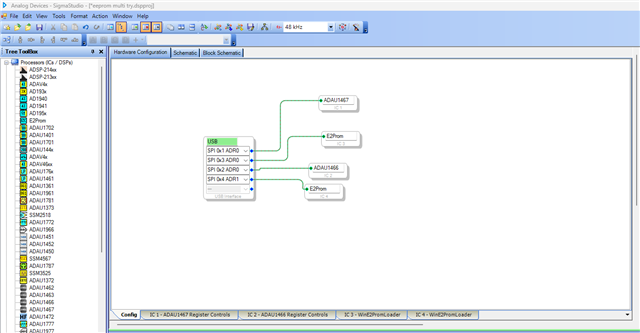
What you are saying is true, though we have two DSP ICs and two EEPROM ICs connected to the USBi, but a single EEPROM folder is created while doing ''write latest compilation thru DSP'' separately with two DSPs.
Below is how I connected.
So, I made two programs for two DSPs in a single SS project. When I click link compile download, two DSPs are programmed and running its respective program successfully.
Now, I choose IC1 that's ADAU1467, when click self-boot and ''write latest compilation thru DSP", that particular EEPROM is programmed from the ADAU1467's master control port successfully.
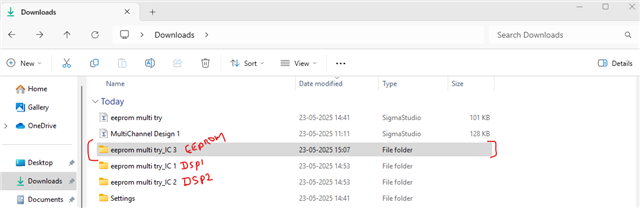
and a folder is created for EEPROM, and I have the hex file. that hex file seems correct.
Now, I choose IC2 that's ADAU1466, when click self-boot and ''write latest compilation thru DSP", that particular EEPROM is programmed from the ADAU1466's master control port successfully.
But the EEPROM folder just the same as before, but the hex file inside it is changed. Now the hex file data is for the ADAU1466's program
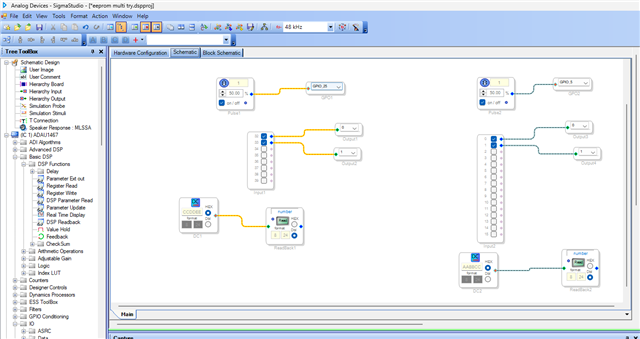
Just to verify the hex file with DSP data, I added a DC cell in my project with a known value. Below is my schematic.
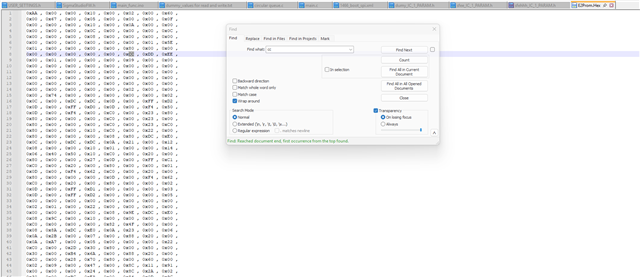
You can see, the ADAU1467's DC cell has a value 0x00CCDDEE, when I compare the hex file which was created with ADAU1467's self-boot write, it's just the same.
when I did self-boot with ADAU1466 IC, my hex file is updated with in the same folder. my 1466 DC cell has a value 0x00AABBCC which matches with the hex file below.
So, you can do what Dave suggested, you can do the self-boot steps for DSP1 and EEPROM hex file will be created, copy that file into some other folder and save it as DSP1_EEPROM_hex file, then do the self-boot steps for DSP2, a new hex file will be created for DSP2, copy and save that for DSP2.
You can see the hex file creation time is changed every time you writing to the EEPROM by clicking 'write latest compilation thru DSP'.
StasT said:
. If we have the EEPROMs as IC 2 and IC 4, the IC 2 "E2Prom.hex" file gets generated, but it doesn't seem complete
I don't quite understand what you mean by "it doesn't seem complete", isn't the file properly generated for a single DSP?
It seems what Dave suggested is possible as I have shown above, but I'm not sure where you run into troubles in this procedure.
please give it a try as I did above and let us know how it goes.
Regards,
Harish
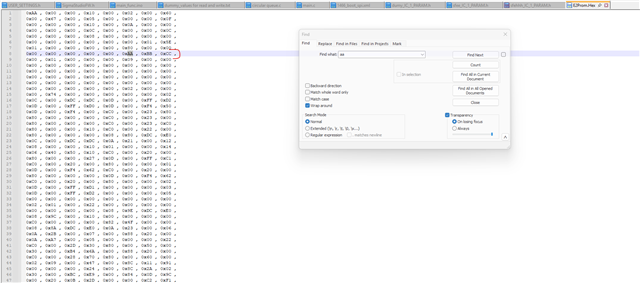
Hi Harish,
Thanks for looking into this. It would still be strongly preferred to not have to copy over the folder/file when exporting. Is this something that can be fixed in the software? Though has development basically been discontinued at this point? There are continuing problems that need to be solved, such as the fact that the "AudioSignalRouterIndxSel34S300Alg" and "EQS300Invert" blocks don't signify the appropriate upper page (via the "SECOND_PAGE_ENABLE" command in the ".params" export), as well as a lot of UI issues.
So it does look like the export is working properly, albeit always into "IC 2". I had thought that it was abbreviated because I'd tried the "IC 3" export and it'd overwritten the "IC 1" export. We do appreciate the suggestion and we'll have to think about which option is better - one schematic or two. We may want to stick with two if for no other reason than the particular combinations we'd like to use. Thanks again,
- Arthur and Stas
Please log in to reply.