ADAU 1701
Hello Guys,
I do write 3way Xover program on ADAU 1701 Miniz. I do want to write and read-back as many programs as I can, but i couldn't figure it how.
I also do want add one switch to save and read-back all programs, and want to add LED for all programs. How can I do that?
If you guys can send Sigma Studio Setup Sample, It would be great.
Thank You
No one else has this question
Hello meakmusic,
For adding LEDs you should read the applications note about GPIO.
http://www.analog.com/media/en/technical-documentation/application-notes/AN-951.pdf
This will show you how to interface to LEDs and also to switches.
I do not understand what you mean here:
"I do want to write and read-back as many programs as I can"
I think there is a language barrier so lets see if we can understand each other.
When you say a "program" I am thinking the SigmaStudio schematic program that is programming the DSP.
I think you might mean several different EQ settings?
If you do want to write multiple programs to the DSP then you will need to have a system controller to do that. You can open several programs in SigmaStudio and have them load up when you switch windows. It is the A/B compare mode. Even more simply you can open up as many windows as you like and you switch to them and then click on link/compile/download and you can load in different programs quite easily. But in a finished product the system controller would have to switch the programs.
If you simply want different settings you can use index selectable EQ cells where it is easy to load in different settings.
Dave T
hello
First of all, thank you for your respond. Let me try to explain it again. I have Adau Miniz evaluation board, and 4 different speakers. I want to write different set up for each speaker with Miniz Eva board. How can I do tho with Sigma Studio? I believe I need 1 channel encoder and 2 switch(read/write). Can you send me an example of it? I hope it was more simple explanation. Regards
Hello meakmusic,
Your earlier post you mentioned a three-way crossover. So this makes me think that you want three outputs, high, low , mid and perhaps a fourth output for a sub. However, in this last post it sounds like you only want to switch between them Can you draw a block diagram of what you want to do?
What is the encoder for?
You say two switches, we can only read switches we cannot write to a switch so I do not understand (read/write ) when it pertains to a switch? So what will the switches do?
If you want to have stereo then you would require two DSPs or output signals out to an external DAC to get four more outputs. This can be done.
So draw a diagram. it will give us a picture of what you are trying to do.
Thanks,
Dave T
Hello Meekmusic,
Ok, so that is some info but I could have used a bit more detail. So is the speaker a two way speaker? I assume it is not passive that there are multiple power amps? Is this a two way cabinet and a sub? Detail the output from the DSP. Also, I assume this is not mono. Are you planning on using one DSP per channel?
So, you want to have several EQ curves to choose from.
1) Is there a microcontroller in your system?
2) What type of switch do you plan to use? A single pole rotary? Four buttons one for each selection? Since GPIO pins are not plentiful, I think a rotary switch selecting different voltages from a voltage divider then using the AUXADC in the DSP to select the option based on the voltage.
3) Do you need to change the crossover frequencies? That would be tough because you would need a micro to do this. What is simple is to keep the crossover fixed and use an index selectable filter to change the curve for the full range audio then send that over to be split up by the crossover.
Dave T
HI:
It seems to me that the easiest is for you to create your sigmaStudio schematic based on index selectable filters.
First create your desire shape frequency shape (as you show in your schematic).
Then simply add a crossover block centered at the correct center frequency between your tweeter and your low frequency speaker.
Lastly send the 2 outputs to it's own power amplifier.
This assumes you have 2 different power amplifiers powering independently the woofer and the tweeter.
I also recommend that you add a compressor before your output to the amplifiers.
Lastly, you should try simply user a switch selector connected to the GPIO. Such switch would simply trigger the correct GPIO. FYI GPIO within your SigmaStudio schematic should be driving the input of the index selectable filter.
For this application the 1701 shouldn't need a micro-controller simply self boot from EEPROM.
Hope this helps.
Miguel
Hello Meakmusic,
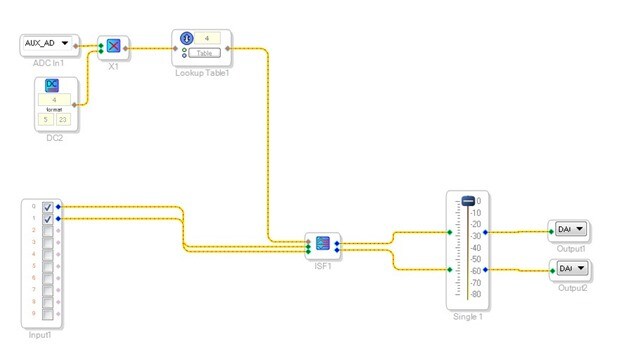
I have attached a project that takes the AUXADC input 3, scales the data and sends it to a lookup table to five it four distinct outputs. Those are sent to an index selectable filter where I setup four exaggerated EQs to make it easy to hear. The first one is flat then the others have the curves you are looking for. (but I am sure not so extreme).
This project is setup in stereo and it is setup for the evaluation board. It uses the pot on the eval board to switch the four different EQ settings.
You will probably want to setup a resistor divider of three 1K resistors between 3.3V and ground. Then tap off this using a single pole four throw switch. The taps would be ground, between the first two resistors, between the next two resistors and then 3.3V. This should give you the four settings without any dithering.
There is more you will probably want to add. Mutes? A limiter is a good idea as Miguel mentioned.
So if you have an eval board then load this up, run audio in and setup some headphones (don't use speakers yet) and turn the pot and you will hear the changes.
Click on the little blue square on the filter cell to see the filters and to be able to adjust them.
This is what the project looks like:
Let us know when you need to add more.
Dave T

Hello Dave,
Yes, this was helpful for me.
I want to use 10EQ, 2 limiter( RMS and peak) , Compressor, delay, mute, gain, phase reserve in 1 preset!
I want to have 4 preset like this.
Thank you you for your quick responses.
HI Miguel
Yes, this was helpful for me.
I want to use 10EQ, 2 limiter( RMS and peak) , Compressor, delay, mute, gain, phase reserve in 1 preset!
I want to have 4 preset like this.
Thank you you for your quick responses.
Please log in to reply.