Change delay and Volume while dsp is running
Hello,
my question concerns the capability of Sigma DSP's to change algorithm parameters during programm execution. In particular I would like to change delay times and volumes to implement a phased array with a ADAU145x.
The idea is that a user might sit on the computer and input coordinates to which the array should point. These would then be converted into delay and volume "coordinates" for each channel by a software and then be transported to the DSP.
Is this in any way possible, or has anyone done anything like this before?
I have had the following ideas:
1) Interface to Sigma Studio directly to change params
2) Connect to the DSP via the programming interface (without Sigma Studioin between) and try to chance params in program memory
3) Use a µC in between PC and DSP to communicate with the DSP over I2C
Do any of these ideas make sense to attempt at all, or is there a much simpler way?
Thank you very much for your help
Hello,
Perhaps the very simplest method is to provide the user with analog pot(s) to steer the array. Connect the pots to GPIO pins set up as Aux ADCs to get their positions into the SigmaStudio schematic. Then you can set up math algorithms to translate to the needed values with which to drive "voltage controlled" delays and volumes.
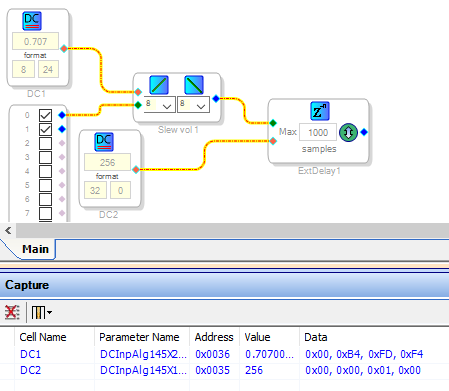
Otherwise, your third suggestion is the generally accepted practice. A microcontroller writing to parameter memory is definitely the most versatile control method. You can safeload the parameters directly into the various algorithm blocks. One way to find out the needed parameter addresses and values is to enter a change in the SigmaStudio GUI to observe the resulting activity in the Capture Window. DC source blocks are particularly easy to adjust via parameter loading, and they can in turn drive algorithms equipped with a "voltage" control input:
In the example above, DC Sources operate a delay and a volume control. When we adjust the DC source values in the GUI, the Capture Window shows the parameter address and data which your uC needs to safeload to make the same adjustment.
Best regards,
Bob

HI
I agree with the process. This is how stirring is usually done. Will a single DSP be used for the entire Line Array?
Or will each loudspeaker in the line array have a DSP?
In any case, this technique will work for both cases. If it's a single DSP to be used. Please consider using multitap delays to save delay elements.
Regards
Miguel
Hello Bob,
thank you very much for the information, very useful!
To Mike:
The Plan is to use one 145x DSP and use the many outputs it has, to steer the array, as this is more suitable to the requirements at hand. I will make shure to follow your advice about using tap delays.
In the wiki I found the "Multi-Tap Voltage Controlled Delay" article. In the "Cores Supported" section the 145x is not mentioned. I take it that is because the 145x was not lauched jet when the article was approved (21 Jun 2012)?
Thanks again for the help!
Michele
Hello Michele,
Yes, the product was not released at that time. It was really close to that date as I recall.
Dave T
Please log in to reply.