Is there a way to edit/modify the library algorithms in SigmaStudio?
I need to control the various parameters in the Noise Gate and Compressor library modules using an external pot.
I understand how to read the pot position data in SigmaStudio...but the Gate and Compressor library modules have no
port pin(s) to allow external contol of many of their parameters.
As I see it there are two possible ways to do this:
1. Edit the library algorithms to include external parameter control via new symbol pins.
2. Figure out the protocol used by SigmaStudio to control these parameters in real time via the USB link to the 1701 board and add a simple microcontroller to mimic SigmaStudio parameter change commands to the 1701 board.
Any help appreciated.
-Charlie
Hello Charlie,
1. Editing library blocks -- There's been some third-party functions available -- obviously suggesting that the companies involved have access to low-level development tools. However these are not generally made available to customers. And such tools aren't suitable for system-level designers -- for example, there's no C compiler. After all, the whole idea behind SigmaStudio is to avoid such programming.
2. Microcontroller editing parameters via I2C or SPI -- Yes, very possible as well as the most versatile method. This forum can be a helpful resource; also the documentation wiki. Unfortunately, the wiki has no info on uC control parameters for the dynamics processors. The usual solution is to exercise the block and observe the results in the Capture Window to discern what the parameters mean. We do have a head start in the form of this post:
Compressor Table Format - Changing compressors at run-time
calculate Compressor gain table
An example for the ADAU1452 is at:Dynamics Processors The same technique can apply here:
Gain Table
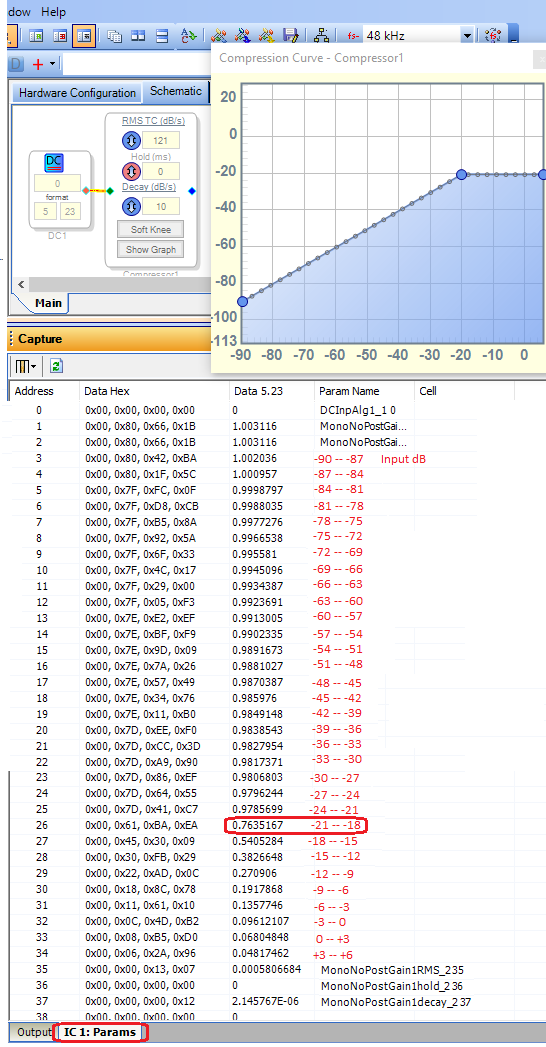
Basically, the Gain Table typically splits the compressor's input audio level into 3 dB segments, with a parameter entry for each segment. Since the Wide Range Peak Compressor has a -90 to +6 dB range, there's 33 parameters to cover this 96 dB span. Each parameter represents the compressor's linear gain (the ratio of output to input) for that segment. To see this in action, below I show a gain table with no compression (dB out = dB in) from -90 to -20 dB, with a constant limit from -20 dB to +6 dB. You can see the resulting parameters by selecting the IC1: Params tab in the Capture Window and doing a Link-Compile-Download (with or without hardware):
The Gain Table's parameters begin with Line 3 above. The red numbers I added show the input dB levels for each line. Notice that the gain parameters are approximately 1.0 -- unity gain until you get to Line 26, corresponding to the -20 dB limiting level. Thereafter, gain drops by 3 dB (0.707 linear gain) for each additional entry. This keeps the compressor's output level constant with higher input levels.
To have your uC update the compression table, it needs to:
calculate each linear gain parameter = 10 ^ (dB gain / 20) according to the desired compressor curve.
Convert the decimal gains to hex format.
Safeload the new parameters to overwrite the gain table in parameter RAM.
Hold and Decay parameters
Experimenting with different GUI entries suggests these conversions @ 48KHz sample rate:
RMSTC -- Approximate Parameter value = (4.8 E-6) * RMSTC in mS
Hold -- Parameter value = (5.72 E-6) * Hold in mS.
Decay -- Approximate parameter value = (2.17 E-7) * Decay in dB/s.
As with the gain table, these parameters need conversion to hex and safeloading into the parameter RAM.
Best regards,
Bob

Got it! I built my own compressor table generator in C using an Arduino that writes the table to PRAM via I2C. Works great! Thanks!
-Charlie
Please log in to reply.