Dynamics Processors
Request the Compressors processors's algorithm Information.
dynamics processors
Hello,
The documentation at Dynamics Processors [Analog Devices Wiki] may prove helpful. If you[re having an issue with applying one of the compressors, perhaps one of us on the forum could help with it.
Best regards,
Bob
Hello., Bob
Thank you for your reply, I did not find the answer to solve the current problems I encountered, you can tell me directly, thank you.
Hello,
Since your screenshot shows the Capture Window, I'll assume you wish to control the Peak Compressor's Hold, Decay, and Table values at runtime from a microcontroller. Like you, I could not find anything on this subject in the Documentation Wiki. Also your screenshot suggests you're using the ADAU145x (because the Block Schematic tab shows). It also appears that you have been testing different GUI values to test their effect upon the parameters, in order to discern their relationships. Below I attempt to do the same thing.
Here's what I've been able to find:
Gain Table Parameters
These turn out easier than they appear. This reference provides the key:
calculate Compressor gain table
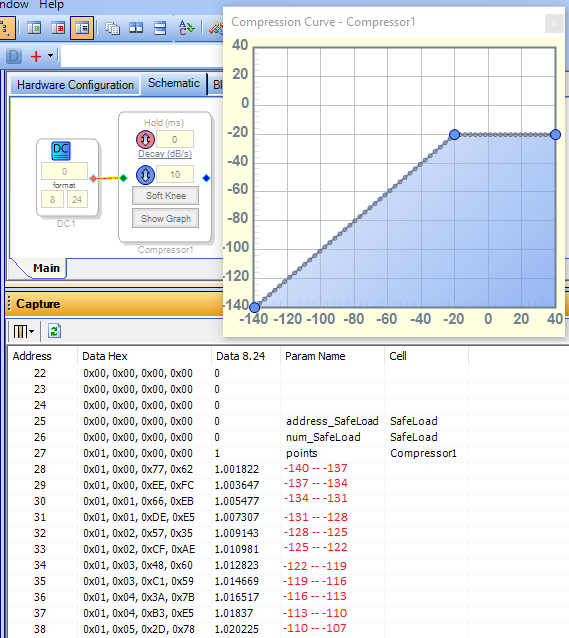
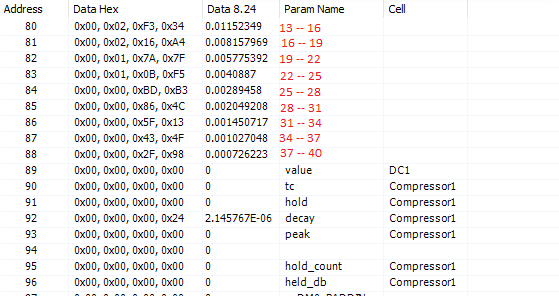
Basically, the Gain Table typically splits the compressor's input audio level into 3 dB segments, with a parameter entry for each segment. Since the Wide Range Peak Compressor has a -140 to +40 dB range, there's 60 parameters to cover this 180 dB span. Each parameter represents the compressor's linear gain for that segment. To see this in action, below I show a gain table with no compression (dB out = dB in) from -140 to -20 dB, with a constant limit from -20 dB to +40 dB. You can see the resulting parameters by selecting the IC1: Params tab in the Capture Window and doing a Link-Compile-Download (with or without hardware):
The Gain Table's parameters begin with Line 28 above. The red numbers I added show the input dB levels for each line. Notice that the gain parameters are approximately 1.0 -- unity gain. Now let's look further down in the parameter list:
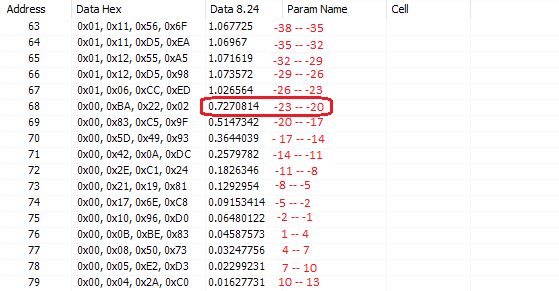
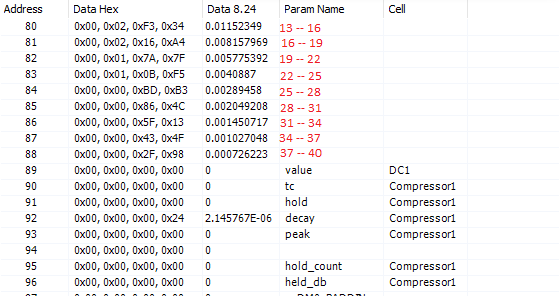
Again we see unity gain continuing for parameters up to Line 67. Starting with Line 68 we enter the limiting region in the table. To get a constant output for increasing level, each parameter is 3 dB lower (multiply by 0.707) than the previous one. Here's the bottom end of the Gain Table parameters, showing that the linear gain reduction continues all the way to +40 dB input:
To have your uC update the compression table, it needs to:
calculate each linear gain parameter = 10 ^ (dB gain / 20) according to the desired compressor curve.
Convert the decimal gains to hex format.
Safeload the new parameters to overwrite the gain table in parameter RAM.
2. Hold and Decay parameters
Experimenting with different GUI entries suggests these conversions @ 48 KHz sample rate:
Hold -- Parameter value = (2.861 E-6) * Hold in mS.
Decay -- Approximate parameter value = (2.17 E-7) * Decay in dB/s.
As with the gain table, these parameters need conversion to hex and safeloading into the parameter RAM.
Best regards,
Bob

Hello gouliamg,
Did Bob's excellent answer help you with your question?
If not then can you ask a more specific question as to what is not working like you expect?
Thanks,
Dave T
Please log in to reply.