ADUSB "USBi" Blue LED Not Going Off
Hi, I have been using the ADUSB2Z "USBi" interface to program a board with an ADAU1772 on it. I have a whole box of these board, produced with a pick and place machine. I have been pulling my hair out in that Sigma Studio will not communicate with a vast majority of them, yet some it will. I have checked and there is no difference between the boards. In trying to find the problem, I decided to load Sigma Studio 3.1.2 on, as I had 3.1.1. Suddenly now the blue LED on the USBi doesn't go off when powered off the USB (nothing else attached). I uninstalled and went back to 3.1.1 and the problem persists. This blue LED from previous experience goes out a couple of seconds after the USBi is plugged into the PC. Please assist!
adau1772
Integrated/Special Purpose A/D Converters
Audio CODECs
Hi,
USBi's application note: http://www.analog.com/media/en/technical-documentation/application-notes/AN-1006.pdf
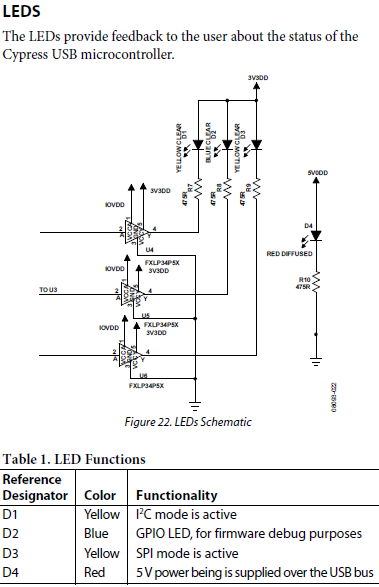
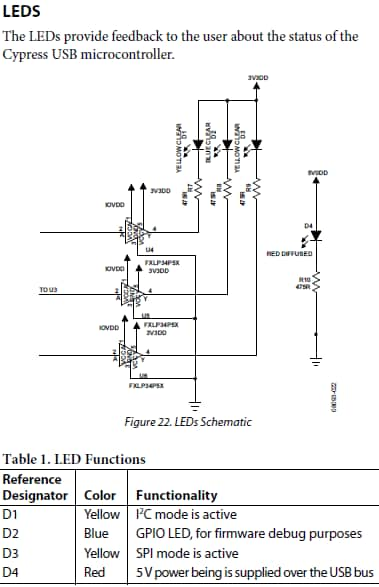
As you said, once plugged into USB port, the blue LED must light during ~1s. Then it mustn't light again.
You can read the application note for some hint about the USBi problems, like on-board EEPROM overwrite and so.
Best regards,
Simon
Desolder the EEPROM and use the cypress tool to load the usbi.spt file.
Not that comfortably, but if the chip is still alive ...
The cypress chip will try to boot from I2C EEPROM if it is available, but It will enumerate as a Cypress FX2LP if the EEPROM is completely empty. If there is something left in the EEPROM, maybe it is unable to wake up. In this case it is nice to have a dump ..
There are some other cases the cypress chip won't wake up, for example floating reset or no valid clock.
Btw. another workaround, you can use a cheap FX2LP board, you just have to build a custom adaptor.
Hi charles,
There is a thread "cheap usbi ..."
You can simply scope the crystal. I don't know why, but the FX2 requirement is a crystal that can handle 500uW drive level and there is no damping resistor in the usbi schematic.
I have seen an FX2 chip that won't enumerate because of a floating RESERVED pin. But as far as I know, the BGA has no RESERVED pin. Have you checked the RESET circuit? Have you checked 1V8DD? The FX2LP x53 needs 1V8 for the core.
best regards
Hi Simon,
Thanks for the info. I did not change the address for the EEPROM so I can't see how it was erased, that is the frustrating part. I tried resetting the USBi as mentioned, but there is not even any feedback from Sigma Studio as to whether it did it or not. The LED status has not changed, all 4 LEDs are on permanently.
It seems this all went wrong when putting the newer version of Sigma Studio on, but even now that I uninstalled both and installed 3.11 back on, the problem has persisted. I really do not want to buy another USBi, because I don't know what caused this problem and it may just occur with the new one also. I've checked in Windows Device Manager and the USBi is not even detected. Opened all the branches and plugged and unplugged it and nothing changed. This to me seems that the microcontroller is not even responding, never mind if the EEPROM is blanked.
Do you know what else I could try please?
Kind regards
Charles
Hi Heidi,
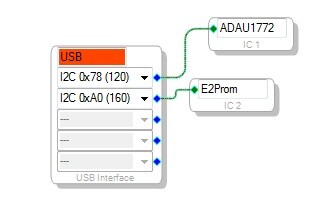
I unsoldered the EEPROM U1 and plugged the USBi into the PC again. Still same problem, all 4 LEDs are on and Windows has not detected there is even a device on the USB port. By "Cypress Tool" I assume you mean "Cypress Suite USB"? If Windows had recognized there is a device, then I would use this tool to download the "ADI_USBi.spt" file to the microcontroller? If the EEPROM was in fact the problem, do you have the hex file that I can load on please?
However, since I cannot even detect the microcontroller from the PC, what do you suggest I do? Seems it needs replacing, or is there a way to check for the problems you listed?
The cheap board you mentioned, do you have a URL for it please?
Thank you for your help!
Kind regards
Charles
Hi Heidi,
Thank you for the link! After a bit of digging, this page refers to your link:
low cost USBi programmer using cypress CY7C68013A board - diyAudio
Just bought off Amazon this device:
https://www.amazon.com/gp/product/B009NR8ZY4/ref=od_aui_detailpages00?ie=UTF8&psc=1
It will take some time to get here, so in the meantime I will investigate your suggestion, thank you!
Kind regards
Charles
Please log in to reply.