ADAU1452 T-Connection, Readback, Level Detector
Hello guys,
I have noticed a strange behavior of the T-Connection in combination with DSP readback within my ADAU1452 project. My intension was to read the current signal amplitude of multiple channels with DSP readback blocks over SPI as burst read. Everything works well excerpt the displayed levels are not the same even when fed from the same T-Connection.
Then I´ve tested within a blank project with the same behavior. Please find the project in attachment and here´s the screenshot:
It is not only the current signal amplitude that is varying, but also the RMS value (level detector on the bottom shows -6dB, whereas the two above show -3dB)
Is there any method to fix that problem?
Thanks in advance! :-)
Audio Signal Processors
adau1452
level detector
SigmaDSP Audio Processors
dsp_readback
t-conncetion
Show More
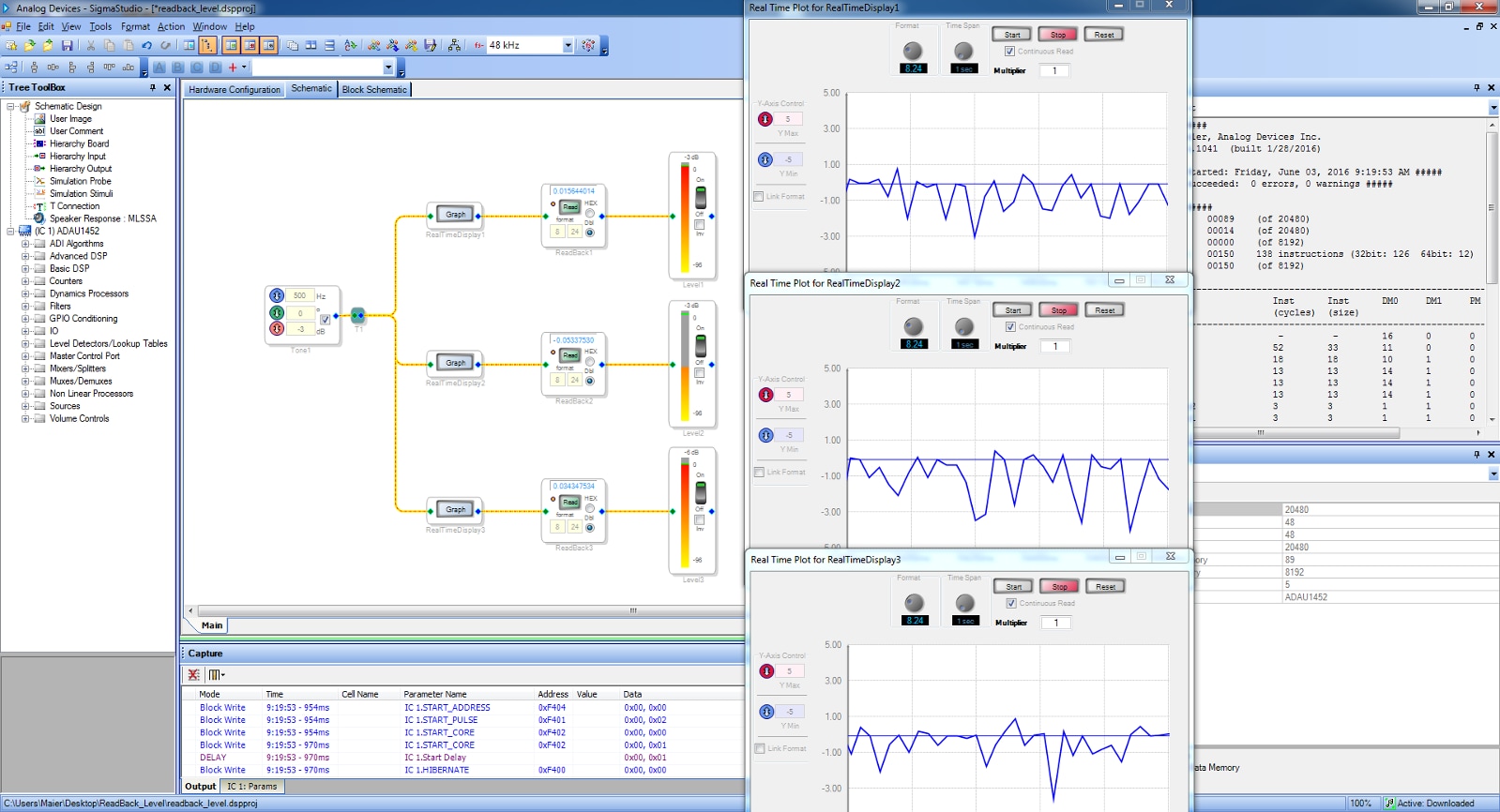
Hi,
It's usually not a good idea to "SPI read back furiously" some values.
My USBi has a SPI clock of about 377kHz.
A SPI data transfer for a single 8.24 (32bit) value is 3+4bytes long = about 0.15ms.
If you have 3graphs + 3values + 3levels, and a 48kHz sampling frequency, you have to understand that it's not a good idea. Even if the different displays are updated at less than 48kHz (and I know they are!).
I know that when I use 2graphs on my ADAU1452 it works fine. I also know that when I use more, it randomly stop updating the display values. Same goes for levels detector.
In the documentation of the read-back display they speak of "buffer under-run error on the USB interface", and you can tweak the display's update rate.
In the doc of the level-detector: "Using multiple level detectors may degrade the responsiveness".
SigmaStudio Toolbox [Analog Devices Wiki]
Best regards,
Simon
Hi Robin,
The default sinus source is between -1 and +1 (0dB). Your sinus source is between -0.707 and +0.707 (-3dB).
For the level detector as used in this design: 0 = -infinite dB.
-0.707 or +0.707 = -3dB.
Then the displays blocks do not read the value "exactly" at the same time.
The sinus source value is probably updated at 48kHz into the DSP.
So there are slightly differences in the values, depending when each block has read the value.
The difference is reduced when the sinus frequency is reduced.
The difference is increased when you overload the USBi SPI capabilities (it is the case in this example ).
If you read the compiler_output.log you'll find that the DSP uses shift registers, but that's all. No further details.
It is also better to use a single 3x readback block than to use 3 separate 1x readback blocks.
That's to explain the sigmastudio part (so it's not strange that you had 3 different plots and 3 different readouts and 3 different levels )
For the MCU part:
I think that if you use a single 3x readback block and perform a single 3MHz SPI block read, it should be fine, as 3MHz >> 48kHz!
But if the problem is some delay between some internal DSP register I'm afraid we can't do much.
Another thing would be to raise the SPI frequency even more once you set the PLL, but that's not a great idea.
Another thing would be to use a serial audio interface between the MCU and the DSP.
I insist on: "It's usually not a good idea to "SPI read back furiously" some values."
Best regards,
Simon
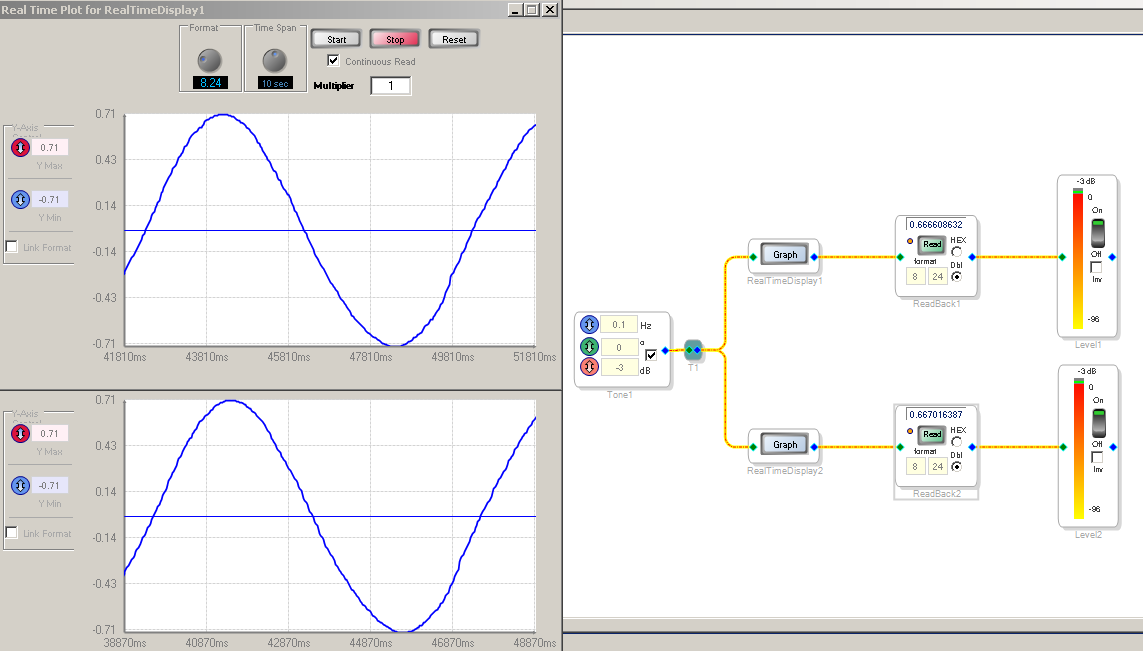
Hi Robin,
In sigmastudio you can set different sampling rates for the different blocks.
I'm pretty sure you can do your level detector using SPI if you go fast enough.
Monitoring average and instantaneous signal levels
For the serial audio format used like TDM and that sort of things, I don't really know how it works. I know that those formats are used between the DSP and the Codec (I use the EVAL-ADAU1452MINIZ), and you can tweak that in the hardware configuration window.
Simon
Dear Simon,
thank you for your very fast response!
As I read your reply, I think my post was bit unprecise: I know that the USBi is kind of a bottleneck for the readouts with sigma studio. However it is exactly the same behavior when the SPI read is implemented on a uC (F_CPU 48MHz) that has a SPI Clock > 2MHz and outputs the converted values to an led shift register (VU meter).
Using a sine wave with low frequency as an input to the multichannel DSP (all channels fed from same input) generates the visual output of a sine wave walking through the channels.
For my application I do not need to update the values much more than 30x/s but all approches to average, hold and preprocess the values in any kind did not fix the problem.
When I was looking into the corresponding registers of the readback blocks they showed differing values, too but this might be an issue of the mentioned SPI read speed with the Sigma Studio and USBi.
kind regards,
Robin
Hi Simon,
thanks for your detailed explanation! I caught your message :-)
Is there the possibility to fill the Readback registers at a slower rate but (at least) with the identical values? Or the other way round: I wanted to implement a Signal Level meter. If the transfer of the data over SPI causes these problems, why don´t use the DSP for outputting this? Is there a function block that could realize that? Or any other idea?
Thanks in advance!
best regrads,
Robin
Thanks for the hint to the tutorial. I´ll try that and let you know ;-)
Please log in to reply.