Envelope Generator (ADSR) block for ADAU1701
Hi Guys,
an Aida DSP user builds analog synthesizers, he is curious about
the possibility to use ADAU1701 to realize some of the common blocks found in popular old analog synths.
One of the building blocks is the ADSR, I've found an excellent documentation about it here.
I know for more powerful processors (like ADAU144x which is supported by Aida DSP library) have Signal Envelope
block available, but for the smaller ADAU1701 there isn't.
The block needs six inputs:
Gate In
Trigger In (optional, to retrigger envelope after attack is complete)
Attack duration
Decay duration
Sustain duration
Release duration
And one output
Audio Envelope Out
Anyone has an idea on how to do it from scratch in Sigma Studio? I'm thinking about realizing time constants (capacitors) with first order low pass filters, but I don't know if there are other ways so I'm asking the community.
The final project and Arduino sketch will be available to the community here and on github.
Thank You
Audio Signal Processors
envelope generator
aidadsp
arduino
SigmaDSP Audio Processors
adau1701
adsr
Show More
Hello,
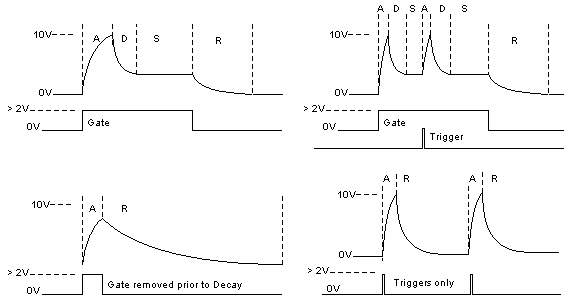
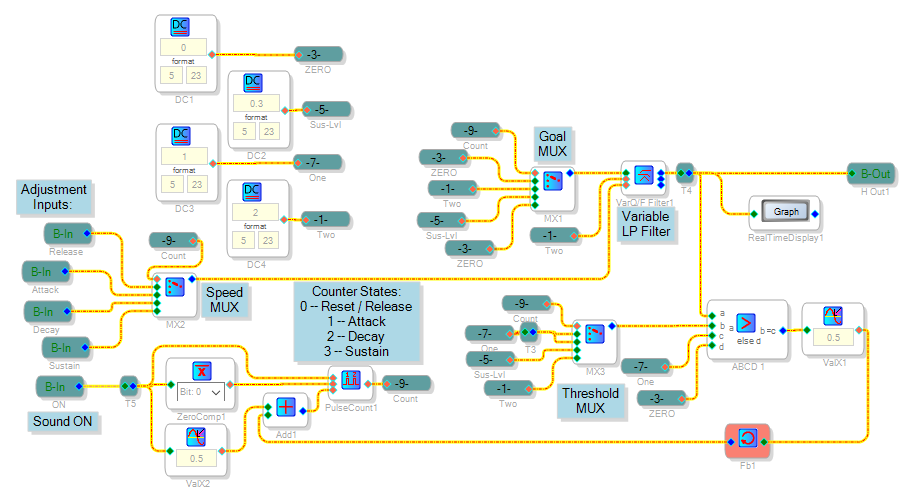
Your idea of using filter responses to build a ADSR is quite good. The design below uses one State-Variable Filter with logic which selects a specific DC input and filter cutoff frequency for each of the four response segments:
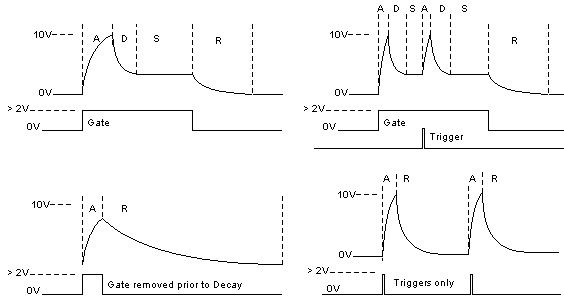
A typical envelope output looks like this:
The attached project file runs on a ADAU1701MINIZ board.
Best regards,
Bob
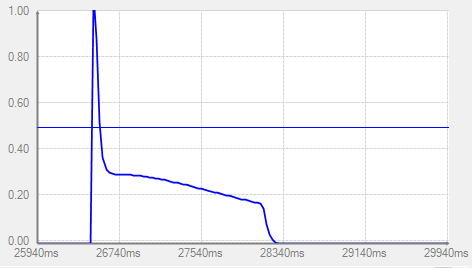
Hello KJBob! Can I use this from an analog input, for example for guitar processing? How could I do that? Thank you! Sincerely, Alex!
Hello Alex,
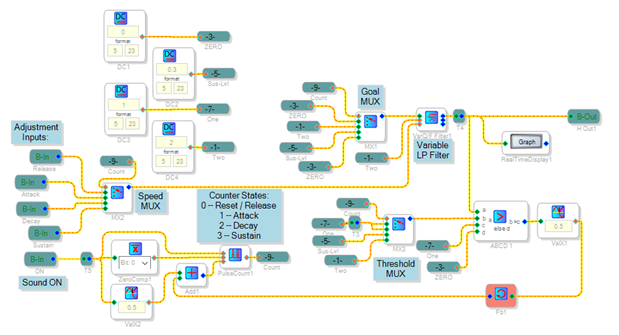
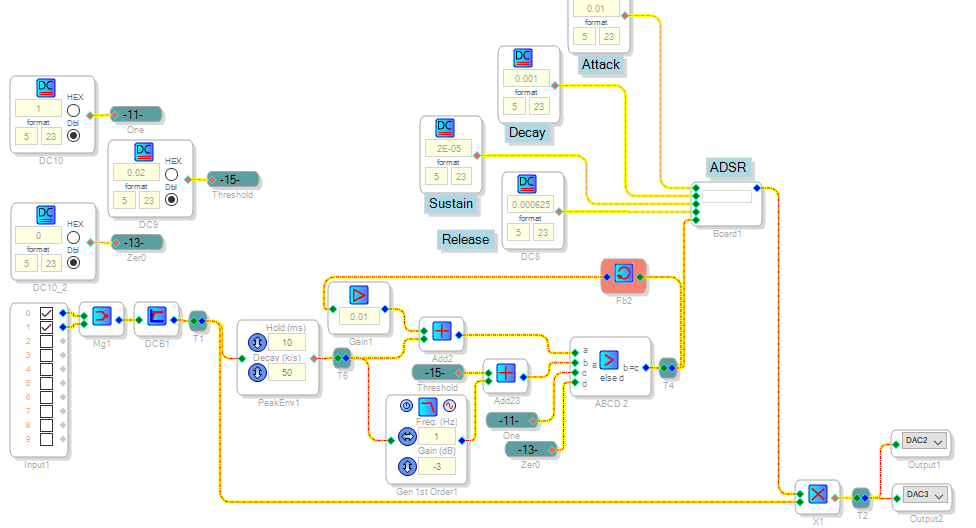
You could have an analog input drive a Envelope block and a ABCD Comparator to input either a 1 (5.23 format) or zero to substitute for the GPIO input in the MAIN portion of the above project. Depending upon how well this works with your typical input and use, there's a few refinements you may or may not need:
Hysteresis to prevent spurious triggering
A variable threshold, which allows your effect to work over a wider input range
The project shown above and attached below has both these features. There's many other things you can try to make your sidechain (the part of the project which listens to the incoming audio and triggers the ADSR) provide a more interesting effect. Also I show the ADSR simply controlling the output gain (with a multiplier) -- this is where you would have the ADSR control a more interesting function such as distortion, sustain, Wah, etc. It's all up to you. Have fun with your effects project!
Thanks KJBob! Thanks to your support and this forum, my project continues to develop. With respect, Alex!


Hi again Bob!
Sorry to resurrect an old thread, but I was wondering more about how this ADSR generator works, specifically the adjustment inputs.
I've been playing around with the values and I'm confused how DC values going into a Variable LP filter can vary the ADSR times. I've also noticed that some values, like 0.9 in Release, have some seemingly unexpected results.
I'm looking control the ADSR values in a synthesizer setup, so would like to say something like "attack for 4ms".
Many thanks,
Daz
Hello Daz,
There's no problem bringing up an old thread -- we have no thread necromancy rules here. However, I had forgotten how this thing works so I pulled out my eval board and ran it until it more or less came back to me.
In this ADSR a counter keeps track of the four needed states, driving three Muxes . One helps with the logic, one sets the "Goal" DC level for the filter's signal input, and one adjusts the filter speed for each state. Having the output for the entire envelope come from the same filter insures smooth transitions.
The State-Variable Filter is described at SigmaStudio Wiki -- State Variable Filter. This filter operates similarly to analog state-variable filters -- it provides Lowpass, Bandpass, and Highpass responses all at once, with variable cutoff frequency and Q. Here the Q input is set to 2, providing a Q of (1/2) -- that's quite low, so the filter has a damped response like that of a RC filter. Originally I adjusted the DC source inputs for A, S, D, and R to get a suitable result. Now I'll attempt to put some numbers to it. Let:
Vin = Input to F pin
fo = Filter cutoff freq. According to the Toolbox wiki,
Vin = 2 * sin(pi * fo / fs) The sine function is in radians.
To simplify this, we can approximate sin x ~x when x is small -- thus our equation simplifies to:
Vin ~ 2 * pi * fo / fs Solve for fo,
fo ~ Vin * fs / (2 * pi) Insert the Rise Time formula: T = 0.34 / fo,
T ~ 0.34 * 2 * pi / (Vin * fs) Using fs = 48K and expressing T in milliseconds,
T ~ 0.044 / Vin
Thus, the settings shown in the example produce these times:
Interval Vin T
Attack 0.01 4.4 mS
Decay 0.001 44 mS
Sustain 2E-5 2.2 S
Release 0.000625 70 mS
Right away we notice that the ADSR inputs need be quite small, as well as inversely related to the desired times. A release input of 0.9 corresponds to a release time of about 50 microseconds, much faster than an ADSR would ever need. It's so fast -- just 2.4 sample intervals at 48K -- that it confuses the ADSR's logic. The cure for this is the punch line in the old joke, Doctor it hurts when I do this.
With the above info you can have your system's uC do the conversion from desired times to control inputs. Or you could set up a lookup table (LUT) inside your signal flow with a range of times. Lookup tables are relatively efficient -- they use parameter memory but save on instructions.
One final note -- in SigmaStudio as with uC programming, there's usually more than one way to design a particular function. The ADSR shown above may not be the simplest or best among these.
Best regards,
Bob
I really appreciate the effort of really explaining your working. It clears up my initial confusion of Vin being the time or some magic number, instead now I can see it is just an input number which is used to calculate the cutoff frequency and therefore time.
My initial experiments did indeed confuse the ADSR logic, though did make for some interesting noises
I think a conversion in the uC would be the simplest way to go.
And I'm sure that there may be another way to design this. Before I found this post, my initial instinct was to use a bunch of timers and counters, however I then came across this fantastic post.
Many thanks again Bob. Your help is so incredibly valuable for people like me finding their feet.
Please log in to reply.