ADAU1452: core status paused
Hi,
on a custom design I'm not able to make the ADAU1452 to work since the core is always in pause state. By reading the register CORE_STATUS 0xF405 the returned value is 2.
The same design on the evaluation board works perfectly.
I'm using the I2C connection and I'm able to read/write registers.
The datasheet states that the core is in pause only if the loaded program force it, but the same program on the evaluation board works and the returned values are 1 and 3 (core is running - core is in sleep).
The internally generated master clock is working and its output is ticking.
How can I troubleshoot it?
Thank you.
Audio Signal Processors
adau1452
sigma studio
core_status
SigmaDSP Audio Processors
Hello Cape,
How are you booting up the 1452? Are you using SPI? or I2C EEPROM? or a system controller?
When you say "internally driver Master Clock" Can you explain more? There is no internal oscillator only internal PLLs to generate clocks from an MCLK input. So you must have an MCLK in. It is good information if you are programming one of the PLL blocks to be different from the default rates and then you see the output. So explain which clock and which pin you are referring to.
Dave T
Hello Dave,
thank you for your answer.
The clock source is a 12.288MHz crystal connected to the XTALIN/XTALOUT pins, the same as the development board.
When I say that “the internally generated master clock is working” I mean that on the CLKOUT pin I see a 12.288MHz signal. If I change the rate of the CLKOUT I see the output changing coherently.
The DSP is programmed with SigmaStudio via I2C.
By the way, I saw that in my design the pull down resistor on the selfboot pin was not mounted. After installing it (so to disable the selfboot feature) the CORE_STATUS register reports 0. The MCLKOUT pin is still working and I’m able to command the pins (e.g. the MP& which I use as a visual heartbeat).
Hello Cape,
So it sounds like you are up and running?
The CLKOUT pin is generated from the MCLKIN but not from the PLL. Figure 21 in the datasheet shows this. So that means that you were getting MCLK and that the I2C communications are working.
If you had the device in Selfboot without an EEPROM, or with a blank one, it will try three times to load the program but if it gets nothing then it will go to "sleep". So that may have been what was going on.
Let me know where you stand now.
Dave T
Dear Dave,
the current status is selfboot disabled. When I upload the firmware with Sigmastudio, the CORE_STATUS remains in 0. I'm able to communicate with the DSP, I can move the MP6 via Sigmastudio GUI or directly by writing its register, and I get clock signal on CLKOUT and I have no clock signals on the digital ports from/to the codecs.
Whenever I put the DSP in selfboot enabled without an EEprom connected, I get a CORE_STATUS 2, I can communicate with the DSP, move the MP6 and I also have approx. 3.5MHz signal on the bitclock outputs of digital ports.
Using the evaluation board in this same last condition, I get approx 3MHz.
It seems that using the same hardware configuration and the same program I get two different clocks. How it is possible?
Hello Cape,
If you are running using an MCLK of 12.288MHz and have the serial ports set to output I2S then you will see 3.072MHz on the BCLK pin. That is 64x fs because there are 64 bit clocks in each sample period. (frame) This is if the port is set to be a master.
Now, if you load in the program using SigmaStudo then all the register settings will be loaded with the project. If you turn on the power, or lower the reset line, when in the selfboot mode, then the DSP will attempt top read from the missing EEPROM and after three attempts it will give up and enter the paused mode which is why you see the 0x02 in the Core Status register. The state of the registers should be in a default state but they might not be. The reason they might not be will depend on how you powered up. The other thing to look out for is that if there are clocks and GPIO lines active when you power down, then there can be enough power from those lines to keep some of the memory in the part from fully resetting. So look for that as well.
So I would not worry about what the part is doing when you boot it up with no program. It is an invalid state. It needs a program. If you do this from a fully powered down state and when the entire board was powered down so there are no clocks or GPIO inputs, then it should come up with all ports set to inputs (slave) and you should see no clocks. Even the CLKOUT pin will default to disabled from a power up. So you should see no clocks. If you are seeing clocks then there was something keeping the part partially powered up enough to maintain some of the register settings.
Dave T
Dear Dave,
I checked according to your suggestion the status of the various signals/clocks and I can state the followings:
- on a cold start (power down->power up) no external signals/clocks goes to the ADAU1452 except the I2C comm port
- after a cold start no clocks are present on CLKOUT or serial data ports
- whenever I send the program with link/compile/download the CLKOUT starts as well as the serial data ports according to the configuration of the serial ports inside Sigmastudio
Now the interesting fact: I've investigated the 3,5MHz bit clock on the serial ports that were configured as I2S. If I change the configuration to 2channels, 4channels and 8channels the frequency correctly doubles to 7MHz and 14MHz, but this is not the correct frequency.
I checked the PLL_CTRL1 at 0xF001 and it was correcly set to 0x02, while the PLL_CTRL0 at 0xF000 was set to 0x70! That register should be set to 0x60 but somehow it goes wrong. After a cold start with no program loaded it remains to 0x70 while it is stated in the datasheet that on power up should be set to 0x60.
I also tried to set the PLL_CTRL0 to 0x60 but the CORE_STATUS remains in pause, even if I download again the program.
Lastly I checked the program counter at 0xF461 and it is continuously changing, so I believe that something is moving... But the MP6 never changes its state according to the program I made...
Hello Cape,
I think it is time for you to send over your schematic. Let me have a look and load it up here on an eval board.
Thanks,
Dave T
Dear Dave,
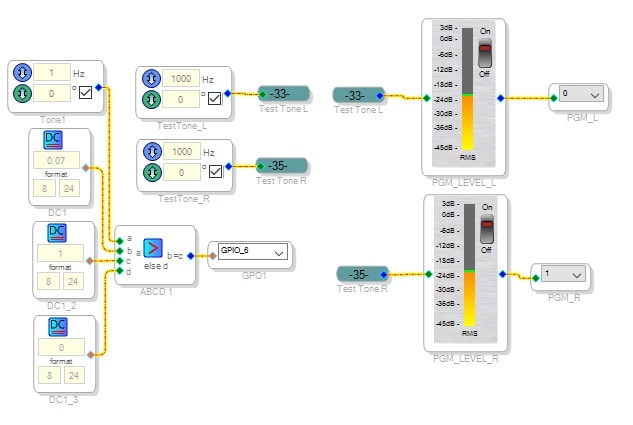
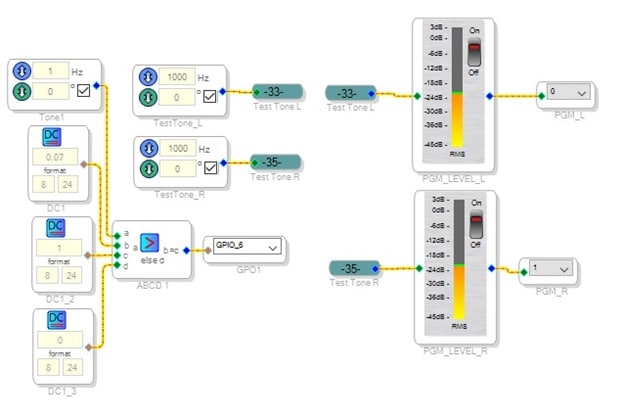
the Sigmastudio program is really simple:
how can I send the project file to you?
Hello Cape,
The comment you said earlier about the program running fine on the evaluation board is important.
Lets start looking more closely at your PCB. The fact that you are getting some registers changing when you are not addressing them and that you are not running at the right frequency is making me think there is something regarding signal integrity that could be causing errors in the transmissions.
I did build a similar program to yours and it worked for me here as well.
So how many layers is your PCB?
What are the layers used for?
I assume you are using SPI comms, what clock frequency?
Can you capture a scope screenshot that shows the SPI clocks and data lines? Use the analog inputs of a scope not digital inputs. They square off the waveform and I want to see any issues.
Do you have a Beagle to be able to capture what is being sent to the DSP from your controller?
BTW, to send a schematic you click in the upper right of the window where it says "use advanced editor", then you will be able to attach files to the post.
Dave T
Dear Dave,
I managed to make it to work!
I forgot to mention that I had some trouble using the USBi to program via I2C (as well as SPI) because it seems that with some long cables (approx. 20cm) there is not enough drive strength to create a working communication with the ADAU1452. There was no way to communicate with the ADAU1452 and using a logic analyzer I saw that after the first ACK the communication was stopped. I bought a CY7C68013A evaluation board as suggested in other forums and programmed with CyConsole. It worked like a charm. But I hadn't connected the reset line of the ADAU1452. At my partial excuse is the fact that the application note "Basic SigmaDSP Microcontroller Integration" there was no mention of the reset line, so I believed that the soft reset would have been sufficient.
I understand that I have to deeply check the program loading procedure in order to avoid issues in the final design where the program upload will be made via the system files export.
Once connected the reset line I got it to work.
BTW, the communication that is now up and running is I2C.
Thank you again for your support!
Hello Cape,
There are a couple of things you said do not make sense. What does the soft reset have anything to do with registers changing? Do you not have the reset line held high?
It seemed to me that this was a drive strength issue with the USBi. I understand that. This is why the cable is short. It could also be a signal integrity issue with the longer cable. So it seems like the data transmission had errors and so that would cause either the wrong register to be written to or the wrong data to be written.
So I am really glad you found the solution.
Dave T
Dear Dave,
the problem at first was that I was not able to program in any way my board (not the EVAL) with the USBi, so I managed to get a programmer with the CY7C68013A evaluation board. This worked, but the final step was to connect one of the pins (as stated in other forums) of this evaluation board to the reset pin of the ADAU.
It seems that the firmware download procedure requires to trigger the reset pin of the ADAU but I didn't found any mention of it.
Is there any document that explain this in detail?
Thank you!
Hello Cape,
Sorry for the delay.
It is my understanding that the USBi does not trigger the reset pin of the DSP. It had that capability in the early design but it was never used.
How are things going?
Dave T
Please log in to reply.